
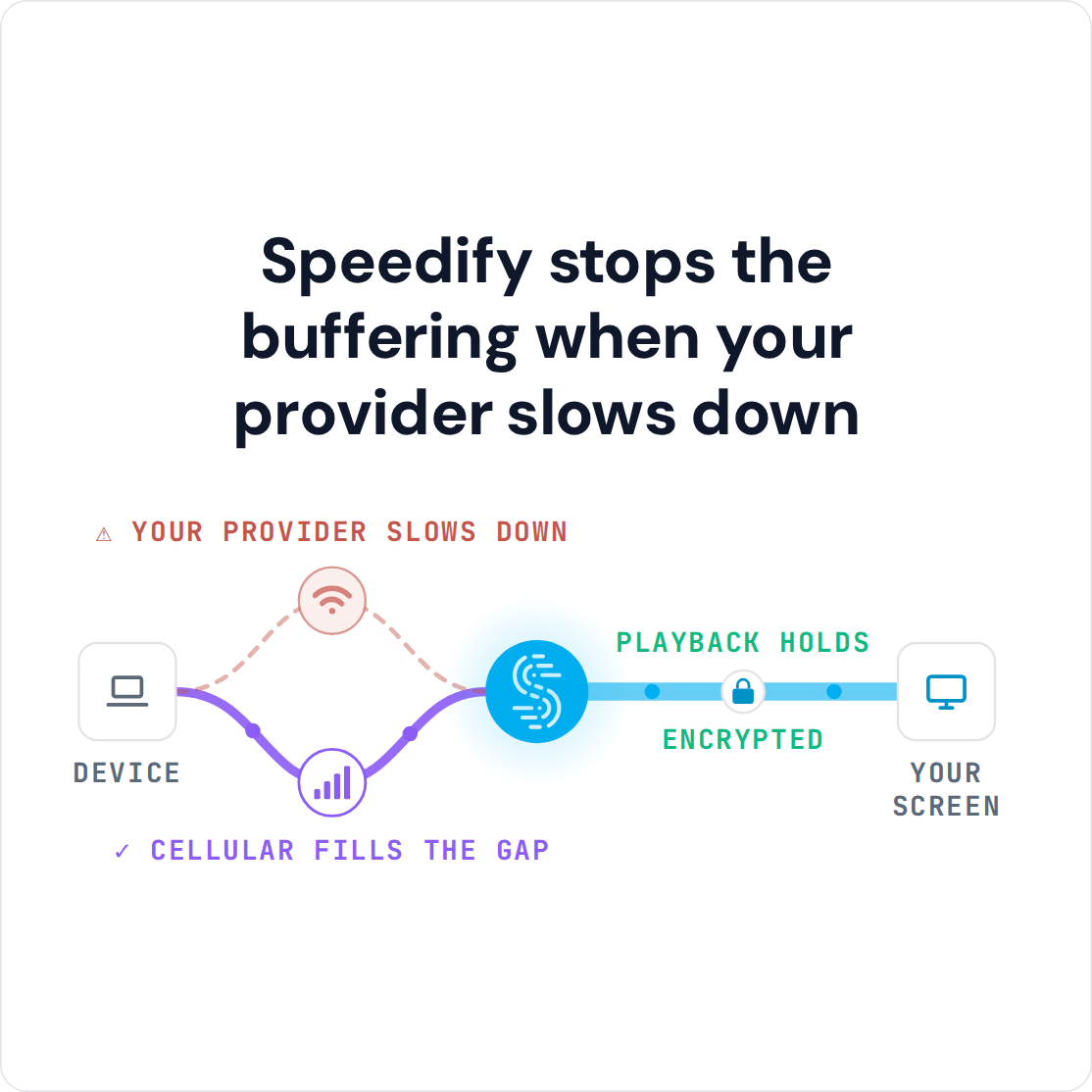
How to Fix Streaming Problems
The show freezes, a circle spins, and by the time it moves again the moment is gone. That reloading pause is buffering, and it usually is not the streaming service – it is your own internet connection being asked to do too much, or being quietly slowed down for video.
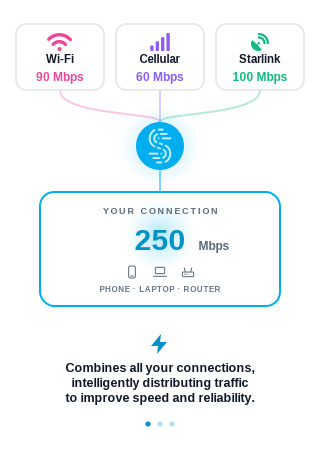
Speedify is an app that runs a device over Wi-Fi, 4G/5G cellular data, wired Ethernet and other internet connections at once, so a stream draws on more than one line at a time. That needs two or more internet connections; on a single connection Speedify works as an encrypted VPN and cannot stop that connection from dropping. Read on for the usual causes, the checks worth doing in order, and how streaming with Speedify stops the stalling.
What Causes Streaming Problems?
Platform issues. Just to be sure that there aren’t any issues with the platform you’re trying to stream video from – check their status page or support social media pages. They should be up and running. If the platform is fine, the problem is most likely your connection.
ISP throttling. A lot of times ISPs will throttle your bandwidth for video streaming, to conserve it across the network. Is this happening? To check, play the same video with and without a VPN. If it plays much better through the VPN, your ISP is likely slowing streaming traffic.
Slow internet from your ISP. Also – you should test the speed of your Internet connection. Is your Internet bandwidth fast enough, within Netflix’s recommendations: at least 5 Mbps for Full HD (1080p) and 15 Mbps for Ultra HD (4K)?
Unstable internet from your ISP. When you test your speed, check out the lag and jitter numbers: the lower, the better.
Guide: How to Fix Streaming Video Problems
Every streaming platform offers a connection troubleshooting guide on their website. We recommend you try that first. If it doesn’t help, make sure you try the steps below when it comes to issues related to your Internet connectivity:
- Reboot your device and router. Sometimes that’s all you need to do.
- Move closer to the wireless router. Or even better, use a wired connection, if available.
- Close any background programs that might be using bandwidth on your device. These include backup programs, social networks, collaboration tools, torrenting applications etc.
- Check to see if there are any other devices on your network using bandwidth. Maybe your kids are streaming something themselves. Or playing games online.
- If your ISP is throttling you, use a fast VPN. As streaming traffic goes through the encrypted tunnel, they won’t be able to detect it and throttle it.
- If you have a second Internet connection available (e.g. public WiFi, mobile data, backup connection), why not use that as well? Use the extra connection along with your home Internet simultaneously on your device for faster, more stable Internet. All you need is an app that combines internet connections, like Speedify.
Fix Streaming Problems and Other Connection Issues with Speedify
As a VPN that combines connections, Speedify allows you to combine multiple Internet connections at once. This happens through a VPN-grade encrypted tunnel, so your privacy and data security is protected.
If one of the connections you’re using becomes slower or even disconnects, Speedify will automatically start moving traffic to the other working connection(s). When the first connection is back, it starts using it again.
And don’t worry – just because it’s a VPN that doesn’t mean you can’t access your favorite streaming platforms. Some streaming services block VPN traffic. With Speedify’s Bypass feature, you can choose to send a service such as Netflix directly over your connection instead, but bypassed traffic gets no combining, no failover and no encryption, so Speedify cannot stop that service from buffering or hide it from ISP throttling.
We hope to have answered your question on how to fix streaming problems. You can now try Speedify for free.
Speedify
Get started with Speedify today.
Speedify combines Wi-Fi, 4G/5G cellular, Ethernet, Starlink and satellite into one faster, more reliable internet connection. Free to try: 5 GB a month with a free account. No credit card required.
🚀 Speed
Faster uploads and downloads, because Speedify uses all your internet connections at once.
📶 Stability
If one internet connection drops, Speedify moves your traffic to the others in milliseconds.
🔒 Security
AES-256 encryption on every internet connection, on any network you join.


15M+ downloads worldwide. 75K+ five-star reviews on iOS and Android.