
How to Fix Slow Streaming Video Problems on Your Laptop
A laptop across the house from the router is working with the weakest signal in the building, which is why video that plays fine on the TV stops to reload part-way through on the laptop – that pause is buffering. A provider slowing video traffic makes it worse.
Speedify is a software app for Windows, macOS and Linux laptops that uses Wi-Fi, 4G/5G cellular data, wired Ethernet and other internet connections at the same time. The pages below name the causes on a laptop, list the fixes in order, and explain how Speedify puts a second internet connection to work.
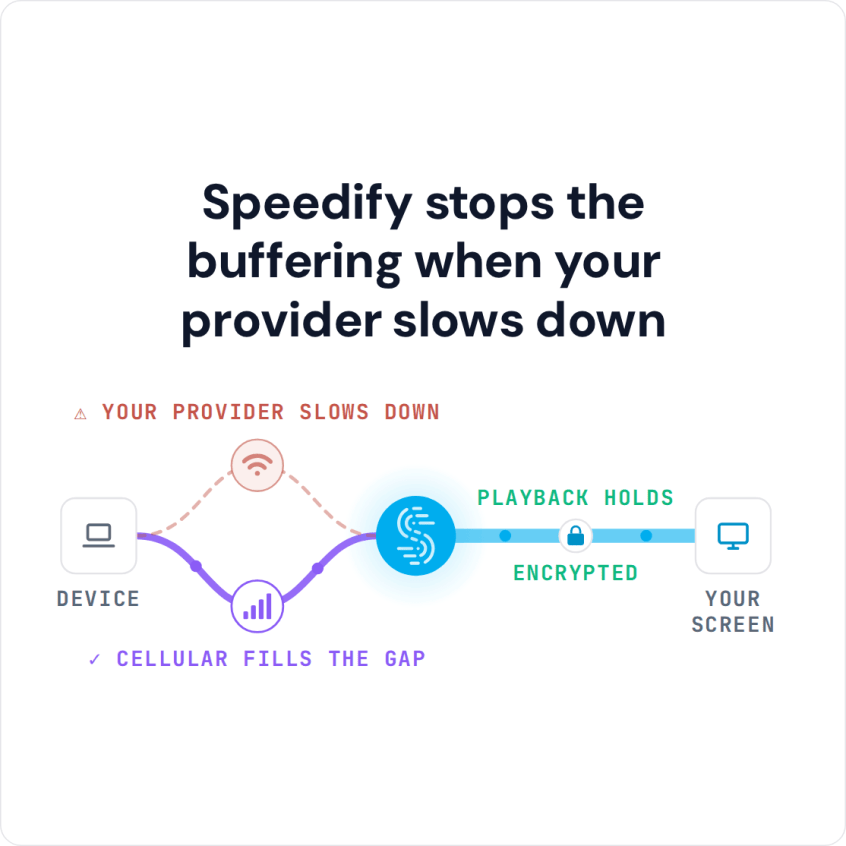
Speedify stops the buffering when your provider slows down
Causes for Slow Video Streaming on Your Laptop
Platform issues. Just to confirm 100% that there aren’t any issues with the platform you’re trying to stream video from – check their status page or support social media pages. Netflix, Hulu, HBO, Disney+, BBC, etc. – they should all be up and running If it’s not them, then it’s definitely you.
ISP throttling. A lot of times ISPs will throttle your bandwidth for video streaming, to conserve it across the network. Is this happening?
Slow internet from your ISP. Also – you should test the speed of your Internet connection. Is your Internet bandwidth fast enough, within these recommendations: at least 5 Mbps for a HD quality video / 25 Mbps for an Ultra HD video?
Unstable internet from your ISP. When you test your speed, check out the lag and jitter numbers: the lower, the better.
The Ultimate Guide to Fix Slow Video Streaming on Your Laptop
Each of the streaming platforms offers a connection troubleshooting guide on their website. We recommend you try that first. If it doesn’t help, make sure you try the steps below when it comes to issues related to your Internet connectivity:
- Reboot your router and laptop. Sometimes that’s all you need to do.
- Move closer to the wireless router. Actually, use a wired connection, if available.
- Close any background programs that might be using bandwidth on your laptop. These include backup programs, social networks, collaboration tools, etc.
- Check to see if there are any other devices on your home network using bandwidth. Maybe your kids are streaming something themselves. Or playing games online.
- If your ISP is throttling you, use a fast VPN. As streaming traffic goes through the encrypted tunnel, they won’t be able to detect it and throttle it.
- If you have a second Internet connection available (e.g. public WiFi, mobile data, backup connection), don’t let it to waste. Use the extra connection along with your home Internet simultaneously on your laptop for faster, more stable Internet. All you need is a channel bonding service like Speedify.
Video Streaming Is Slow on My Laptop… Not Anymore with Speedify!
As a fast bonding VPN, Speedify allows you to combine multiple Internet connections at once on your laptop. This happens through a VPN-grade encrypted tunnel, so your privacy and data security is protected.
If one of the connections you’re using becomes slower or even disconnects, Speedify will automatically start moving traffic to the other working connection(s). When the initial connection is back, it starts using it again.
And don’t worry – just because it’s also a VPN doesn’t mean you can’t access your favorite streaming platforms. Speedify’s bypass feature allows only trusted traffic from Netflix, HBO, Hulu, Disney+ and more to go around the encrypted tunnel.
We hope to have answered your question on slow video streaming on your laptop. You can now try Speedify for free.
Speedify
Get started with Speedify today.
Combine Wi-Fi, 4G/5G cellular, Ethernet, Starlink, and more into one faster, steadier connection. Free to try — no credit card required.
🚀 Speed
Faster uploads and downloads by bonding all your connections at once.
📶 Stability
Automatic failover in under a second when any connection drops.
🔒 Security
AES-256 encryption on every connection, on every network you join.



15M+ downloads worldwide. 75K+ five-star reviews on iOS and Android.