
Reliable Internet for Outside Broadcast Vehicles
A live shot from a packed stadium car park fails for a dull reason: the van leans on one cellular modem, and every phone in the crowd sits on that tower, so no capacity is left for video.
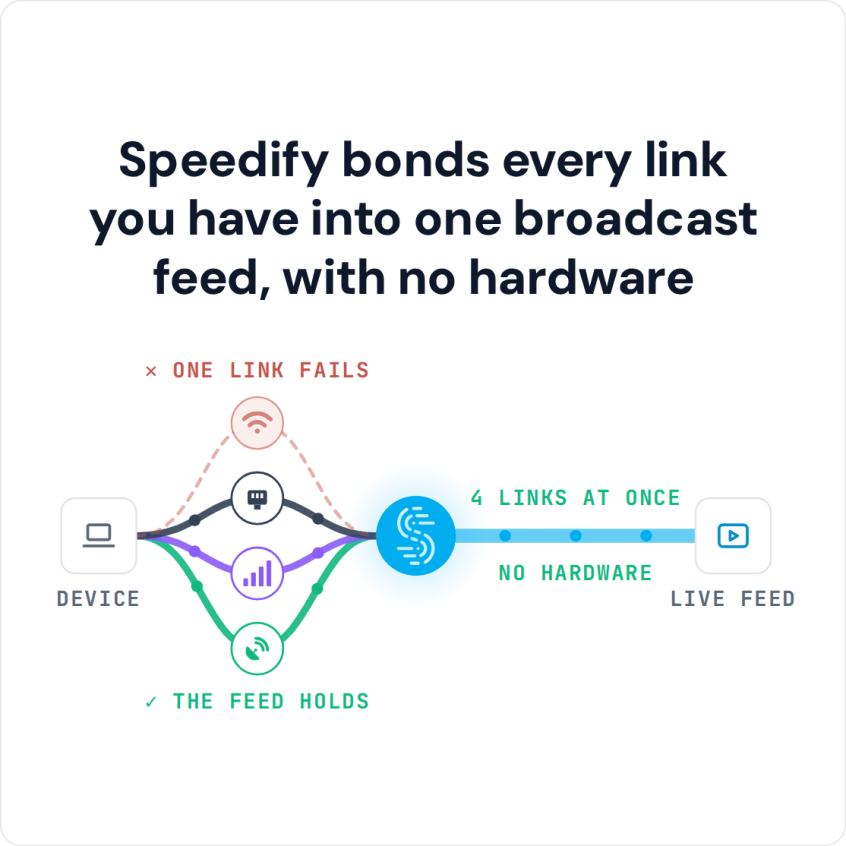
Speedify is software that sends a vehicle’s traffic over several internet connections at once (Wi-Fi, 4G/5G cellular, Ethernet, Starlink and other satellite internet), so one weak carrier no longer decides whether the feed survives. With a single connection, Speedify works as an encrypted VPN and cannot stop that connection from dropping.
Speedify bonds every link you have into one broadcast feed, with no hardware
This article walks through redundant mode, Starlink on the move, working with the encoders and streaming PCs that package your camera feed, and fleet rollout. Talk to Speedify about kitting out your vans.
Watch now
How Speedify combines internet connections on any hardware
Get started with Speedify for your business
Speedify offers three commercial paths. They work together, and most enterprise customers use two or more.
01
Speedify Teams
Speedify on every supported OS for every team member
Centralized dashboard for billing, user provisioning, and usage analytics
CSV import/export and a RESTful management API
02
Speedify for Routers
License for supported OpenWrt routers
Powered by Speedify hardware lineup ready to deploy out of the box
Miri, GL.iNet and other partner models
Covers every device on the network, with no per-device install
03
Embed Speedify into your product
A · DIY
Build it yourself with the Speedify SDK.
Integrate Speedify into your iOS, Android, Windows, macOS, Linux or QNX product. Full developer documentation, sample code and supported integration paths. Your team owns the build, and the Speedify SDK handles combining the internet connections.
B · CUSTOM ENGINEERING
Have the Speedify team build it for you.
Why Outside Broadcast Vans Need More Than One Internet Connection
An outside broadcast van moves between venues, cities, and coverage areas that were never designed with live streaming in mind. Stadiums pack thousands of phones onto the same towers a broadcast van needs. Parade routes and breaking news locations often sit outside any strong signal at all. A van that depends on a single cellular provider or a single satellite dish is one dead zone away from losing the feed, and there is no do-over on a live broadcast.
Combining Multiple Carriers Plus Starlink on the Move
Resilience for a moving vehicle comes from carrying more than one path and combining them rather than switching between them. A well-equipped OB van runs two or three cellular modems on different carriers plus a Starlink dish, and Speedify merges all of them into a single uplink so capacity from every source adds together. Speedify vs. LiveU lays out how that software-based approach compares directly to dedicated cellular bonding hardware built for the same job.
How Speedify Protects Live Feeds With Redundant Mode
For the moments when a dropped frame is not an option, Speedify’s Redundant Mode sends every packet over each connection (up to three) instead of splitting traffic across them, and uses whichever copy arrives first. Losing one carrier mid-shot should not interrupt the feed, because the other connections were already carrying the same data. Redundant Mode uses more cellular data.
Speedify’s Streaming Mode builds on that same principle for continuous live video specifically, smoothing out the packet loss and reordering that normally shows up as pixelation or frozen frames on a live shot.
Integration With Encoders and Streaming PCs, and Deploying Across a Fleet
Speedify runs on the streaming PC or encoder host feeding the broadcast, sitting underneath whatever encoding software the crew already uses and combining the connections at the network level so nothing about the production workflow has to change. For crews carrying spare phones, Speedify’s cellular sharing feature lets a phone on the same local network add its 4G/5G cellular connection to the encoder’s combined pool over Wi-Fi, turning a spare phone into another uplink.
Standing up a fleet of vehicles on the same setup follows a short process:
- Standardize which cellular carriers and modems each vehicle carries.
- Install Speedify on each vehicle’s streaming PC or encoder host.
- Leave Streaming Mode, the default, on for most vehicles, and switch to Redundant Mode where a feed cannot afford to lose a frame.
- Test combined throughput and failover at each venue type the fleet regularly covers.
- Document per-vehicle connection inventories so field crews know exactly what’s available at setup.
Combining cannot invent bandwidth beyond what the carriers on board actually deliver. A van parked where every carrier is congested will still see reduced throughput: combining connections recovers lost packets and keeps the session up across the paths available, but cannot raise the capacity ceiling of a saturated tower.
Speedify Is Used on Millions of Devices Worldwide
Speedify has made internet connections faster and more reliable for businesses and individuals since 2014.
15M+
Speedify downloads worldwide75K+
5-star reviews for Speedify on iOS and Android82
Speedify server points of presence in 50+ cities on 6 continents500TB+
Of internet traffic carried by Speedify every weekSpeedify Partners
Speedify works with these companies to bring faster, more reliable internet and networking technology to their customers and employees.


Outside Broadcast Internet Connectivity: FAQ
How many connections does an OB van need for combining to help?
Speedify needs at least two working connections to combine, so a van carrying two cellular modems and a Starlink dish gets meaningfully more resilience than one running a single carrier.
Does Speedify replace dedicated cellular bonding hardware like LiveU?
Speedify runs as software on existing streaming PCs and encoders, combining the same kinds of connections dedicated cellular bonding hardware does, without requiring proprietary field units.
What is the difference between Streaming Mode and Redundant Mode?
Speedify’s Streaming Mode optimizes combined connections for continuous live video, while Redundant Mode sends a copy of every packet over each connection (up to three) for moments where losing no data matters more than efficiency.
Can a second device add its internet connection to the van’s combined pool?
Speedify’s cellular sharing feature lets a nearby phone on the same local network share its 4G/5G cellular connection over Wi-Fi, adding that capacity into the main encoder’s encrypted tunnel.
Speedify Business Solutions
Speedify Teams
Speedify for Routers

Speedify Embedded Solutions and Integrations
Add Speedify to your own app or hardware with the Speedify SDK. Your product then combines internet connections, fails over automatically when one drops, and encrypts the traffic, using the same technology as the Speedify app.