
The Road to WiFi 7 – Current Challenges and Opportunities
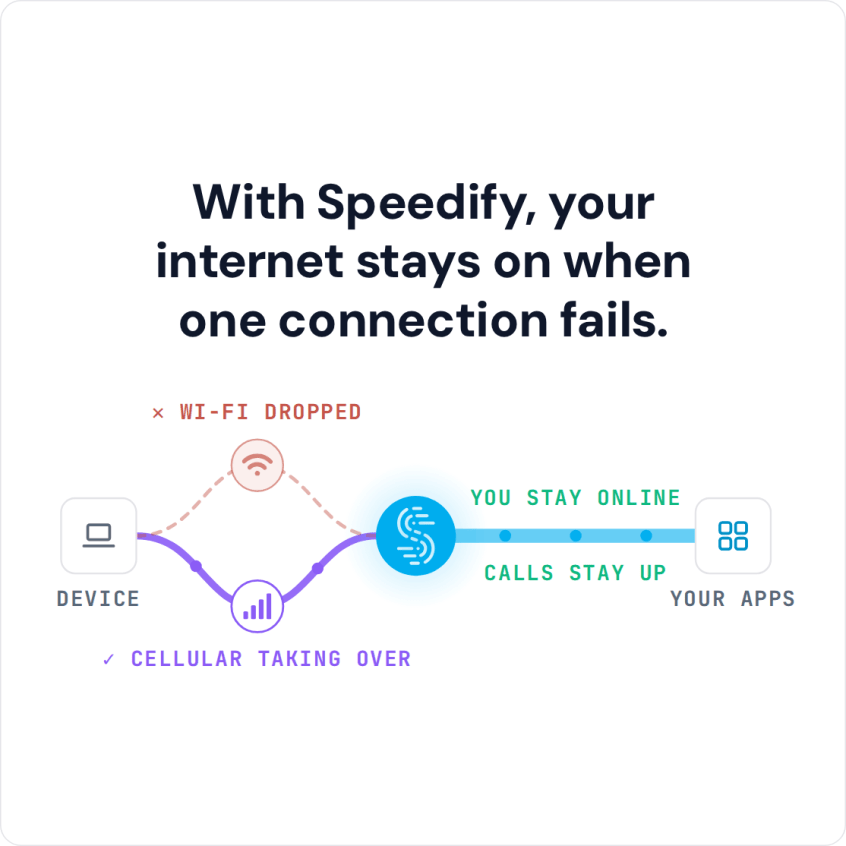
Read the video transcript below. It covers why 6 GHz Wi-Fi 7 has a shorter range, and how Speedify, an app that combines internet connections and encrypts traffic like a VPN, lets phones share their 4G/5G cellular connections through its cellular sharing feature. Speedify keeps a session up when one connection drops only with two or more internet connections, such as Wi-Fi plus a phone’s 4G/5G cellular; on a single connection it works as an encrypted VPN and cannot stop that connection from dropping.
Mobile Tethering Challenges: What Needs to Be Improved
Ryan: Are there hardware limitations on tethering?
Alex Gizis: Sure. Any time you’re trying to get to the internet, your speed is pretty much gonna be the speed of the slowest step along the way. The bottleneck. So you jump on the Wi-Fi and, it’s a little Wi-Fi chip, right? I mean, if you look at a router, they have these giant antennas sticking off them. These phones don’t. It’s got these little, little antennas, and then the person probably has their hand wrapped around it.
So you’ve got these tiny antennas to a small chip without giant amplifiers, and then it goes through the CPU, which, actually, they’re getting pretty powerful these days, cell phones. And then it goes through, the cellular, off to some tower, and that bandwidth could be clogged, and it hits the tower, and its internet could be clogged.
So a lot of spots where things could go wrong. A lot of times, I think, the Wi-Fi, there’s a lot of things going on a Wi-Fi at the same time. Especially if you’re on 2. 4 GHz. Probably the Wifi that’s slowing you down.
Ryan: Sometimes when you’re tethering, or when you create a personal hotspot, it lets you use the Wi-Fi for your hotspot.
Alex Gizis: It Doesn’t let you use the Wi-Fi. So it’s a weird thing that they changed in Android phones a couple years ago. That if you join the hotspot of an Android phone that’s on a Wi-Fi network, instead of sending you out cellular, it sends you out the Wi-Fi. The problem is, is it doesn’t make a whole lot of sense, because I joined the Wi-Fi, it didn’t work very well, so I decided to use my phone’s hotspot, hotspot puts me back onto the Wi-Fi that I just tried and chose not to use, right?
I mean, I know the passphrase to the Wi-Fi, because I set my phone up on it. Why would I want to be put back on that? And the answer is, I never would. I think it’s something they did to try to reduce cellular usage without really thinking it through. And, maybe I’m special and I never want it.
Maybe some people want it sometimes and don’t want it sometimes. There’s no option that I can find an Android to turn off and say, stop putting my other devices back on the Wi-Fi if they join this hotspot. I want them on cellular, why I joined a phone’s hotspot.
So I got really frustrated. So the only solution we came up with is to actually use Speedify as a proxy. This is the Pair & Share feature. Where, when a phone running Speedify joins the hotspot, instead of using the hotspot that sends you back out the Wi-Fi, you talk to the Speedify daemon that instead puts you out the cellular, which is what you really want, right? And you can control who’s allowed to use it and things, but that’s part of the reasoning, so now you can join and use his cellular if that’s what you want to do.
And of course, that opened up all kinds of crazy things, right? You can then have other phones join the hotspot, and their Speedify daemons can offer up, you want to use my cellular too, even though they’re not running the hotspot, they can share their cellular to you. They can even share their cellular back up to the guy running the hotspot.
It’s like a hotspot on steroids.
Ryan: Like a hotspot spiderweb.
Alex Gizis: Like a “mesh”. Yeah, so you sort of create this mesh network over one phone’s Wi-Fi hotspot. One guy makes Wi-Fi hotspot, Everybody joins it and they share their cellular back and forth and everyone gets faster, more reliable internet.
Road to WiFi 7: Software-Defined Radios
Ryan: But how is it possible on Android to use the Wi-Fi and share Wi-Fi at the same time if there’s only one Wi-Fi radio?
Alex Gizis: Yeah, so this is that clever virtual Wi-Fi idea. So there’s one Wi-Fi radio on the phone and it gets on the same channel as the Wi-Fi that it’s joining and it says, “Hey, I’m a client!” and then on the same channel it announces, “I’m a router.” And he’s just switching back and forth in software. Sometimes saying to this guy, “Hey, I’m your client, please send this packet.”
And then saying to the other guy, “Oh, I’m your router.” And so he’s ferrying the packets back and forth between the two. All on one channel, so it’s not creating bandwidth, right? It’s the same space where they’re having multiple conversations at the same time.
Ryan: Are the chips software defined?
Alex Gizis: The wireless chips these days are largely software defined. There’s hardware radios like the old days, they would tune crystals to get them on the right frequency and then ship it and it would never change. And then there’s this vision of software defined radios where it’s just kind of an antenna going into a CPU and everything’s done in software.
I think right now we’re kind of two thirds of the way to that vision. There’s real radio hardware in there, but so many details of the protocol and the frequency and which power level to use and things are all controlled by software. I think we’re sort of in a weird two thirds software defined.
When we went from Wi-Fi 6 to Wi-Fi 7, it was all new chips. Nobody pulled that off with just a software update.
Ryan: Yeah, you needed a new phone.
Alex Gizis: Right. But when WPA3 encryption for Wi-Fi came along, a lot of devices were able to just have a software update to support the new Wi-Fi security right on the chip without changing hardware. So it’s somewhere in the middle right now.
WiFi 7 Promises Unprecedented Bandwidth
Ryan: Yeah, Wi-Fi 7 can do like 5 GHz, 2. 4 GHz, 6 GHz.
Alex Gizis: 6 GHz, I’m very excited. There’s a huge amount of bandwidth. It’s more than a GHz of bandwidth up at 6 GHz. I mean, it’s more than all the Wi-Fis put together before. It’s a little bit shorter range than 5 GHz, but it’s so much bandwidth. Like, you and your neighbors will never bump into each other. You can do channels that are hundreds of MHz wide that let you do gigabits. Although, the range gets shorter and shorter the faster you go. But I’m so excited. I mean, the days of all of us bumping into each other in 2.4 GHz, and everybody slowing down when the neighbor download stuff, it’s going to be over.
Ryan: Is it correct to say that a channel is a GHz wide? Isn’t that like a frequency unit?
Alex Gizis: Yeah, so with the frequency, the more data you want to send, the more Hz you need. And they’re essentially bands. So the wider it goes, the faster you can get. Depending on your encoding scheme, they’re getting more and more efficient. It used to be you needed a couple Hz to send one bit per second, but they’re really getting very efficient. I think there are now some coding schemes where you get more than one bit per Hz by having different levels.
The 6 GHz Band Physics: Antennas and Propagation
Ryan: 6 GHz has shorter range, right?
Alex Gizis: Yes, and you know why it has shorter range? This is crazy. Most engineers don’t know this. So most people just think the higher the frequency, the worse it is at going far. The worse it is at going through walls. The actual reason is that when they talk about how 6 GHz goes shorter than 5 GHz, they mean with a 1/4 wave antenna.
A standard antenna, that’s a 1/4 wave size. Well, the higher the Hz, the shorter a 1/4 wave antenna is. And actually, the skinnier it is. It’s just proportionately, if the wave is half the frequency, the antenna is half the size and half the width. You just shrink the whole antenna in half the size.
So now it has a 1/4 of the area to catch the radio waves coming from the other guy. It’s just a geometry problem that your antenna has smaller surface area that makes the higher frequencies not go as far.
Ryan: So why don’t they just make them bigger?
Alex Gizis: Well, they do. This is why the routers are spouting more and more antennas. So all these antennas, if any of them catch a bit of the signal, they add them up and shove it into the radio. So the higher the frequency it is, the more antennas they’re sticking on. Right now you’re seeing routers with 8, 12 antennas.
WiFi 7 – What’s Coming
Ryan: Routers that have antennas on all sides…
Alex Gizis: Yeah, it’s starting to look like spiders and stuff. It’s adding more antennas to get more area to catch these radio waves. And get them into the radio.
Ryan: I always just assumed that the signal would die off faster because it’s a higher frequency.
Alex Gizis: No! So an interesting thing is, Einstein’s theory of relativity. There is no time for a radio wave. The closer you get the speed of light, the slower time goes for you.
A radio wave is at the speed of light, it doesn’t experience time. Can’t die off as it goes further, because it doesn’t know it went further. Just geometry.

Connectivity Tech Discussions
In the Connectivity Tech Discussions Between Two Palms video series, Speedify CEO Alex Gizis and technical guests talk through the latest internet technology: Starlink and other satellite internet, Wi-Fi 7, Apple, fiber, new routers, remote connectivity and networking protocols.