
How good is your internet connection?
Want faster upload and download speeds and more reliable internet? Run two or more internet connections at the same time, such as Wi-Fi, 4G/5G cellular, Ethernet or Starlink. This is often called internet bonding or connection bonding. Speedify is an app that combines two or more internet connections at once, so you get faster uploads and downloads and stay online if one connection drops out. Download Speedify and start with a free account that includes 5 GB per month.
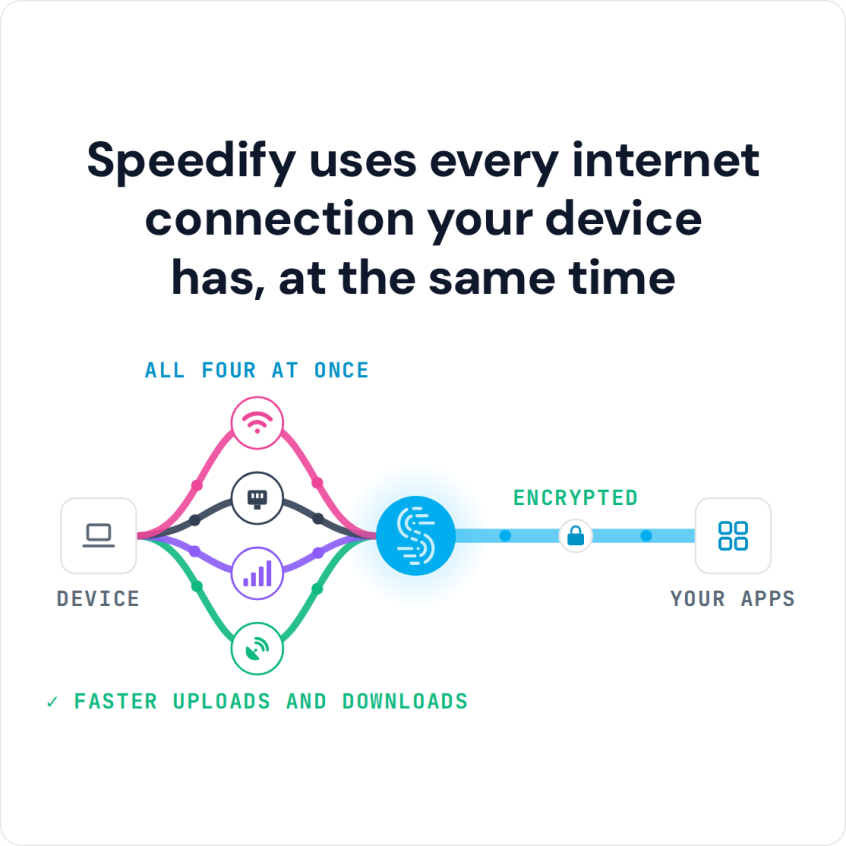
Speedify uses every internet connection your device has, at the same time
How do I use WiFi and 4G/5G cellular at the same time with Speedify?

Pick your two internet connections and your device below and we'll take you to the step-by-step setup guide.


Who Benefits from Combining Internet Connections
If you live in an area where internet coverage and speed are hit or miss, you are not the only one. Combining internet connections adds their capacity together, so two or more connections give you faster downloads and uploads and a steadier connection than any one of them alone.
Whether you depend on a stable internet connection for work, school or entertainment, a second internet connection keeps you online when the first one drops.
Setting this up may sound complicated, but with Speedify it takes one click once you have more than one internet connection available.
How to Combine Internet Connections for Faster Downloads and Uploads
A few products on the market combine internet connections, and most of them are hardware that is not easy to set up. If something stops working, troubleshooting that hardware is hard. On top of the internet plans and modems from your providers, you need an extra router, more cables and a higher bill.
Most of these products are built for businesses. Speedify is software that anyone can install on a computer or phone, with no additional hardware required. Here is an example:
You install Speedify on your computer and open it. Next, plug in an Ethernet cable from one internet provider and connect to Wi-Fi from another. Speedify combines the two internet connections right away. You are not limited to Ethernet and Wi-Fi: Speedify combines Wi-Fi, 4G/5G cellular, Ethernet, Starlink and satellite internet connections, and it runs on iPhone and Android phones too.
How Speedify Combines Internet Connections and Handles Dropouts
Rather than switching between internet connections, Speedify splits your internet packets across all of them and puts them back together at the Speedify server. That happens automatically, so there is nothing for you to manage. If one internet connection goes offline, Speedify automatically reroutes all Internet activity through the remaining connections until the lost one comes back online. Speedify also adds encryption, like a VPN, which hides your traffic and keeps it private. You do not need an IT expert to start combining internet connections with Speedify.
Speedify
Get started with Speedify today.
Speedify combines Wi-Fi, 4G/5G cellular, Ethernet, Starlink and satellite into one faster, more reliable internet connection. Free to try: 5 GB a month with a free account. No credit card required.
🚀 Speed
Faster uploads and downloads, because Speedify uses all your internet connections at once.
📶 Stability
If one internet connection drops, Speedify moves your traffic to the others in milliseconds.
🔒 Security
AES-256 encryption on every internet connection, on any network you join.



15M+ downloads worldwide. 75K+ five-star reviews on iOS and Android.