
Speedify Combines Starlink with Wi-Fi, 4G/5G Cellular, Ethernet, Satellite and Other Starlink Dishes for More Reliable Internet at Sea
Yes, you can combine Starlink with other internet connections at sea. Speedify is an app that uses Starlink Maritime, 4G/5G cellular, a second Starlink dish and older satellite internet at the same time, as one internet connection for the whole vessel.
One Starlink dish is enough for many boats in good weather. Larger vessels, and operations that can’t go offline, need a second internet connection. When one drops, Speedify keeps the vessel online over the others. With a Starlink dish as the only internet connection on board, Speedify works as an encrypted VPN and cannot stop it from dropping. Here is how ferries and other boats stay online on Starlink.
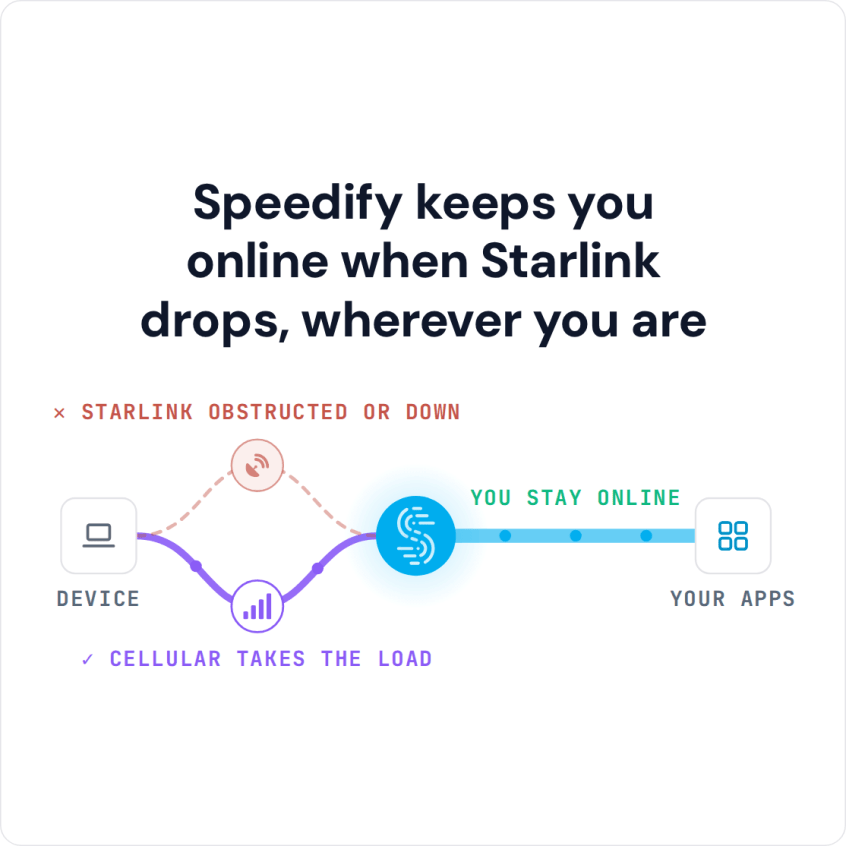
Speedify keeps you online when Starlink drops, wherever you are
Watch now
How Speedify combines internet connections on any hardware
Get started with Speedify for your business
Speedify offers three commercial paths. They work together, and most enterprise customers use two or more.
01
Speedify Teams
Speedify on every supported OS for every team member
Centralized dashboard for billing, user provisioning, and usage analytics
CSV import/export and a RESTful management API
02
Speedify for Routers
License for supported OpenWrt routers
Powered by Speedify hardware lineup ready to deploy out of the box
Miri, GL.iNet and other partner models
Covers every device on the network, with no per-device install
03
Embed Speedify into your product
A · DIY
Build it yourself with the Speedify SDK.
Integrate Speedify into your iOS, Android, Windows, macOS, Linux or QNX product. Full developer documentation, sample code and supported integration paths. Your team owns the build, and the Speedify SDK handles combining the internet connections.
B · CUSTOM ENGINEERING
Have the Speedify team build it for you.
Which Internet Connections You Can Combine with Starlink on a Vessel
Starlink Maritime is Starlink’s internet service for ships. Bad weather, a rolling ship, and the short drops when a Starlink dish switches satellites (about every 15 seconds) still interrupt the service, and on a large vessel many people share the same Starlink internet connection.
Speedify can use any of these alongside Starlink:
- 4G/5G cellular near the coast or in port, through a USB cellular modem or a marine cellular antenna
- A second Starlink dish on the same vessel, for more upload and download speed. Both Starlink dishes switch satellites on the same 15-second schedule, so a second Starlink dish doesn’t cover those short drops; cellular or another satellite service does.
- Older satellite internet for ships, kept as a second internet connection on routes where Starlink coverage is weak
- Marina or shore Wi-Fi when the vessel is docked
How Speedify Combines Several Internet Connections on a Vessel
Speedify runs on a router or computer on board and watches every internet connection all the time: its speed, its delay and how much data it loses. When several internet connections are working, Speedify sends traffic over all of them at once, so you get faster uploads and downloads than any one of them gives alone. See how Speedify combines internet connections.
When one internet connection weakens or drops, Speedify moves its traffic to the others on its own. Ship-to-shore calls, crew video calls and passenger internet keep going, with nothing to reconnect.
Speedify also encrypts all internet traffic on every internet connection, which protects operational data and crew communications at sea.
How to Combine Starlink with Other Internet Connections on Your Vessel
Step 1: List Every Internet Connection Your Vessel Can Use
A common setup is one Starlink Maritime dish plus one more internet connection: a 4G/5G cellular antenna, a second Starlink dish or an older satellite service.
Step 2: Connect Each Internet Connection to the Onboard Router
Connect each internet connection to the router or server that will run Speedify, so each one shows up as its own network connection. On larger vessels, Speedify can run on a dedicated router or server in the ship’s network rack. See the routers Speedify supports.
Step 3: Download and Run Speedify
Download Speedify and install it on the router or computer that runs the vessel’s internet. Speedify finds every internet connection and starts using them right away, with no routing to set up.
Which Vessels Get the Most from Combining Starlink with Other Internet Connections
- Commercial vessel operators who need steady internet for navigation, reporting and ship-to-shore communication
- Ferry and cruise operators giving internet to hundreds of passengers and crew on one voyage
- Fishing and fish farming operations running monitoring systems that can’t miss data
- Offshore platforms and support vessels that need internet for crew calls home and daily business
- Yacht owners and crews who want Starlink Maritime plus cellular or a second satellite service
Speedify Is Used on Millions of Devices Worldwide
Speedify has made internet connections faster and more reliable for businesses and individuals since 2014.
15M+
Speedify downloads worldwide75K+
5-star reviews for Speedify on iOS and Android82
Speedify server points of presence in 50+ cities on 6 continents500TB+
Of internet traffic carried by Speedify every weekSpeedify Partners
Speedify works with these companies to bring faster, more reliable internet and networking technology to their customers and employees.


Speedify Also Shows the Status of Every Starlink Dish on Board
Speedify shows real-time Starlink dish alerts for each connected Starlink dish in the app. If a Starlink dish has a problem, such as overheating, Speedify shows an alert once the problem has lasted 15 seconds, and clears it when it’s fixed.
For vessel operators running several Starlink dishes, the Starlink Control Center, a screen in the Speedify app, shows the status, speed and alerts of all of them in one place.
Speedify Business Solutions
Speedify Teams
Speedify for Routers

Speedify Embedded Solutions and Integrations
Add Speedify to your own app or hardware with the Speedify SDK. Your product then combines internet connections, fails over automatically when one drops, and encrypts the traffic, using the same technology as the Speedify app.