
Speedify Makes Starlink a Reliable Internet Connection for Your Church by Providing Faster Upload and Download Speeds
Yes, Starlink works well as church internet, especially for rural churches that cable and fiber never reached. Starlink lists typical downloads of 45 to 280 Mbps and uploads of 10 to 30 Mbps for one Starlink dish, enough to livestream Sunday services, host online Bible study and run the church office.
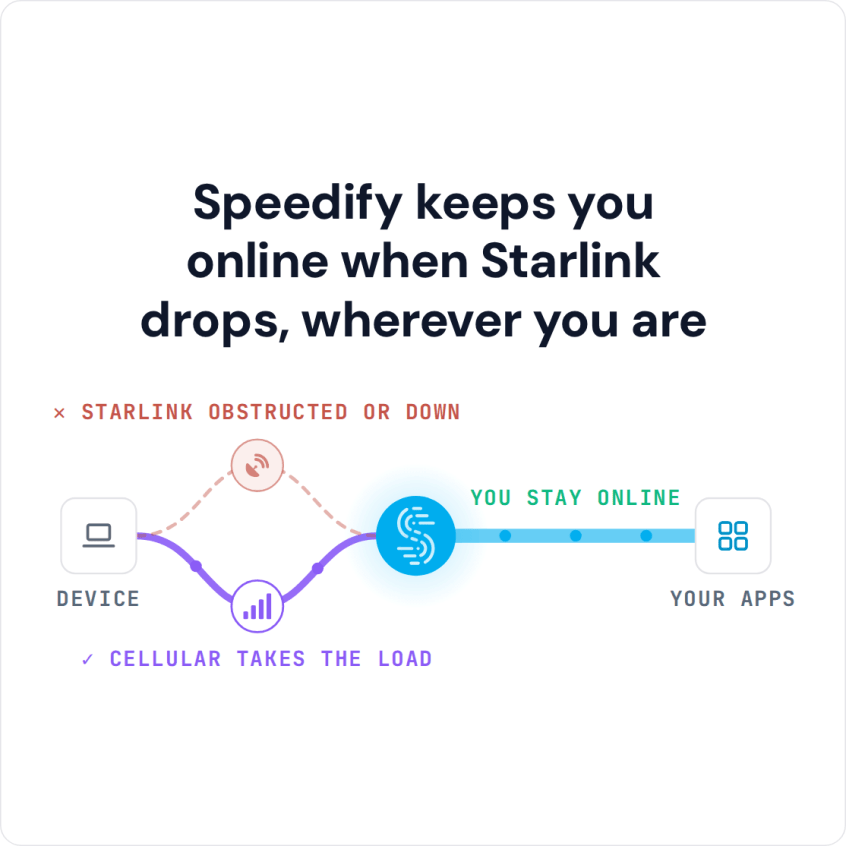
A livestream needs steady upload speed, and one Starlink internet connection still has short drops. Speedify is an app that uses Starlink and 4G/5G cellular at the same time, so if Starlink drops during the sermon, the livestream keeps going over cellular. Speedify works the same way for synagogue services on Starlink.
Speedify keeps you online when Starlink drops, wherever you are
Watch now
How Speedify combines internet connections on any hardware
Get started with Speedify for your business
Speedify offers three commercial paths. They work together, and most enterprise customers use two or more.
01
Speedify Teams
Speedify on every supported OS for every team member
Centralized dashboard for billing, user provisioning, and usage analytics
CSV import/export and a RESTful management API
02
Speedify for Routers
License for supported OpenWrt routers
Powered by Speedify hardware lineup ready to deploy out of the box
Miri, GL.iNet and other partner models
Covers every device on the network, with no per-device install
03
Embed Speedify into your product
A · DIY
Build it yourself with the Speedify SDK.
Integrate Speedify into your iOS, Android, Windows, macOS, Linux or QNX product. Full developer documentation, sample code and supported integration paths. Your team owns the build, and the Speedify SDK handles combining the internet connections.
B · CUSTOM ENGINEERING
Have the Speedify team build it for you.
How Starlink Helps Churches That Need Better Internet
Churches use the internet for more every year: livestreaming weekly services for members who are homebound or far away, video calls for Bible study and prayer groups, church management software in the cloud, and online giving and event sign-ups.
On slow DSL or weak cellular alone, most of that is hard or impossible. A Starlink dish on the church building changes that, with enough speed to run all of it at the same time.
The part churches notice most is upload speed, because that’s what carries the livestream out. Twitch, for example, recommends 4.5 Mbps of upload for a 1080p stream at 30 frames per second, and 6 Mbps at 60 frames per second. Starlink covers that in normal conditions, but your Starlink dish switches satellites about every 15 seconds, and a short drop or a passing storm can freeze the stream for everyone watching at home.
What Starlink and Speedify Cost for a Church
Starlink sets its prices by plan and by country, so check starlink.com for the current price where your church is. Residential plans are for one fixed address. Priority plans are served first when the Starlink network is busy, which matters if your livestream runs at a busy time of day.
Speedify costs $89.99 a year for an Individual plan, or as low as $4.99 a month on a 3-year plan, which covers the computer that runs your livestream. For a church staff team, Speedify Teams costs $89.99 per user per year, with a 5-user minimum.
How Speedify Keeps Your Church Livestream Online on Starlink
Speedify runs on the computer that sends your livestream, or on the church router. When Starlink and 4G/5G cellular are both working, Speedify uses them at the same time, so the livestream gets faster uploads than either one gives alone. When Starlink slows down or drops during a service, Speedify moves the livestream to cellular on its own, and the livestream keeps going for people watching at home.
Speedify needs that second internet connection. With Starlink alone, Speedify can’t make uploads faster or cover drops. No cellular modem? Cellular sharing in Speedify lets volunteers’ phones on the church Wi-Fi share their cellular connections with the streaming computer.
Speedify also encrypts all internet traffic, which protects church emails, member records and giving data on every internet connection.
How to Set Up Speedify with Starlink at Your Church
Step 1: Install the Starlink Dish at the Church Building
Mount the Starlink dish with a clear view of the sky. Flat roofs and open church grounds work well. Check the Starlink app for obstructions before you fix the mount in place.
Step 2: Add a 4G/5G Cellular Internet Connection
Connect a 4G/5G cellular router or a USB cellular modem to the streaming computer or to the router running Speedify. Even a weak rural cellular signal helps Speedify cover short Starlink drops, though it may not carry a full-quality livestream on its own.
Step 3: Download and Run Speedify on the Streaming Computer
Download Speedify and install it on the computer that runs your livestream, or on a compatible router for the whole building. Speedify finds every internet connection and starts using them right away.
Which Churches Get the Most from Starlink and Speedify
- Rural churches where Starlink is the only fast internet available
- Churches that livestream every week for homebound members and people who can’t attend in person
- Growing congregations adding online ministry that their current internet can’t keep up with
- Churches hosting conferences and community events that need internet for sign-ups, presentations and streaming
- Multi-campus churches where one campus runs on Starlink and receives video from the main campus
Speedify Is Used on Millions of Devices Worldwide
Speedify has made internet connections faster and more reliable for businesses and individuals since 2014.
15M+
Speedify downloads worldwide75K+
5-star reviews for Speedify on iOS and Android82
Speedify server points of presence in 50+ cities on 6 continents500TB+
Of internet traffic carried by Speedify every weekSpeedify Partners
Speedify works with these companies to bring faster, more reliable internet and networking technology to their customers and employees.


Speedify Also Shows Your Starlink Dish Status
Speedify shows real-time Starlink dish alerts in the app. If your Starlink dish has a problem, such as overheating, Speedify shows an alert once the problem has lasted 15 seconds, and clears it when it’s fixed.
For volunteers who run the livestream, that means they can see a Starlink dish problem without special equipment or networking knowledge.
For church staff and volunteers: Download Speedify on the computer that runs your livestream and use Starlink and cellular together. New to livestreaming? Start with how to live stream a church service.
For multi-campus churches and church IT teams: Speedify can combine Starlink and cellular for every campus. Contact Us to plan the setup.
Speedify Business Solutions
Speedify Teams
Speedify for Routers

Speedify Embedded Solutions and Integrations
Add Speedify to your own app or hardware with the Speedify SDK. Your product then combines internet connections, fails over automatically when one drops, and encrypts the traffic, using the same technology as the Speedify app.