
Speedify Lets Network Providers, Carriers, and ISPs Use Starlink to Expand Internet Coverage and Reliability
Yes, Starlink is an ISP (internet service provider): a satellite internet provider that sells service straight to homes and businesses. Other ISPs can use Starlink too. Wireless ISPs (WISPs, which send internet by radio from their towers to customers), rural ISPs and cellular carriers use Starlink to reach customers their own network can’t reach, or as a backup when their own lines fail.
Speedify, an app that runs on routers and computers, uses a Starlink internet connection together with an ISP’s existing wired, radio or cellular internet connection, so the customer gets the speed of both and stays online when one drops. Below: how ISPs and carriers use Starlink, how Speedify fits in, and where the pair helps most.
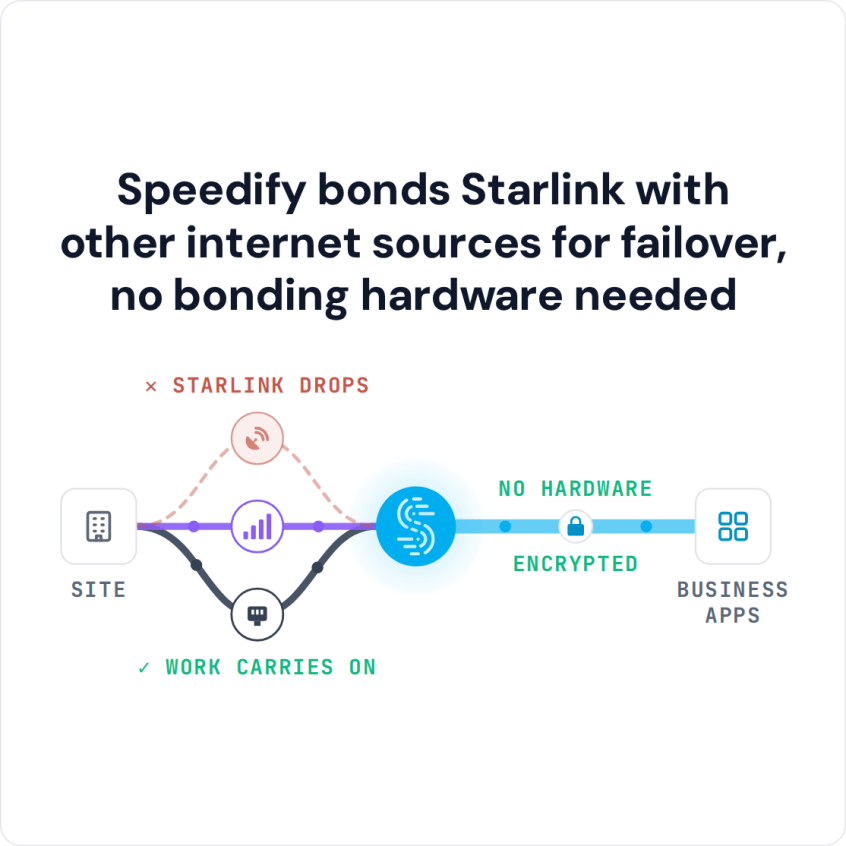
Speedify bonds Starlink with other internet sources for failover, no bonding hardware needed
Watch now
How Speedify's channel bonding technology works on any hardware
Get started with Speedify for your business
Speedify offers three commercial paths. They're not exclusive — most enterprise customers combine two or more.
01
Speedify Teams
Speedify on every supported OS for every team member
Centralized dashboard for billing, user provisioning, and usage analytics
CSV import/export and a RESTful management API
02
Speedify for Routers
License for supported OpenWrt routers
Powered by Speedify hardware lineup ready to deploy out of the box
Miri, GL.iNET, and other partner models
Whole-LAN bonding without per-device install
03
Embed Speedify into your product
A · DIY
Build it yourself with the Speedify SDK.
Integrate Speedify into your iOS, Android, Windows, macOS, Linux, or QNX product. Full developer documentation, sample code, and supported integration paths. You own the build, we provide the bonding stack.
B · CUSTOM ENGINEERING
Have us build it for you.
How ISPs, Wireless ISPs and Carriers Use Starlink
Starlink sells business service that network providers can use to reach areas where they have no fiber or towers. What a provider may resell depends on Starlink’s terms in each country, so check with Starlink before you plan a service around it. Starlink’s satellites cover rural and remote areas in many countries. For an ISP serving a rural area, Starlink can be the final link to customers that fixed wireless or wired lines can’t reach.
Starlink also works as a backup path for an ISP’s existing internet connections. Ground networks suffer fiber cuts, power outages and broken equipment. Adding a Starlink internet connection through Speedify, either as a standby or used all the time, keeps customers online when the main internet connection fails.
How Speedify Works When ISPs Add Starlink for Customers
Speedify runs on the customer’s router, or on a router the carrier or ISP manages. Speedify watches every internet connection at the same time and spreads traffic across them. With Starlink and the ISP’s main internet connection both working, Speedify uses both, so the customer gets close to their combined upload and download speed. When the main internet connection fails, Speedify moves all traffic to Starlink right away, and calls and downloads keep going. When the main internet connection comes back, Speedify starts using both again.
Speedify needs at least two internet connections at the customer site. With Starlink alone, Speedify can’t add speed or stop Starlink’s short drops.
Speedify also encrypts all internet traffic, so customers get the same protection on every internet connection.
How ISPs Can Set Up Speedify with Starlink for Customers
Step 1: Set Up Starlink Service for the Customer Site or Service Area
Activate Starlink service for the customer’s location or your service area. If Starlink is the final link to a rural customer, install the Starlink dish at the customer’s building or at a local distribution point. Check that the Starlink internet connection works.
Step 2: Connect the Starlink Router Next to the Customer’s Main Internet Connection
Connect the Starlink router to the customer’s router, or to the router the ISP manages, next to the existing main internet connection. Each internet connection should show up on its own port in the router’s settings.
Step 3: Install Speedify on the Customer’s Router
Install Speedify on the customer’s router (see the routers that work with Speedify). Speedify finds every internet connection and starts using them together. The customer’s internet now runs on Starlink and the main internet connection at the same time, and Speedify switches between them automatically when one fails.
Which Network Providers Benefit Most from Starlink and Speedify
- Rural ISPs and wireless ISPs bringing internet to rural communities where fiber and fixed wireless don’t pay for themselves
- Cellular carriers adding satellite backup where there aren’t enough towers for steady 4G/5G coverage
- Regional telecom providers offering business customers satellite and wired internet together, so the service stays up when one line fails
- Wholesale internet providers offering Starlink as the final link or as a backup through their existing sales channels
- Network teams at ISPs who want to run several internet connections per customer site in software, across many sites, on routers they already manage
Speedify Is Used on Millions of Devices Worldwide
Speedify has powered stronger Internet for millions of consumers since 2014
15M
Millions of Speedify downloads worldwide, and growing every day5⭐️
More than 75,000 5-star reviews for Speedify in the iOS and Android app stores82
Points of Speedify presence in datacenters around the globe500TB
Hundreds of terabytes of fast, secure data streamed every week via SpeedifySpeedify Partners
Speedify partners with these amazing organizations to deliver better internet and next-generation networking technology to their customers and employees.


Speedify Also Shows Starlink Dish Alerts for Every Customer Site
Speedify shows Starlink dish alerts in the app for each Starlink dish connected to it. If a customer’s Starlink dish has a stuck motor, a mounting pole that isn’t straight, or is overheating, Speedify shows an alert, so it’s clear whether a problem is the Starlink dish or your own network.
To plan Starlink and Speedify across your service area or customer sites, Contact Us.
Speedify Business Solutions
Speedify Teams
Speedify for Routers

Speedify Embedded Solutions and Integrations
Embed Speedify software into your app or hardware products and leverage the core channel bonding technology of Speedify in new and interesting ways.