
Mobile Workers’ Must Have: Speedify Bonding VPN for Fast, Stable and Secure Internet with Unbreakable Tunnels
An enterprise VPN that disconnects during a board call is a security tool nobody keeps switched on. Employees turn the VPN off, and company traffic leaves the building unprotected.
Speedify is an app that combines Wi-Fi, 4G/5G cellular, Ethernet, Starlink and satellite internet connections into one encrypted connection, so the VPN stays up when office or hotel Wi-Fi weakens and staff have no reason to switch protection off. The speed and failover gains need at least two internet connections per device, such as Wi-Fi plus a phone’s 4G/5G cellular; on a single connection, Speedify works as an encrypted VPN and can be a little slower.
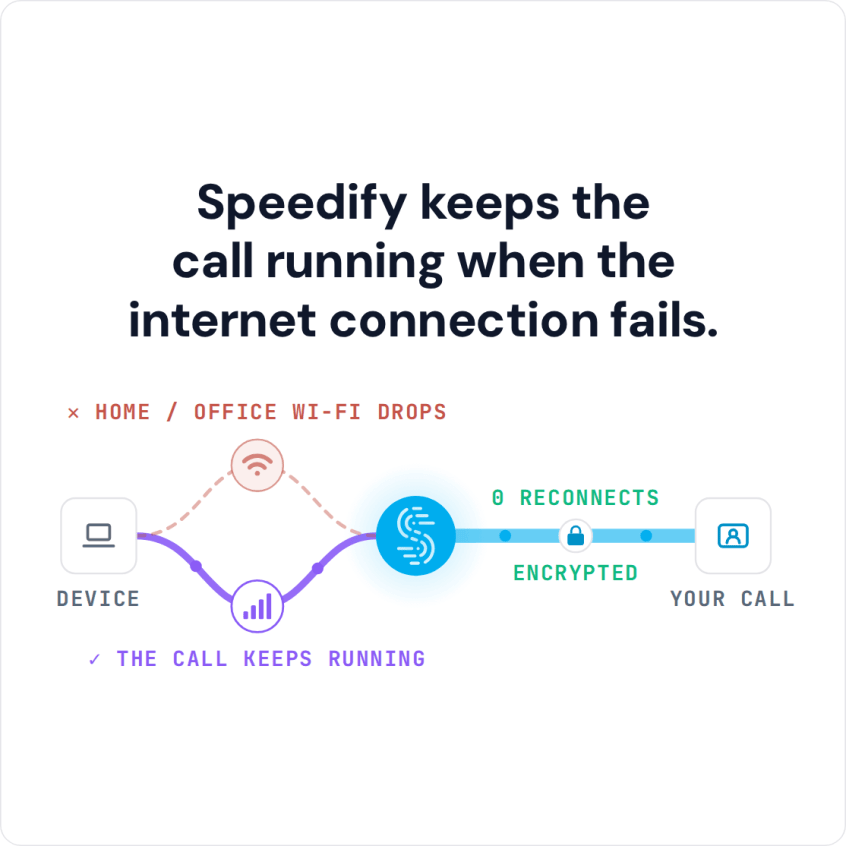
Speedify keeps the call running when the internet connection fails.
Read on for what an enterprise VPN does for a company, what to compare before buying one, and how Speedify keeps large teams encrypted and online with nothing to rack or maintain.
Watch now
How Speedify combines internet connections on any hardware
Get started with Speedify for your business
Speedify offers three commercial paths. They work together, and most enterprise customers use two or more.
01
Speedify Teams
Speedify on every supported OS for every team member
Centralized dashboard for billing, user provisioning, and usage analytics
CSV import/export and a RESTful management API
02
Speedify for Routers
License for supported OpenWrt routers
Powered by Speedify hardware lineup ready to deploy out of the box
Miri, GL.iNet and other partner models
Covers every device on the network, with no per-device install
03
Embed Speedify into your product
A · DIY
Build it yourself with the Speedify SDK.
Integrate Speedify into your iOS, Android, Windows, macOS, Linux or QNX product. Full developer documentation, sample code and supported integration paths. Your team owns the build, and the Speedify SDK handles combining the internet connections.
B · CUSTOM ENGINEERING
Have the Speedify team build it for you.
Why Speedify for Teams Works as an Enterprise VPN
Speedify is a full VPN that also combines internet connections, so a company does not have to choose between encrypted traffic and a connection that stays up. Each device sends its traffic over every internet connection it has, and when one drops, the others carry on with the same public IP address, so calls, remote desktop sessions and logins to company systems are not interrupted.
Speedify for Teams adds central account management: a Teams dashboard to add and remove users, handle billing and view usage statistics, and a Teams REST API to push Speedify settings to every user. There is no minimum number of users.
What an Enterprise VPN Does and Where Speedify Fits
An enterprise VPN does two jobs: it encrypts staff traffic on any network, and in its classic remote-access form it connects employees to the company’s internal network. Speedify does the first job and keeps the connection up, but it is not a corporate VPN: it does not connect staff to a company intranet or replace IT’s remote-access tools. Companies that need both keep the remote-access VPN and run Speedify on a router or a second device that shares its connection, because two VPN clients cannot reliably run side by side on one computer. For cloud apps that only accept known addresses, a Dedicated Server’s static IP goes on the allow list.
What to Compare Before Choosing an Enterprise VPN Solution
Encryption: Speedify encrypts traffic between each device and the Speedify server with DTLS 1.2 and AES-256-GCM or ChaCha20-Poly1305, built on Google’s BoringSSL. As with other VPN services, traffic is decrypted at the Speedify server before it continues to the internet.
Logging: Speedify keeps no record of the sites your staff visit and does not sell personal data, but does record connection metadata: IP address, device ID, connection time and data used.
Fixed IP addresses: a Speedify Dedicated Server gives your team a static IPv4 address for IP allow lists, port forwarding, up to 1 Gbps and 3 TB of data a month (more on request), with its own service level agreement of one free day for every hour down.
No third-party relay: a Self-Hosted Server runs Speedify’s server software on your own hardware with Docker Compose, so company traffic exits from a server you control. Self-hosted servers still activate through my.speedify.com.
Uptime: Speedify for Teams comes with a 100% uptime guarantee and one day of free service for every hour down. Speedify runs on Windows, macOS, iOS, Android and Linux.
Speedify Business Solutions
Speedify Teams
Speedify for Routers

Speedify Embedded Solutions and Integrations
Add Speedify to your own app or hardware with the Speedify SDK. Your product then combines internet connections, fails over automatically when one drops, and encrypts the traffic, using the same technology as the Speedify app.