
FIPS Compliance for Government Contractors: What to Check First
Satcom companies, government contractors, federal agencies and any business handling Controlled Unclassified Information face the same hard requirement: the cryptographic module protecting data in transit has to be validated. Speedify does not publish a FIPS 140-3 certificate for its own encryption, which uses Google’s BoringSSL library, so confirm the validation status with Speedify before counting Speedify toward that requirement.
Speedify for Routers runs on OpenWrt routers, and Speedify also runs on Linux computers and servers. Paired with a Speedify Self-Hosted Server on infrastructure you control, Speedify keeps the combined traffic inside your own network boundary. This post covers how FIPS validation applies to software that combines internet connections, what Speedify’s encryption uses today, where Speedify fits, and how Speedify compares to Peplink, Cisco and Fortinet, with hardware details in the companion guide to Speedify on standard Linux hardware.
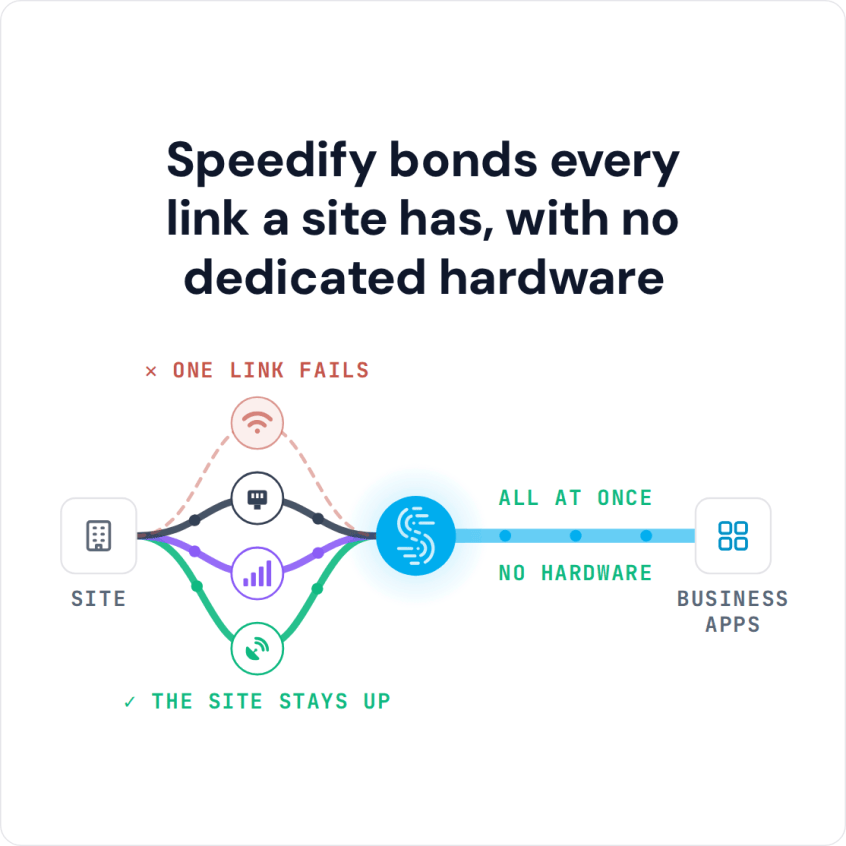
Speedify bonds every link a site has, with no dedicated hardware
Watch now
How Speedify's channel bonding technology works on any hardware
Get started with Speedify for your business
Speedify offers three commercial paths. They're not exclusive — most enterprise customers combine two or more.
01
Speedify Teams
Speedify on every supported OS for every team member
Centralized dashboard for billing, user provisioning, and usage analytics
CSV import/export and a RESTful management API
02
Speedify for Routers
License for supported OpenWrt routers
Powered by Speedify hardware lineup ready to deploy out of the box
Miri, GL.iNET, and other partner models
Whole-LAN bonding without per-device install
03
Embed Speedify into your product
A · DIY
Build it yourself with the Speedify SDK.
Integrate Speedify into your iOS, Android, Windows, macOS, Linux, or QNX product. Full developer documentation, sample code, and supported integration paths. You own the build, we provide the bonding stack.
B · CUSTOM ENGINEERING
Have us build it for you.
What FIPS 140-2 and FIPS 140-3 Actually Require
FIPS 140-2 and its successor FIPS 140-3 define security requirements for cryptographic modules: the software or hardware components that perform encryption, key management, and related functions. NIST’s Cryptographic Module Validation Program (CMVP) issues the certificates. A product is FIPS-compliant when it uses a validated cryptographic module and operates in that module’s approved mode.
That distinction matters for software that combines internet connections. The CMVP validates the cryptographic module, not the full product. An application that combines connections and routes all cryptographic operations through a FIPS-validated module in approved mode can be part of a FIPS-compliant architecture. The logic that combines the connections (packet splitting, reordering, failover) is not a cryptographic function and is not in scope for FIPS validation.
One date matters: all FIPS 140-2 certificates moved to the CMVP Historical List on September 21, 2026. Since then, only FIPS 140-3 certificates count as current for new deployments. Procurement teams should verify certificate status directly against the NIST CMVP validated modules database before making a purchasing decision.
Speedify’s Encryption and Self-Hosted Server in a FIPS Deployment
Speedify runs on OpenWrt 23.05 or later routers and on Ubuntu, Debian and Raspberry Pi OS computers. Speedify’s tunnel encryption does not come from the operating system: Speedify encrypts traffic with DTLS 1.2 using AES-256-GCM or ChaCha20-Poly1305, implemented with Google’s BoringSSL. Speedify does not publish a FIPS 140-3 certificate or a FIPS mode, so ask Speedify for the current validation status before relying on it for FIPS-validated encryption. Speedify’s Self-Hosted Server runs as a Docker container on a Linux host (Ubuntu preferred), on bare metal in your own data center or on a cloud VM inside infrastructure the organization manages.
For compliance teams, this means you control where the traffic flows and where the data sits. With a Speedify Self-Hosted Server deployed inside your network boundary, combined traffic from Speedify clients does not transit Speedify’s infrastructure. Traffic flows from client devices to your server and stays within your environment, subject to your access controls, firewall rules, and logging policies. Device sign-in and server activation still use Speedify’s account service.
When auditors ask where traffic goes, the answer with a self-hosted deployment is specific: it goes to a server at a location you define, on infrastructure you manage, inside your existing compliance framework. Key deployment characteristics for compliance-sensitive environments:
- Activation and licensing. Speedify’s Self-Hosted Server is activated against a Speedify account and a Self-Hosted Server license, and Speedify’s setup guide does not cover running it without internet access. Confirm offline (air-gapped) operation with Speedify before planning an isolated network.
- Hardware agnostic. Speedify runs on OpenWrt 23.05 or later routers with x86_64 or aarch64 CPUs (with a Speedify Router License) and on Ubuntu 22.04 or later, Debian 11 or later and Raspberry Pi OS computers and servers. Organizations are not required to purchase specific hardware to deploy Speedify.
- Encryption library. Ubuntu’s FIPS mode does not change Speedify’s tunnel encryption, because Speedify uses its own BoringSSL library rather than the operating system’s cryptographic module. The checklist at the end of this post lists what to confirm before deployment.
- Self-Hosted Server requirements. Speedify’s Self-Hosted Server runs in Docker on an x86_64 Linux host with at least 2 CPU cores, 4 GB of RAM, 20 GB of storage and a static public IP address, with port 8443/TCP and ports 32768 to 65535 (TCP and UDP) open.
Organizations That Need FIPS Encryption and Combined Internet Connections
Defense contractors operating under DFARS 252.204-7012 or CMMC Level 2/Level 3 requirements need FIPS-validated encryption to protect CUI. Combined internet connections are common in these environments: field offices, remote contractors, mobile work sites, and deployments where a single Ethernet or 4G/5G cellular connection is insufficient or unreliable. Speedify for Routers on an OpenWrt device combining 4G/5G cellular and Ethernet, connected through a Speedify Self-Hosted Server inside the contractor’s AWS GovCloud or on-premises environment, keeps the combined traffic on infrastructure the contractor controls. That settles where the traffic goes, not the FIPS requirement, which depends on the validation status of Speedify’s encryption.
Federal agencies and their contractors managing systems under FISMA or FedRAMP face the same question. The self-hosted deployment model puts the Speedify server component inside the agency’s or contractor’s own Authority to Operate (ATO) boundary.
Law enforcement agencies, state and local government entities, and businesses in regulated industries such as financial services and healthcare can use the same self-hosted model to keep combined traffic on their own servers. Where their rules require FIPS-validated encryption in transit, the same validation question applies.
Speedify Is Used on Millions of Devices Worldwide
Speedify has made internet connections faster and more reliable for businesses and individuals since 2014.
15M+
Speedify downloads worldwide75K+
5-star reviews for Speedify on iOS and Android82
Speedify server points of presence in 50+ cities on 6 continents500TB+
Of internet traffic carried by Speedify every weekSpeedify Partners
Speedify works with these companies to bring faster, more reliable internet and networking technology to their customers and employees.


Speedify vs. Peplink, Cisco and Fortinet for FIPS Environments
| Solution | FIPS-Validated Module | Hardware Agnostic | Self-Hosted Server Option | Air-Gap Compatible | Client Platforms |
|---|---|---|---|---|---|
| Speedify for Routers + Self-Hosted Server | No published FIPS certificate: Speedify uses Google’s BoringSSL; ask Speedify for current status | Yes: runs on commodity Linux hardware, OpenWrt routers | Yes: Docker container on Linux, bare metal or cloud VM | Not documented: activation uses a Speedify account and license | Windows, macOS, Linux, iOS, Android, OpenWrt |
| Peplink SpeedFusion + FusionHub | Yes: Peplink FIPS Module (CMVP #4763, FIPS 140-2 Level 1), moved to the Historical List on 9/21/2026 | No: SpeedFusion requires Peplink/Pepwave hardware on the client side | Yes: FusionHub virtual appliance | Partial | Peplink/Pepwave hardware only for SpeedFusion |
| Cisco Catalyst SD-WAN (Government) | Yes: Cisco FIPS Object Module; multiple active CMVP certificates; FIPS 140-3 transition in progress | Partial: software deployable, optimized for Cisco hardware | Yes: on-premises controller | Partial | Cisco-managed endpoints primarily |
| Fortinet FortiGate SD-WAN | Yes: FIPS 140-2 Level 1 and Level 2; transitioning to FIPS 140-3 | No: tied to FortiGate hardware for full SD-WAN | Yes: on-premises deployment available | Partial | FortiGate hardware / FortiClient |
Verify all certificate statuses against the NIST CMVP database before procurement.
What to Verify Before Deploying Speedify in a FIPS Environment
Before deploying Speedify in a FIPS-restricted environment, IT teams should confirm four things: the router or Linux server is on Speedify’s supported hardware list; the FIPS validation status of Speedify’s own tunnel encryption, which uses Google’s BoringSSL and has no published FIPS 140-3 certificate; the Speedify Self-Hosted Server sits inside the organization’s compliance boundary; and the network path from each Speedify client to that server fits the organization’s network design and security policy. Speedify’s sales team can help scope a deployment for a specific compliance environment.
Speedify Business Solutions
Speedify Teams
Speedify for Routers

Speedify Embedded Solutions and Integrations
Embed Speedify software into your app or hardware products and leverage the core channel bonding technology of Speedify in new and interesting ways.