
Get a Speedify Self-Hosted Server for Faster Upload and Download Speeds
A Speedify Self-Hosted Server is a bonding server you run on your own cloud or hardware: the endpoint that reassembles the traffic Speedify splits across your internet connections, so your combined connection exits through infrastructure you control. Speedify is software that combines two or more internet connections at once (Wi-Fi, 4G/5G cellular, Ethernet, Starlink and satellite) for faster upload and download speeds and automatic failover if one connection drops.
A self-hosted VPN server, by contrast, only tunnels a single connection. This guide explains the difference before you evaluate either option.
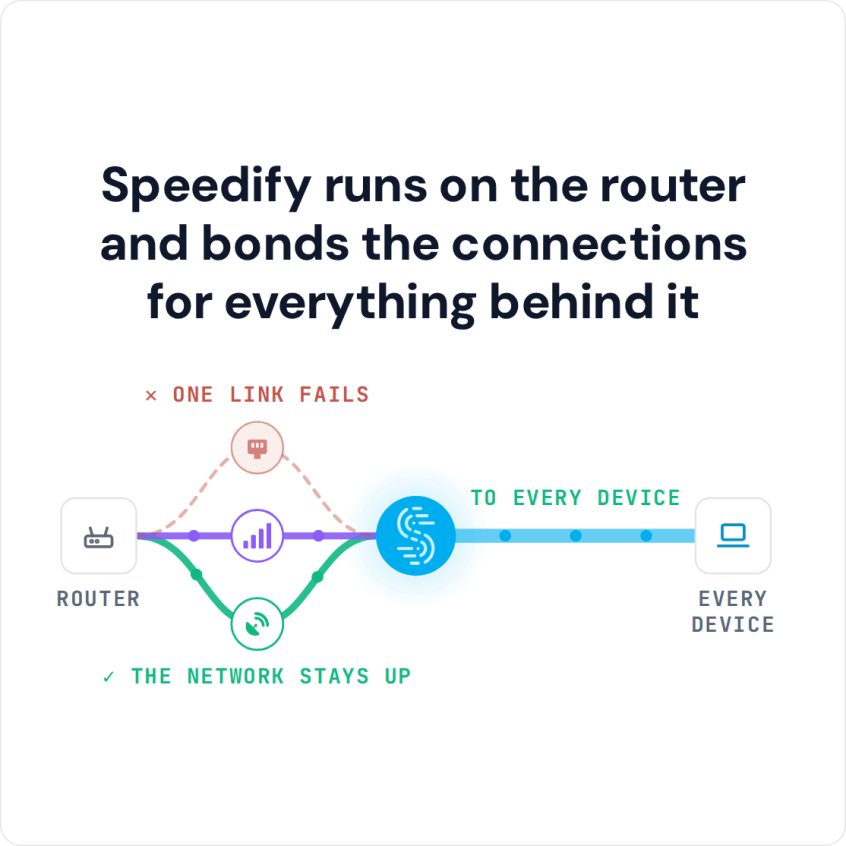
Speedify runs on the router and bonds the connections for everything behind it
How do I use WiFi and 4G/5G cellular at the same time with Speedify?

Pick your two internet connections and your device below and we'll take you to the step-by-step setup guide.


What a Self-Hosted VPN Server Does
A traditional self-hosted VPN server, whether that’s WireGuard running on a Linode VM or an OpenVPN instance on your office server, creates an encrypted tunnel between a client device and a server. Traffic from the client is encrypted, sent through the tunnel to the server, and exits from there.
What a self-hosted VPN server doesn’t do is combine multiple internet connections like Wi-Fi, 4G/5G cellular, Ethernet, Starlink and satellite on the client side. If your client device has one internet connection and that connection drops, the VPN drops. If that internet connection is slow, the VPN is slow.
Self-hosted VPN options from commercial providers add fleet management, policy control, and sometimes dedicated IP addresses on top of that basic tunnel architecture. Those features address organizational security and access control needs, not connection speed or reliability.
What a Speedify Self-Hosted Server Does
A Speedify self-hosted server, hosted wherever you choose, is the other endpoint when Speedify combines internet connections. The Speedify client splits your traffic across multiple internet connections at the same time (say, a 5G cellular connection and a Starlink connection), and the server reassembles those packets into coherent sessions before forwarding them.
The critical difference: if one of your internet connections degrades or drops out, the combined connection continues without interruption, because traffic was already being sent across multiple paths. The Speedify Self-Hosted Server doesn’t need to know anything changed.
This is packet-level combining, not load balancing or simple failover. Load balancing sends different sessions to different internet connections. Speedify splits individual data packets across internet connections and reassembles them at the server. The result is that you can use the combined upload and download speeds of all your internet connections, and you keep a continuous connection even when individual internet connections fail.
VPN bonding means combining several internet connections inside one encrypted tunnel. Speedify does exactly that: the client encrypts your traffic, splits it across your internet connections, and a Speedify server (shared, Dedicated or Self-Hosted) reassembles it. A standard VPN server cannot, because it only ever receives one internet connection per device.
When to Use a Self-Hosted VPN Server vs. a Speedify Self-Hosted Server
You’d want a self-hosted VPN server to:
- Encrypt traffic from a fixed location to a central server for privacy or access control
- Provide remote workers access to internal network resources
- Enforce split tunneling or traffic policy across a device fleet
- Meet compliance requirements that mandate VPN usage.
A Speedify Self-Hosted Server helps you:
- Combine Wi-Fi, 4G/5G cellular, Ethernet, Starlink and satellite internet connections for faster upload and download speeds
- Maintain internet connectivity through connection failures without session dropouts
- Reduce latency by placing the server endpoint geographically closer to your clients or in your own infrastructure
- Meet data residency requirements while still combining internet connections with Speedify.
Speedify Is Used on Millions of Devices Worldwide
Speedify has made internet connections faster and more reliable for businesses and individuals since 2014.
15M+
Speedify downloads worldwide75K+
5-star reviews for Speedify on iOS and Android82
Speedify server points of presence in 50+ cities on 6 continents500TB+
Of internet traffic carried by Speedify every weekSpeedify Partners
Speedify works with these companies to bring faster, more reliable internet and networking technology to their customers and employees.


How to Decide Between a Self-Hosted VPN Server and a Speedify Server
The reasons to go with self-hosting are similar in both cases: you want the infrastructure in your own environment, under your control, with traffic that doesn’t traverse a third party’s network.
The difference is what the infrastructure is doing. A self-hosted VPN server is moving encrypted traffic. A Speedify Self-Hosted Server combines multiple internet connections and reassembles their packets.
If your problem is reliable, high-throughput connectivity that survives connection failures, you need to combine connections, which is what a Speedify server does. If your problem is encrypted access to internal resources, you need a VPN. Organizations with both problems often need both. If you want servers reserved for your organization without running them yourself, Speedify also offers Dedicated Servers, which Speedify hosts and manages.
Speedify Business Solutions
Speedify Teams
Speedify for Routers

Speedify Embedded Solutions and Integrations
Add Speedify to your own app or hardware with the Speedify SDK. Your product then combines internet connections, fails over automatically when one drops, and encrypts the traffic, using the same technology as the Speedify app.