
Starlink Backup Internet That Takes Over Before You Notice
Starlink works well as a failover internet connection, which is what most people mean by Starlink backup internet. Starlink comes from satellites, not the cables in your street, so a fiber cut or a cable company outage doesn’t take it down. The hard part is the switch: when your main internet connection fails, the move to Starlink should happen before anyone on a call notices.
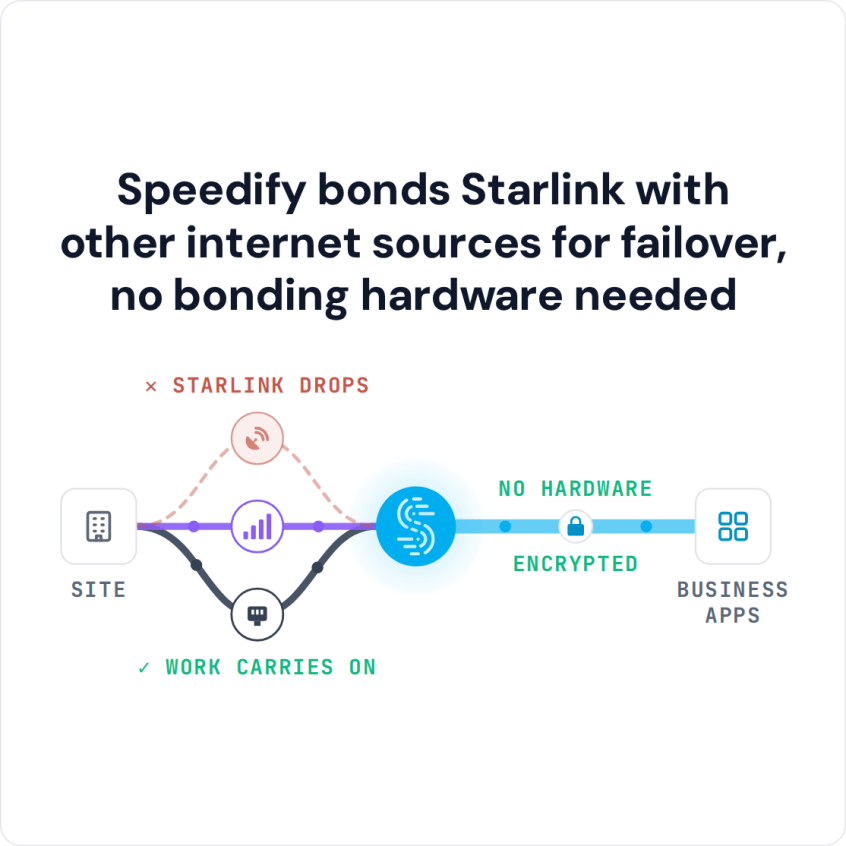
Speedify keeps Starlink and your main internet connection on at the same time and switches your traffic to Starlink automatically when the main line drops. Your traffic keeps the same public IP address at the Speedify server, so calls stay up, and a company VPN on a laptop that connects through a Speedify router stays connected too. Speedify needs both internet connections on at once: on a single internet connection it works as an encrypted VPN and cannot stop that connection from dropping. Speedify is software for your devices and routers, with no special hardware. Contact the Speedify team to plan your setup.
Speedify bonds Starlink with other internet sources for failover, no bonding hardware needed
Watch now
How Speedify combines internet connections on any hardware
Get started with Speedify for your business
Speedify offers three commercial paths. They work together, and most enterprise customers use two or more.
01
Speedify Teams
Speedify on every supported OS for every team member
Centralized dashboard for billing, user provisioning, and usage analytics
CSV import/export and a RESTful management API
02
Speedify for Routers
License for supported OpenWrt routers
Powered by Speedify hardware lineup ready to deploy out of the box
Miri, GL.iNet and other partner models
Covers every device on the network, with no per-device install
03
Embed Speedify into your product
A · DIY
Build it yourself with the Speedify SDK.
Integrate Speedify into your iOS, Android, Windows, macOS, Linux or QNX product. Full developer documentation, sample code and supported integration paths. Your team owns the build, and the Speedify SDK handles combining the internet connections.
B · CUSTOM ENGINEERING
Have the Speedify team build it for you.
Why Businesses Add Starlink as a Failover Internet Connection
Most businesses with fiber or cable already have a good main internet connection. That single line can still take everyone offline. Fiber cuts, internet provider outages, broken equipment in a street cabinet and planned maintenance all cause downtime, and none of them are under your control.
Starlink doesn’t use any of that ground equipment, so a fiber cut on your street has no effect on your Starlink internet connection. Starlink says downloads are usually 45 to 280 Mbps, uploads 10 to 30 Mbps, and the delay 25 to 60 milliseconds on land. That’s enough for video calls, cloud apps, internet phone systems, file transfers and remote desktop sessions.
For a business, Starlink’s Priority plans (Local Priority and Global Priority) are served first when the Starlink network is busy. See current prices on Starlink’s business page.
Automatic Switching to Starlink Comes from a Router or App, Not the Provider
No satellite internet provider switches your business over for you. Starlink, like any internet provider, only gives you an internet connection. Switching between your main line and your second internet connection is the job of a router or an app on your devices, and how well that switch works decides whether your team notices the outage.
How Speedify Switches Your Business to Starlink When the Main Internet Connection Drops
Speedify’s technology for combining internet connections watches every internet connection you have at the same time: your fiber or cable line, your Starlink internet connection and any 4G/5G cellular connections. When your main internet connection weakens or drops, Speedify moves all your traffic to Starlink automatically, in the middle of whatever you’re doing:
- A typical router switch restarts everything that was open when it changes internet connections. Internet phone calls drop, video meetings disconnect and company VPN connections have to reconnect.
- Speedify moves your traffic mid-stream without restarting anything. Calls stay connected, file uploads keep going and VPN connections stay up, so your team can keep working.
When your main internet connection comes back, Speedify moves your traffic back on its own, and keeps watching Starlink so it’s ready for the next outage.
You choose how much Speedify uses Starlink. In the Speedify app, set Starlink to Backup so it’s only used when your other internet connections drop, which saves Starlink data. Or set it to Primary so Speedify uses both at the same time, and your team gets the speed of both internet connections combined, not just one.
Three Ways to Use Starlink as a Failover Internet Connection with Speedify
- Fiber or cable as the main line, Starlink as the failover. The most common business setup. Speedify uses your fiber or cable internet connection first and keeps Starlink ready. If the main line drops, Starlink takes over until it returns.
- Starlink as the main line, 4G/5G cellular as the failover. For places with no fiber or cable, like remote offices, construction sites and field teams, Starlink is the main internet connection and 4G/5G cellular covers its drops.
- Three internet connections at once. For businesses that can’t afford any downtime, Speedify uses fiber or cable, Starlink and 4G/5G cellular together. If any one fails, the other two keep going. Offshore platforms, emergency services and operations where downtime costs money or puts people at risk often use this setup.
How to Set Up Starlink as a Failover Internet Connection with Speedify
Option 1: Install Speedify on Each Device
- Connect your Windows PC, Mac, Linux computer, iPhone, iPad or Android phone to your main internet connection (fiber, cable or 4G/5G cellular) by Wi-Fi or Ethernet cable.
- Connect the same device to your Starlink internet connection as a second network, using whichever link the main line isn’t using. For example, a computer on the main line by Ethernet cable joins the Starlink router’s Wi-Fi.
- Install the Speedify app. Speedify runs on Windows, macOS, Linux, iOS and Android.
- Speedify finds both internet connections on its own. In Speedify’s connection settings, set Starlink to Backup or Primary, depending on how much you want it used day to day.
- On a Speedify Teams plan, set connection priorities and data limits in the Speedify app on each device, or push Speedify settings to the whole team through the Speedify Teams API.
Option 2: Run Speedify on a Router
- Connect your main internet connection and your Starlink dish to a router that runs Speedify on OpenWrt. The Miri X510 is a router made to run Speedify, with ports for several internet connections.
- Speedify uses both internet connections on the router, so every device on your network fails over to Starlink with nothing to install on each one.
- In the Speedify for Routers dashboard, set Starlink’s priority to Backup or Primary, watch usage and set data limits.
A router setup covers every device on your business network, including printers, cameras and anything else that can’t run the Speedify app.
Which Businesses Need Starlink as a Failover Internet Connection
- Businesses that run on cloud apps. Teams using online accounting or customer systems, internet phone systems or remote desktop need an internet connection that doesn’t drop. With Speedify and Starlink as the failover, those sessions keep running through an outage of your main internet provider.
- Financial services and trading. An outage during market hours or a client transaction costs money directly. Speedify moves those sessions to Starlink without cutting them off when a ground-based provider goes down.
- Remote offices with unreliable internet providers. Where the local provider goes down often, Starlink gives you a second internet connection that doesn’t depend on the local cables at all.
- Healthcare and online doctor visits. Dropped video appointments and interrupted patient file transfers aren’t acceptable. Speedify keeps them running through an outage, with no need to restart the session.
- Shops and restaurants. A card reader that can’t get online during an outage means lost sales. Speedify with Starlink as the failover keeps payments and stock systems online.
Speedify Plans for Starlink Failover Across a Business
Speedify Teams gives your IT team one account for the whole business: the Teams dashboard handles team members, billing and usage statistics, and the Speedify Teams API pushes Speedify settings to every team device. Speedify Teams costs $89.99 per user per year.
If you need a fixed IP address, port forwarding or a server that nobody else shares, Speedify Dedicated Servers are available as a managed option. If your data has to stay on your own servers, Speedify Self-Hosted Servers run Speedify’s server side on your own equipment.
The Speedify app runs on Windows, macOS, Linux, iOS, Android and supported OpenWrt routers. For Starlink failover across a whole network, the Miri X510 router powered by Speedify is the ready-made hardware option.
For businesses: Contact Us to plan Starlink failover for your offices or sites.
For home users: Download Speedify to use Starlink as the failover for your home internet, or your phone’s cellular connection as the failover for Starlink.
Speedify Business Solutions
Speedify Teams
Speedify for Routers

Speedify Embedded Solutions and Integrations
Add Speedify to your own app or hardware with the Speedify SDK. Your product then combines internet connections, fails over automatically when one drops, and encrypts the traffic, using the same technology as the Speedify app.