
Fast, Reliable and Secure Discord with Speedify
Choppy Discord voice chat and mid-game dropouts come from the same place: one internet connection that dips for a second or two, with nothing to fall back on.
Speedify supplies that fallback. Speedify is a VPN app that encrypts your internet traffic and uses every internet connection you have at once (Wi-Fi, 4G/5G cellular, wired Ethernet, Starlink and more), so the Discord call holds when one internet connection drops out. The fallback needs two or more internet connections, for example Wi-Fi plus your phone’s 4G/5G cellular; on a single connection, Speedify works as an encrypted VPN and can be a little slower. Further down: what to look for in a VPN for Discord, how to set Speedify up, and how Speedify keeps you audible for the whole session.
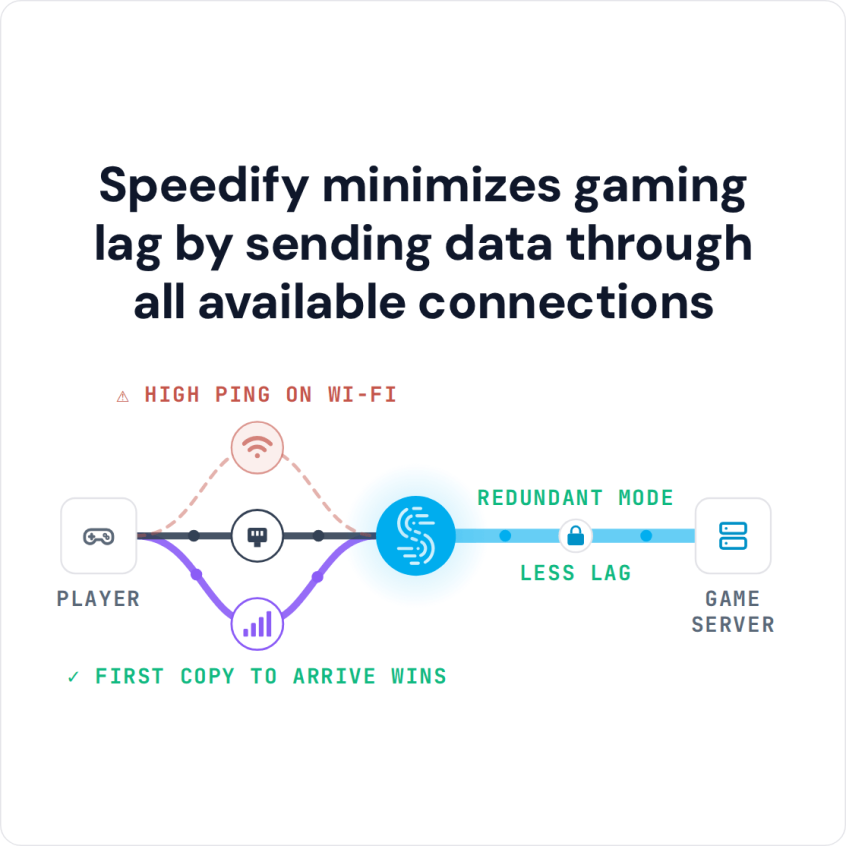
Speedify minimizes gaming lag by sending data through all available connections
How to Set Up Speedify as a VPN for Discord
- Download Speedify on the computer or phone you use Discord on (Windows, macOS, iOS or Android).
- Open Speedify and create a free account (the free tier includes 5 GB per month), or sign in.
- On a phone, tap Allow when the phone asks to add a VPN configuration.
- Add a second internet connection if you have one: on a phone, keep Wi-Fi and 4G/5G cellular both on; on a computer, plug in Ethernet next to Wi-Fi or connect your phone by USB tethering (on a Mac, use an iPhone: Android USB tethering does not work on current Macs).
- Speedify connects to a Speedify server automatically. Open Discord and join your voice channel as usual.
Why You Need a Discord VPN
A Discord VPN serves several purposes beyond simple access. Gaming communities face DDoS attacks on Discord servers, ISP throttling at peak hours, and workplace or school firewalls that block the platform. A good VPN encrypts your connection and masks your IP address; it improves Discord performance only when it can add a second internet connection.
In competitive games, a voice delay or a dropped call at the wrong moment can cost a match. A VPN cannot make a weak connection stronger; a second internet connection that takes over when the first one dips can keep voice chat going.
Key Features to Look for in a Discord VPN
Connection Speed and Latency
Discord relies on real-time communication, so speed and latency matter most. Look for VPN providers with high-speed servers and low latency. Your Discord VPN should keep as much of your original internet speed as possible, so voice and video calls stay smooth.
Server Reliability and Uptime
Frequent server outages disrupt Discord sessions, so pick a VPN with a reliable server network. That matters most during long gaming sessions and community meetings.
Multiple Protocol Support
Different VPN protocols offer varying levels of speed and security. The best Discord VPN services support multiple protocols like OpenVPN, IKEv2, WireGuard, or their own optimized protocols, allowing you to optimize your connection based on your specific needs and network conditions.
Global Server Network
An extensive server network gives you more connection options and better load distribution. When choosing a Discord VPN, prefer providers with servers in several countries, especially in regions where your gaming partners or community members are.
Avoiding Discord VPN Disconnections
Disconnections during critical gaming moments or important conversations can be incredibly frustrating. Here are proven strategies to maintain stable Discord connections:
Choose Servers Strategically
Select VPN servers geographically close to Discord’s data centers or your gaming partners. Closer proximity typically means lower latency and more stable connections. Avoid overcrowded servers during peak hours by testing different server locations.
Use Multiple Connections at Once
A VPN that combines internet connections, like Speedify, uses several connections at the same time instead of switching between them. If one connection drops or has issues, your Discord session does not break.


Optimize Your Connection Settings
Configure your Discord VPN to use UDP protocol when possible, as it’s generally faster for real-time applications like Discord. However, if you experience frequent disconnections, switching to TCP protocol might provide more stability at the cost of slightly higher latency. If calls still lag, see other fixes for a slow Discord.
Monitor Bandwidth Usage
Some VPN providers implement bandwidth throttling or data caps that can affect Discord performance. Choose unlimited bandwidth plans and monitor your usage to ensure consistent performance throughout your gaming sessions.
Why Speedify Stands Out for Discord Users
For Discord, Speedify differs from traditional VPNs in one way: traditional VPNs rely on a single connection, while Speedify works by combining internet connections, using several of them at the same time.
If one connection has problems, your Discord session continues on the others. Speedify’s automatic failover keeps the same public IP address during the switch, because your traffic still leaves through the same Speedify server, so a voice call carries on.
Speedify cannot shorten the route to Discord’s servers, but it routes data over the connections that are working best at that moment, which cuts the stalls and dropouts that make voice chat choppy. With two or more connections in Redundant Mode, Speedify sends each packet over every connection and uses the copy that arrives first, so your ping follows whichever connection is faster at that moment. If you play Roblox, see how Speedify works as a Roblox VPN.
Speedify also prioritizes streaming applications like Discord over background downloads or updates. That way your voice chat gets the bandwidth it needs even while large downloads run on the same device.
Speedify for Discord: Free Tier and Keeping Discord Outside the VPN
Speedify is free to try: a free Speedify account includes 5 GB per month on Windows, macOS, iOS and Android. The Individual plan is $89.99 a year.
Speedify encrypts all of your traffic, not Discord alone. Its Bypass setting works the other way round: it sends chosen services outside the encrypted tunnel while everything else stays inside. To turn the VPN off for Discord only, add Discord under Custom Bypass in Settings > Bypass, or on Android (Speedify 12.1 or later) pick the Discord app in App Bypass. Discord traffic then goes directly from your device instead of through Speedify.
Speedify
Get started with Speedify today.
Speedify combines Wi-Fi, 4G/5G cellular, Ethernet, Starlink and satellite into one faster, more reliable internet connection. Free to try: 5 GB a month with a free account. No credit card required.
🚀 Speed
Faster uploads and downloads, because Speedify uses all your internet connections at once.
📶 Stability
If one internet connection drops, Speedify moves your traffic to the others in milliseconds.
🔒 Security
AES-256 encryption on every internet connection, on any network you join.



15M+ downloads worldwide. 75K+ five-star reviews on iOS and Android.