
Which VPN Communication Protocol Provides Unbreakable VPN Connections: WireGuard or Speedify?
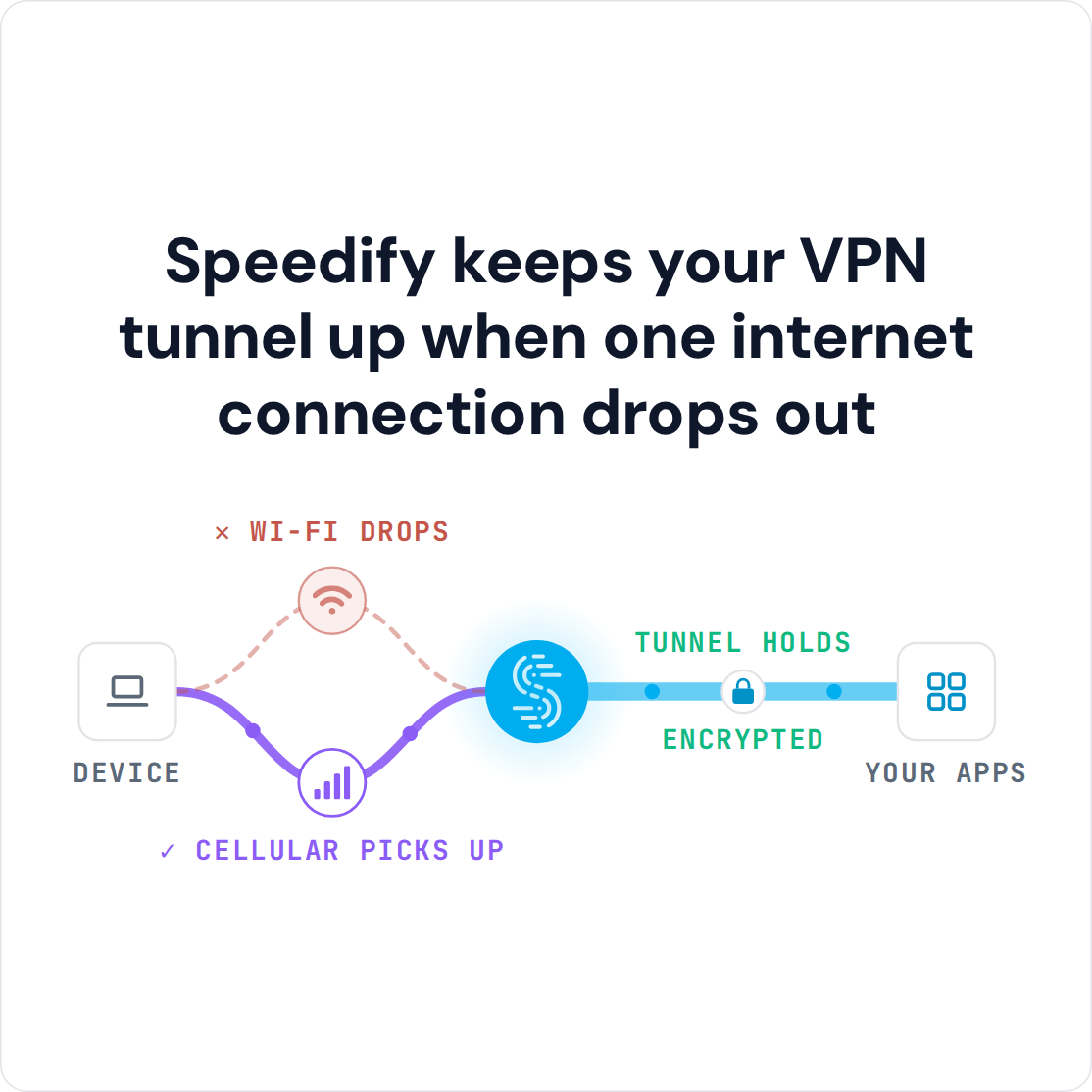
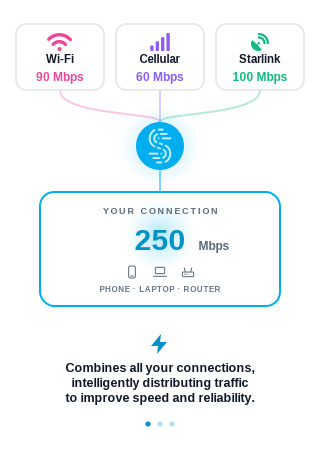
WireGuard vs. Speedify comes down to one difference. WireGuard is a lean, fast VPN tunnel that runs over one internet connection at a time, so it inherits whatever that internet connection does; on its own it does not combine internet connections, and combining them with WireGuard needs other software on top. Speedify is an app that combines Wi-Fi, 4G/5G cellular, Ethernet, Starlink and satellite internet connections into one faster, more reliable internet connection, and encrypts your traffic like a VPN. With two or more internet connections, a wobble on one does not stall the tunnel.
Speedify’s 2021 tests below compare the WireGuard and Speedify protocols on a fast internet connection (a Linux laptop on wired Ethernet and an Android phone) and on the Android phone over Wi-Fi with packet loss. Speedify’s failover and combined speed need two or more internet connections; on a single clean internet connection it works as an encrypted VPN and is a little slower than no VPN at all, as the tests below show.
The Problem with Traditional VPNs: Internet Connection Speed
VPNs use secure protocols to send and receive data over the encrypted tunnel. The best known are:
- IPsec (Internet Protocol Security), often paired with IKEv2 or L2TP
- OpenVPN, based on SSL/TLS
- PPTP (Point-to-Point Tunneling Protocol), an old protocol no longer considered secure
The problem with these protocols is that they trade speed for security. The encryption and the way they send data through the tunnel slow the internet connection down and add latency (lag), which hurts when you are streaming video or gaming online.
WireGuard Explained: A Lean VPN Tunnel Built into Linux
WireGuard describes itself as a fast, modern and secure VPN tunnel (communication protocol). WireGuard aims for better performance and lower power use than older protocols such as IPsec and OpenVPN, and it is simpler to set up than they are. A WireGuard session often starts in a fraction of a second. WireGuard became part of the Linux kernel in March 2020.
VPN companies have built WireGuard into their apps, including NordVPN, StrongVPN and Private Internet Access. WireGuard is designed to be extensible, so third parties can add features on top of it.
The Speedify Protocol: Encryption Plus Combined Internet Connections
From the start, Speedify took a different approach from traditional VPNs: using all available Internet connections to send and receive traffic, by combining them (link aggregation). With two or more internet connections, that makes your internet connection faster and more reliable instead of slower.
In 2021, Speedify added further improvements to the Speedify protocol. The protocol can open up to 8 parallel transport internet connections to the server on each of your internet connections. For example, with Wi-Fi and 4G/5G cellular on a smartphone, the Speedify protocol can open up to 16 internet connections to the server in parallel. That speeds up sending and receiving data, and helps most on internet connections with high packet loss, such as wireless ones, and high latency, such as Starlink.
Is Speedify a VPN? Yes. Speedify encrypts your traffic (DTLS 1.2 with AES-256-GCM or ChaCha20-Poly1305) and sends it through Speedify’s own server network (more than 50 locations on paid plans), like any VPN, and adds the combining of internet connections on top. Speedify keeps no record of the sites you visit and records internet connection metadata (IP address, device ID, connection time and data used). A free account includes 5 GB per month; Linux needs a paid plan.
WireGuard vs. Speedify Specifications Side by Side
Both protocols improve on traditional VPNs. Here is how WireGuard and the Speedify protocol compare on paper:
|
WireGuard (and implementations based on it) |
Speedify protocol |
|
|
IPv6 support |
yes |
yes |
|
Encryption |
ChaCha20 |
AES-256-GCM (hardware accelerated) or ChaCha20-Poly1305 |
|
Transport protocol |
UDP |
Multiple TCP, UDP, HTTPS |
|
Cross platform support |
yes |
yes |
|
Multiple sockets per internet connection |
no |
yes |
|
Multiple internet connection support |
no |
yes |
The main differentiators between WireGuard and the Speedify protocol are:
- The transport protocol: WireGuard uses UDP only, which can fail on networks that allow only web traffic (HTTP and HTTPS), such as some hotels, conference centers and public networks.
- Multiple sockets / internet connections support: WireGuard does not support sending information over multiple sockets over the same internet connection, nor can it handle aggregating multiple internet connections into a single “super pipe”.
Here is how the two compared in real tests.
WireGuard vs. Speedify Speed Test: Setup and Method
WireGuard vs. Speedify test setup: to compare like with like, Speedify’s team installed the latest stable version of WireGuard (as of 2021) on a test server running on DigitalOcean and used that same server for every test. All tests were run with speedtest.net.
The tests used two client devices: a Pixel 2 smartphone running Android 11 and an Ubuntu 18.04 laptop with an Intel i7-8565U, on Verizon Fios internet. Each result in the tables below is the average of 3 test runs.
For the packet loss tests, an OpenWrt router added packet loss to the network with netem.
WireGuard vs. Speedify testing scenarios: first, a Linux laptop connected over Ethernet to the 1 Gbps internet connection ran speedtest.net with no VPN, with WireGuard and with Speedify, and the Android phone ran the same three tests on that 1 Gbps internet connection. This matches typical conditions for working in an office or from home on a fast broadband internet connection.
Next, to simulate moving around the house or through a city, an Android phone on 25 Mbps Wi-Fi was tested at several packet loss rates. The Wi-Fi network ran on a 1 Gbps Verizon Fios internet connection. Speedtest.net ran with no VPN as a control, then with WireGuard and with Speedify, on the same setup. The OpenWrt router set the packet loss, and speedtest.net ran in single internet connection mode to match single-stream activity such as downloading a file or watching a video.
No failover tests were run. WireGuard sends traffic over one internet connection at a time, so when that internet connection drops, traffic stops until the device moves to another network and WireGuard picks up from there. Speedify is already using the other internet connections, so it keeps the VPN session going as the device leaves and joins networks, without interrupting downloads or calls in progress.
WireGuard vs. Speedify on a Fast Broadband Internet Connection (Linux Laptop and Android Phone)
| Linux Laptop and Android Phone |
AVERAGE DOWNLOAD SPEED (Mbps) |
|||
|
Scenario |
No VPN |
WireGuard |
Speedify |
Speedify improvement over WireGuard |
| Speedtest.net, fast internet connection (Android) |
509 |
151 |
483 |
220% |
| Speedtest.net, fast internet connection (Linux) |
872 |
552 |
856 |
55% |
WireGuard vs. Speedify test results: on the fast internet connection, Speedify was faster than WireGuard on both Linux and Android. On Linux, Speedify was 55% faster than WireGuard; on Android, 220% faster. In both cases Speedify came close to the speed measured without a VPN (856 vs. 872 Mbps on Linux, 483 vs. 509 Mbps on Android). Every VPN costs some speed, and in these tests Speedify’s cost was small.
Things to consider:
- These tests used the same devices, internet connection and server, so the only difference was the client software and the VPN protocol. One server ran both the Speedify and the WireGuard software, which removes differences in server performance and internet routes.
- Encryption: WireGuard uses ChaCha20, an efficient software-only encryption algorithm that can outperform AES when AES runs purely in software. Speedify supports ChaCha20 too, but first checks whether the processor has hardware support for AES. Most modern processors have special instructions for AES, which are more efficient than encryption done purely in software. If Speedify finds hardware AES, it uses AES; otherwise it falls back to ChaCha20. Both test devices had hardware AES support, which may explain part of the difference in performance.
- Linux kernel vs. userspace: on Linux, WireGuard runs inside the kernel (the core of the operating system), which should give it a performance advantage because less data passes back and forth between the kernel and userspace (the code outside the kernel). Speedify is a userspace VPN app. In theory WireGuard started ahead here, yet it did not perform as well as Speedify.
In the Android tests, the WireGuard app is a userspace implementation of the WireGuard protocol, which puts it on even footing with the Speedify app, also a userspace VPN app. - Transport protocol: WireGuard uses only UDP between the VPN client and server. Speedify supports several transports, including TCP, UDP and HTTPS, and picks one automatically for the conditions. In these tests, Speedify chose a TCP transport with several parallel TCP connections to get the most throughput from the fast internet connection.
Conclusion: the difference in performance at high speeds most likely comes from a combination of encryption, transport protocol and Speedify’s other packet processing optimizations.
WireGuard vs. Speedify on Wi-Fi with Packet Loss (Android Phone)
|
Android Smartphone |
AVERAGE DOWNLOAD SPEED (Mbps) |
|||
|
Scenario |
No VPN |
WireGuard |
Speedify |
Speedify improvement over WireGuard |
| 0% loss, 25 Mbps (Android) |
23.0 |
21.6 |
22.8 |
6% |
| 1% loss, 25 Mbps (Android) |
9.7 |
6.2 |
21.4 |
242% |
| 5% loss, 25 Mbps (Android) |
3.6 |
2.0 |
18.5 |
825% |
| 10% loss, 25 Mbps (Android) |
1.1 |
0.8 |
14.3 |
1710% |
WireGuard vs. Speedify test results for unreliable internet connections: on an internet connection with packet loss, Speedify was faster than WireGuard and faster than the same internet connection with no VPN at all. These tests measured a single TCP connection with speedtest.net, which is similar to a file download or a video stream. Packet loss cuts speed sharply as it rises: with 10% loss, the 25 Mbps test internet connection fell to about 1 Mbps without a VPN, while Speedify kept 14.3 Mbps. The higher an internet connection’s latency, the more loss hurts.
WireGuard’s speed under packet loss followed the no-VPN result and fell below it at every loss level (6.2 vs. 9.7 Mbps at 1% loss). Speedify’s speed stayed far higher, especially at the higher loss levels.
Why Speedify Held Its Speed Under Packet Loss
The transport protocol plays an important role. Because packet loss hurts TCP so much, UDP is the natural choice for a VPN transport: UDP lets packets arrive out of order, so the VPN protocol can detect lost packets and recover them. WireGuard’s results followed the no-VPN case, which suggests it does not try to recover lost packets. Speedify’s UDP transport has lost packet recovery and can often reach higher speeds than a single internet connection with packet loss would allow.
In these tests, though, Speedify was using its TCP transport, not UDP. Two things made that performance possible:
- Speedify was using multiple TCP connections in parallel over the same internet connection, which can help to better utilize the internet connection bandwidth when packets are lost. If a single TCP connection loses a packet, it has to slow down and retransmit the packet, but the other parallel TCP connections can continue sending packets and pick up the slack.
- BBR congestion control: Speedify’s servers use the BBR TCP congestion control algorithm, so each of these TCP transport internet connections used BBR. BBR is a newer congestion control algorithm that handles packet loss better and performs better than older algorithms on internet connections with high latency or packet loss.
Conclusion: Speedify held its speed across these network conditions. Speedify picks the encryption algorithm and transport internet connections for each network and device to get the best performance it can. Its biggest advantage, using two or more internet connections at once with failover between them, was not part of these single-connection tests.
Speedify
Get started with Speedify today.
Speedify combines Wi-Fi, 4G/5G cellular, Ethernet, Starlink and satellite into one faster, more reliable internet connection. Free to try: 5 GB a month with a free account. No credit card required.
🚀 Speed
Faster uploads and downloads, because Speedify uses all your internet connections at once.
📶 Stability
If one internet connection drops, Speedify moves your traffic to the others in milliseconds.
🔒 Security
AES-256 encryption on every internet connection, on any network you join.


15M+ downloads worldwide. 75K+ five-star reviews on iOS and Android.