
Roblox lag spikes and sudden disconnects usually trace back to one weak internet connection carrying everything. A single Wi-Fi link stumbles, and Roblox stumbles with it. Steam games behave the same way, covered in using a VPN for Steam.
Speedify is a VPN app that encrypts your internet traffic and sends that traffic over Wi-Fi, 4G/5G cellular, wired Ethernet, Starlink and other internet connections at the same time. When one internet connection falters, Roblox keeps moving on the others. That gain needs two or more internet connections, such as Wi-Fi plus your phone’s 4G/5G cellular; on a single connection, Speedify works as an encrypted VPN and can be a little slower. What you get here: how to judge a VPN for Roblox, how to set Speedify up, and how Speedify keeps play steady and private.
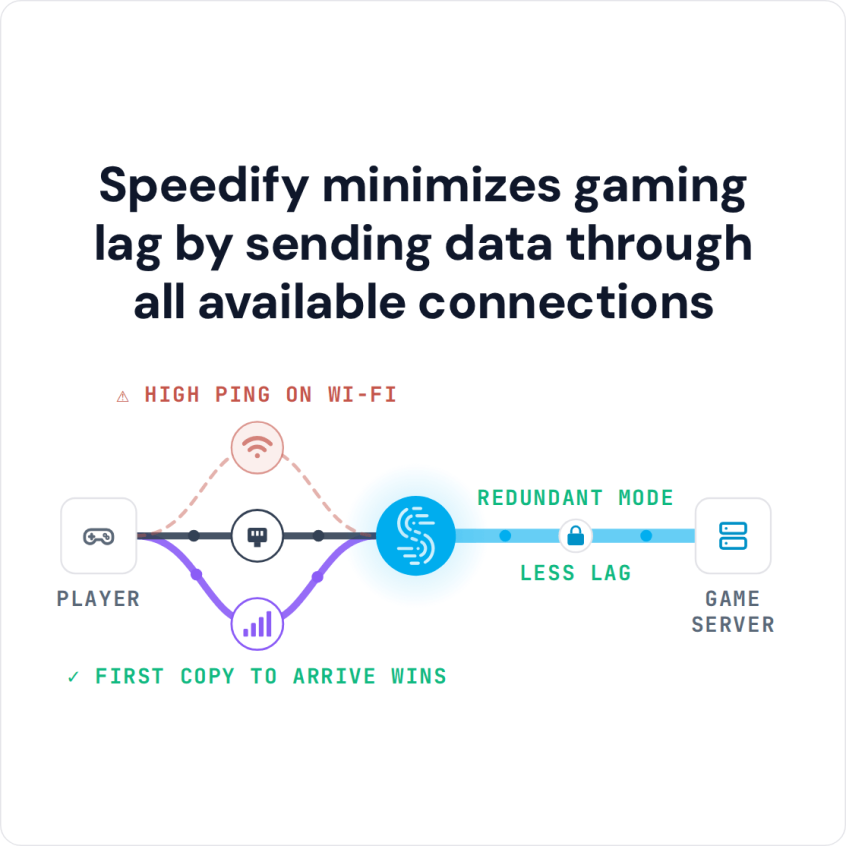
Speedify minimizes gaming lag by sending data through all available connections
How to Set Up Speedify as a Roblox VPN in Five Steps
- Download Speedify on the computer, phone or tablet you play Roblox on (Windows, macOS, iOS or Android).
- Open Speedify and create a free account (the free tier includes 5 GB per month), or sign in.
- On a phone or tablet, tap Allow when it asks to add a VPN configuration.
- Add a second internet connection if you have one: on a phone, keep Wi-Fi and 4G/5G cellular both on; on a computer, connect your phone by USB tethering (an iPhone works on a Mac or a Windows PC, an Android phone on Windows) or plug in Ethernet next to Wi-Fi. Speedify uses them together, which spends some of your cellular data.
- Speedify connects to a Speedify server automatically. Open Roblox and play as usual.
If Roblox will not load or keeps disconnecting while Speedify is on, check Roblox’s own rules first and keep a Speedify server in the country you are in. Speedify’s Bypass setting (Settings > Bypass, or App Bypass on Android) sends Roblox directly from your device, outside the encrypted tunnel, while the rest of your traffic stays encrypted. To stop using the VPN for Roblox altogether, turn Speedify off.
Why Roblox Players Need VPN Protection
Schools, universities and workplaces often block Roblox to keep students and staff on task and to save bandwidth. For students who want a quick game during breaks, or parents who want to check on their children’s gaming from work, those blocks get in the way. On many of those networks a Roblox VPN gets past the block while keeping your traffic encrypted, although some networks block VPNs too.
Beyond access, Roblox players often see unstable connections at peak hours, when servers and home networks are crowded. ISP throttling adds lag spikes, disconnections and poor game performance. A smart VPN for Roblox that spreads your traffic over more than one internet connection makes play steadier.
Privacy also matters. VPN encryption keeps your internet provider and other people on the same Wi-Fi network from seeing what you do online. A VPN does not change what Roblox itself collects from an account, which is worth knowing for parents thinking about their children’s online safety.
What to Look For in a Roblox VPN
Ultra-Low Latency Performance
Roblox games require real-time responsiveness, making latency the most critical factor in VPN selection. Your ideal Roblox VPN should maintain ping times under 100ms to ensure smooth gameplay. Look for providers that specifically optimize their servers for gaming applications and offer dedicated gaming server options.
Consistent Connection Stability
Nothing ruins a Roblox session like a disconnect at the wrong moment. Server uptime matters, but most drops start on your side: one Wi-Fi connection that stalls. A VPN with automatic failover to a second internet connection keeps long sessions going.
Robust Security Without Speed Sacrifice
While security is important, overly aggressive encryption can slow down your connection unnecessarily. The best Roblox VPN solutions balance strong security protocols with gaming-optimized performance. Look for services offering lightweight protocols that provide excellent security with minimal speed impact.
Global Server Coverage
Roblox’s global player base means you might want to play with friends in different regions. A wide server network gives you the flexibility to pick a server based on where you are gaming and who you are playing with.
Preventing Roblox VPN Disconnections
Maintaining stable connections requires more than just choosing a good VPN provider. Strategic server selection plays a crucial role in connection stability. Choose servers closest to Roblox’s data centers or your gaming partners to minimize latency and connection drops.
Configure your Roblox VPN to use the best protocol for gaming. OpenVPN offers strong security, but protocols like IKEv2, WireGuard or protocols that combine internet connections often perform better for real-time games. Try different protocols to find the best balance for your network.


Turn on automatic reconnection in your VPN client to keep interruptions short if a connection drops. A good VPN reconnects quickly enough that a brief interruption barely registers in the game.
Monitor your bandwidth usage and avoid VPN servers that implement strict data limits or throttling during peak hours. Unlimited bandwidth plans ensure consistent performance throughout extended gaming sessions.
Why Speedify Is a Good VPN for Roblox Gaming
Among Roblox VPN options, Speedify stands apart in one way. Traditional VPNs rely on a single connection, while Speedify works by combining internet connections, using Wi-Fi, 4G/5G cellular and others at the same time.
If one connection has problems, your Roblox session continues on the others. Speedify’s automatic failover also keeps the same public IP address, because your traffic still leaves through the same Speedify server, so the Roblox game server keeps talking to the same address.
Speedify constantly monitors connection quality and sends Roblox traffic over the connections that are working best at that moment. That cuts the lag spikes caused by packet loss and stalls on one connection.
Speedify also gives real-time traffic such as games, calls and streams priority over downloads and updates on the same device, so a large update does not starve the game.
For families with several Roblox players, Speedify can run on each player’s device (an Individual plan covers up to 5 devices at once), and each device combines the connections it can reach, such as Wi-Fi and a phone’s 4G/5G cellular.
A VPN Does Not Lower Roblox Ping, but It Can Cut Lag Spikes
A VPN adds a stop between you and the Roblox server, so ping usually stays the same or rises a little. Speedify cannot shorten the route to the Roblox server either, but with two or more connections in Redundant Mode it sends each packet over every connection and uses the copy that arrives first, so your ping follows whichever connection is faster at that moment. What Speedify does is keep the game connected and fight packet loss: with two internet connections, Speedify sends game traffic over both, and Redundant mode sends a copy of each packet over more than one connection, so when a packet is lost on one connection, its copy still reaches the game over the other.
Optimizing Your Roblox VPN Setup
To get the most from your Roblox VPN, test different server locations at different times of day. Server load changes gaming performance, so finding the best servers for your playing schedule helps.
Keep your VPN software updated to benefit from the latest performance optimizations and security improvements. Many providers continuously refine their gaming optimizations, and staying current ensures you’re getting the best possible performance.
Consider using Quality of Service (QoS) settings on your router if available. Prioritizing VPN traffic can further improve your Roblox gaming performance, especially in households with multiple internet users.
Speedify
Get started with Speedify today.
Speedify combines Wi-Fi, 4G/5G cellular, Ethernet, Starlink and satellite into one faster, more reliable internet connection. Free to try: 5 GB a month with a free account. No credit card required.
🚀 Speed
Faster uploads and downloads, because Speedify uses all your internet connections at once.
📶 Stability
If one internet connection drops, Speedify moves your traffic to the others in milliseconds.
🔒 Security
AES-256 encryption on every internet connection, on any network you join.



15M+ downloads worldwide. 75K+ five-star reviews on iOS and Android.