

Unbreakable VPN Connection to Stop DNS Leaks by Combining Starlink, Wi-Fi, 4G, 5G, and DSL with Speedify
Are you using a VPN service to protect your online privacy? Are completely certain that it fully lives up to the promise?
Being completely anonymous online is not easy. Using DNS leaks, your ISP or any other device can eavesdrop on your traffic. They are able to see the Internet requests made by you. This is because the browser and apps send the DNS queries directly to the ISP. They sometimes avoid the VPN tunnel.
But first, you should find out if you do have DNS leaks. And if so, how to fix them.
Speedify delivers an unbreakable VPN connection by intelligently bonding multiple internet sources, ensuring continuous uptime and encrypted protection.
Why Speedify VPN is unbreakable vs. other VPNs
Most VPNs stop working the moment one of your internet connections has a problem. If your Wi-Fi glitches, or your device briefly switches between 4G / 5G and Starlink, you can suddenly lose your VPN connection.
Speedify is built to prevent that. Instead of relying on just one connection, Speedify can use all your available internet connections at the same time: Wi-Fi, Ethernet, 4G / 5G cellular, even Starlink or other satellite. If one connection slows down or drops, Speedify instantly moves your traffic to another internet source so your VPN stays connected and your online activity isn’t interrupted.
In this video, you’ll see how Speedify keeps your internet connection secure, smooth, and reliable by intelligently spreading your encrypted data across the available connections. The result: an unbreakable VPN tunnel.
Combining multiple internet sources like Wi-Fi, 4G, 5G, Starlink and wired broadband together makes Speedify VPN unbreakable

Speedify combines Wi-Fi, 4G, 5G, Starlink and wired broadband for secure and unbreakable VPN tunnels
No matter how secure your VPN is, if you experience a drop in your Internet connection, either your VPN tunnel will break leaving you unprotected, or you’ll be stuck offline. Speedify is the only VPN that seamlessly combines all of your connections, including Wi-Fi, 4G, 5G, Ethernet, and Starlink, into one unbreakable connection to keep you online and secure.
Speedify will automatically detect any available Internet connections on your device, encrypting and intelligently distributing your online traffic between them for optimal performance. If you need help we have quick start guides available for most common set ups.
Combine personal hotspots for unbreakable and secure uploads and downloads
Speedify's Pair & Share feature enables you to connect to multiple personal hotspots at the same time and wirelessly share LTE, 4G, and 5G cellular connections back and forth between multiple Speedify users on the same local network to create a faster, more reliable connection for everyone.
With Speedify, all of your available internet sources - even shared personal hotspots - are combined inside the secure VPN tunnel with your encrypted traffic intelligently distributed between them, while split tunneling allows blocked sites to bypass. So, if any connection slows down or drops out, the VPN tunnel stays active and the other connections will automatically take over to keep you securely, seamlessly connected.
Use Speedify to combine...
Combine these connections on:



How to Fix DNS Leak – Test to See If Your Online Privacy Is Exposed
Your online activity gets exposed if your ISP or anybody in the middle can get your Internet requests. See below what a DNS is in this video from GoDaddy:
VPNs are the best solution to protect your online privacy, as they create a tunnel between your computer and the Internet. But, unfortunately, not all VPN services make your online activity fully anonymous. Here’s how to find out if you’re exposed or not. We’ll be using the DNS leak test service provided by DNSLeakTest.com, and Speedify as the VPN service:
- Find out your public IP address with the VPN service disabled. You’ll see that your approximate location can be identified based on that only.
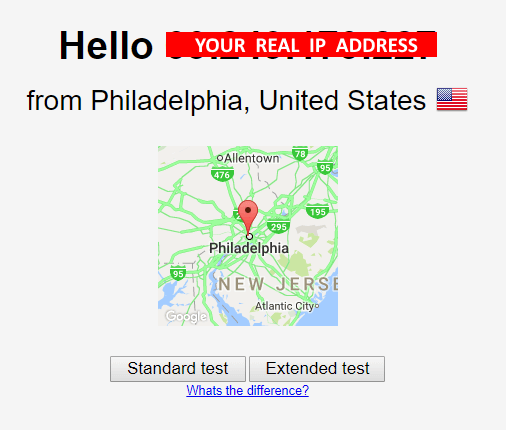
- Run the Standard DNS leak test and see the DNS servers your browser is quering.

- Start the VPN service and connect to a VPN server in a different country, preferably on a different continent. Reload the testing page – it should display a different IP address. This is good – it means the VPN works in protecting your privacy with the websites or services you’re accessing.
However, there’s one more step to go to confirm full online privacy – seeing if you’re also anonymous when DNS requests are made. Go to step 4.
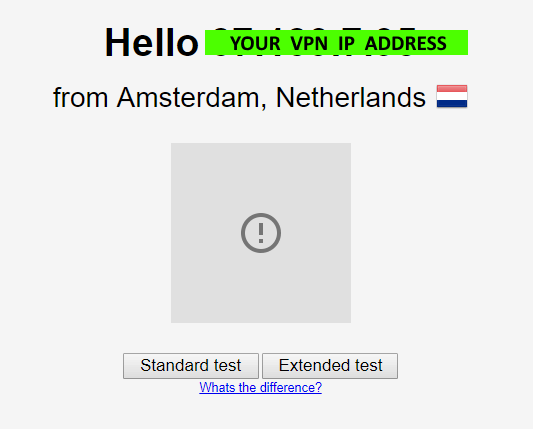
In the example above, we chose a VPN server located in the Netherlands. You can choose the one that you like from your VPN service.
- Run the Standard test for DNS leaks again with your VPN on. This will generate a list of DNS servers that the browser queries.
Are the DNS IPs and Hostnames different than the ones identified in step 2, when running the test without the VPN on? If so – you’re all set – your VPN protects you against DNS leaks!
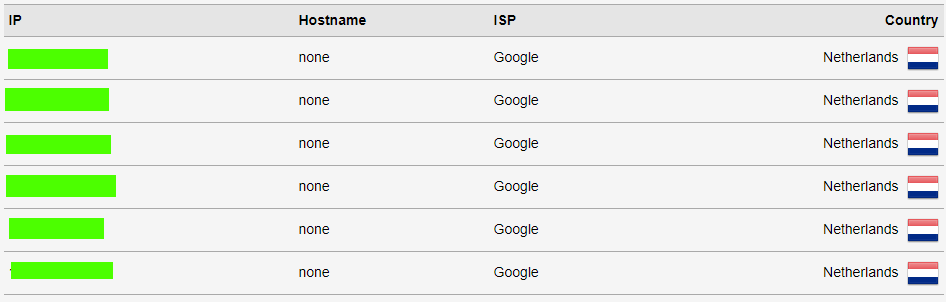
Do any of the DNS results show up in your home country (assuming you selected a server in a different country)? If so, it’s time to change the VPN service you’re using!
How to Fix DNS Leak: Choose a Fast Bonding Anonymous VPN. Get Speedify!
Speedify is a fast bonding anonymous VPN built from the ground up for all 3 coordinates you need from a VPN: complete security, total reliability and speed.
Speedify’s advanced security algorithm will protect your online privacy whether you’re
- shopping online,
- working remotely,
- connected from a public WiFi hotspot
- just browsing at home.
Using channel bonding technology, Speedify is able to combine multiple connections at once. It creates one super fast and reliable pipe. Speedify will get all your devices the best and most secure Internet experience.
Don’t want to risk it all because your VPN service has DNS leaks? Wondering how to fix DNS leaks? Get started with Speedify today!


Speed
Stability
Security
Speedify devs love talking tech on YouTube, Tiktok, and Instagram!
Alex Gizis and the Speedify devs discuss and explain technology including Starlink satellites, Wi-Fi 7 routers, Apple networking features, fiber optics, broadband internet, 5G mobile networks, AI, networking protocols, and much more. Follow Speedify on YouTube, TikTok, Instagram, and LinkedIn!
Alex and the Speedify team are always exploring the latest in networking and security technology—like 5G, 6G, WiFi 7, laser and satellite internet—and sharing it in new discussion content across YouTube, TikTok, Instagram, and LinkedIn every week.
Got a tech question? Let's go deeper! Pop into Speedify Office Hours live every Wednesday at 10 AM Eastern. Speedify CEO Alex Gizis and our network engineers are standing by to break down your questions about networks, tech updates, and Speedify features.
