
Unbreakable VPN Connection for Teams by Combining Starlink, Wi-Fi, 4G, 5G, and DSL with Speedify
A VPN for teams protects every colleague’s connection, not only yours: your own laptop may be protected on the cafe Wi-Fi, but the files colleagues send back over Slack, Google Drive or Microsoft OneDrive travel through whatever hotspot they happened to join. One unprotected teammate exposes the whole thread.
Speedify for Teams gives everyone one app that encrypts each person’s internet traffic and runs it over Wi-Fi, 4G/5G cellular, Ethernet, Starlink and satellite internet connections at once.
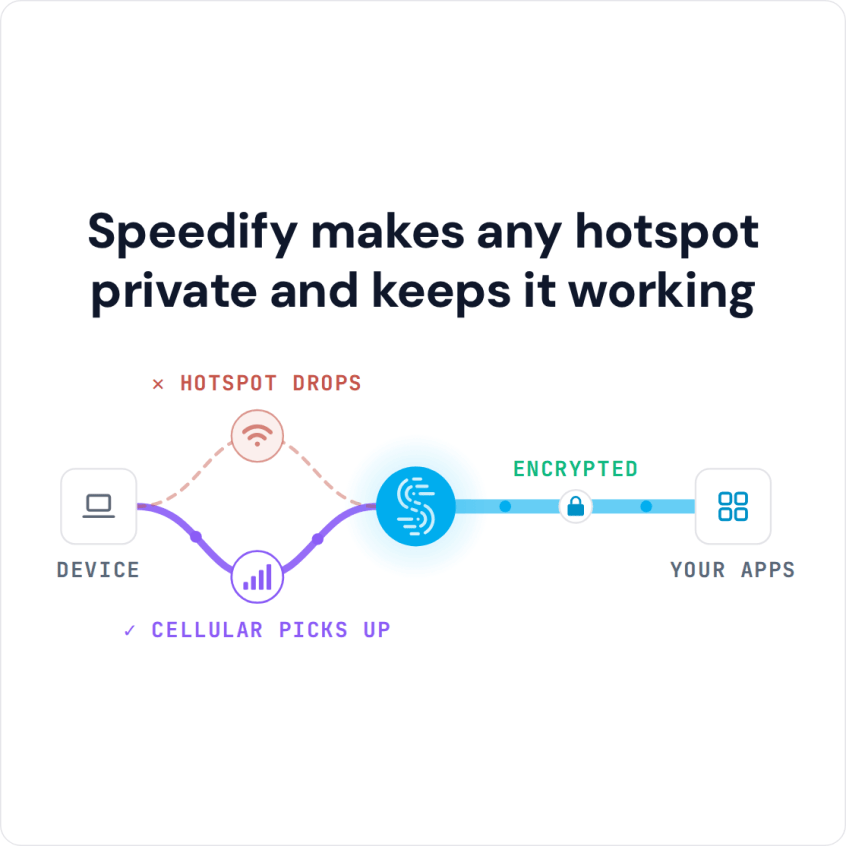
Speedify makes any hotspot private and keeps it working
Below: what a VPN for teams adds over individual plans, what Speedify for Teams includes, and what your colleagues gain: private internet traffic, and calls that hold together from a hotel room or a client site. The call reliability needs two or more internet connections per person, such as Wi-Fi plus a phone’s 4G/5G cellular; on a single connection, Speedify works as an encrypted VPN and can be a little slower.
How a VPN for Teams Helps Your Business
A VPN for teams differs from several individual plans in four ways, though the details vary from one VPN service to another:
- Centralized account management
- Dedicated servers with a static IP address that only your organization uses, so other users’ behavior cannot get that IP address blocked
- Ability to integrate the VPN functions through your business ecosystem via APIs
- All of the above at a more effective cost per user
Leaving the logistics aside, your team will benefit from all the features you get with a VPN:
- Encrypted browsing on public Wi-Fi networks, so company logins and confidential files cannot be read by others on the network. Protecting company data on public Wi-Fi is one of the main reasons to use a business VPN.
- Encrypted calls and messages between team members on hotel, office and public networks that block calling apps such as WhatsApp, Microsoft Teams or other VoIP platforms (check local rules when you travel).
- Reaching your own company tools and cloud accounts while traveling, over the same encrypted connection. Speedify is not a corporate VPN: it does not connect you to a company intranet or replace IT’s remote-access tools. Streaming services set their own regional rules in their terms, and Speedify does not unblock geo-restricted streaming libraries.
- Your internet provider and the networks you join see only an encrypted connection, not the sites you visit, so the provider cannot sell your browsing for “personalized” ads. Speedify keeps no record of the sites you visit and does not sell personal data; it does record connection metadata such as your IP address, device ID, connection time and data used.
With a VPN that combines connections, like Speedify, you also stay online by combining two or more connections at once: when one drops, traffic moves to the others.
How Speedify for Teams Keeps Business Calls Connected
Say your team has a VPN that covers every security point above. The next problem is internet reliability.
All that security is wasted if the internet connection is slow or keeps disconnecting. A VPN adds an extra hop, and most VPNs slow down your Internet connection a little. On a fast line that rarely matters; on a slow one, it can break up a business call.
With Speedify for Teams, your team does not have to trade security for Internet speed. Speedify’s technology for combining connections uses multiple Internet connections at the same time, so each person gets faster downloads and uploads and a connection that holds when one network drops. When one connection fails, Speedify keeps the same public IP address, so calls, remote desktop sessions and logged-in company tools do not see a new address; a dual-WAN router changes the IP and can break them.
Plus, with Speedify for Teams you can also get:
- Dedicated Servers: a Speedify server only your team uses, with up to 1 Gbps, 3 TB of data a month (more on request), a static IPv4 address and port forwarding. Speeds are more consistent because no one else is on the server.
- The Teams Dashboard, where you manage billing, add and remove users and view usage statistics.
- The Teams API: a REST API (HTTP requests, JSON responses) to add and remove users and devices, push Speedify settings to the team, and check how much each user uses their account.
- Support for virtually any device running Windows, macOS, Linux, iOS and Android.
Speedify for Teams also comes with a 100% uptime guarantee: one day of free service for every hour the service is down. There is no minimum number of users.
Microsoft Teams Calls over a VPN: Use Bypass for Split Tunneling
Many searches for a VPN for Teams are about Microsoft Teams. If Teams calls or another company app work poorly through a VPN, Speedify’s Bypass setting (Settings > Bypass, with Custom Bypass for other sites) sends the services you choose directly from the device, outside the encrypted tunnel, while the rest of your traffic stays encrypted through Speedify. Secure DNS (DNS over HTTPS) in a browser can stop Bypass from working. If your company requires its own VPN client, check with your IT team: Speedify and another VPN cannot reliably run side by side on the same device.
Why Get the VPN for Teams from Speedify
Speedify encrypts traffic like a VPN and combines internet connections at the same time, so your team gets a safer and steadier connection without giving up one for the other.
Speedify for Teams fits teams of any size, and team settings can be pushed to every user through the Teams API.
Speedify
Get started with Speedify today.
Speedify combines Wi-Fi, 4G/5G cellular, Ethernet, Starlink and satellite into one faster, more reliable internet connection. Free to try: 5 GB a month with a free account. No credit card required.
🚀 Speed
Faster uploads and downloads, because Speedify uses all your internet connections at once.
📶 Stability
If one internet connection drops, Speedify moves your traffic to the others in milliseconds.
🔒 Security
AES-256 encryption on every internet connection, on any network you join.



15M+ downloads worldwide. 75K+ five-star reviews on iOS and Android.