
“Free” access comes at a cost
Use Speedify to increase your upload and download speeds: combine internet connection sources like Wi-Fi, 4G, 5G, Starlink and wired broadband

Combine Wi-Fi, 4G, 5G, Starlink and wired broadband to fix slow upload and download speeds
Speedify is the only app that seamlessly combines all of your connections, including Wi-Fi, 4G, 5G, Ethernet, and Starlink, into one stronger connection to keep you online and secure.
In most cases, Speedify will automatically detect and start using any available Internet connections on your device while intelligently distributing your online traffic between them for optimal performance. If you need help we have quick start guides available for most common set ups.

Combine personal hotspots for better upload and download speeds
Speedify's Pair & Share feature enables you to connect to multiple hotspots at the same time and wirelessly share LTE, 4G, and 5G cellular connections back and forth between multiple Speedify users on the same local network to create a faster, more reliable connection for everyone.
For the first time, it's possible to share cellular data between multiple devices, including PCs, Macs, iPhones and Androids. Use multiple phones as hotspots for internet access and get increased bandwidth and mobile failover for all paired devices.
Use Speedify to combine...
Combine these connections on:



The Experiment
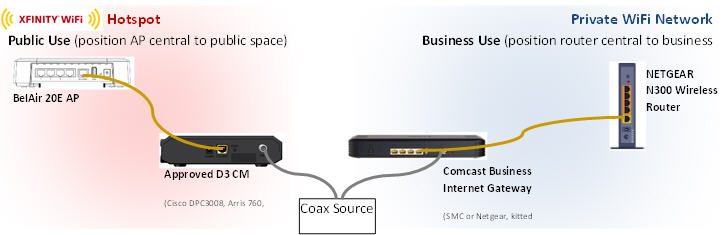
Comcast sent us the standard business Xfinity Hotspot setup for use in our office (this is different than the residential equipment). This includes a Cisco DPC3008 cable modem and BelAir 20E Wi-Fi router, which broadcasts the Xfinity public hotspot. It’s worth noting that this is totally separate from the Netgear CG3000DCR cable modem that supplies our office Internet gateway. We started testing by plugging both devices into a power strip, which was being monitored by a Kill-A-Watt power meter. First we tested the devices idle to get a control for the experiment. We turned on the Xfinity public hotspot and connected it to the Internet, but no one was on it. After getting some consistent data, we then connected two Windows laptops to the Xfinity hotspot, one watching Netflix and the other downloading files. You could immediately see the difference in the power meter, as the devices jumped from 0.14 Amps when idle, up to 0.22 Amps when actually being used. To translate this into dollars and cents, we used the average cost of power here in the Mid-Atlantic, which is $0.162 per KWh.
| Amps | Vrms | PF | KWh | KWh / year | Cost in Middle Atlantic (2013) | |
| Idle | 0.14 | 122 | 0.62 | 0.0105896 | 92.764896 | $14.99 |
| Under Load | 0.22 | 122 | 0.6 | 0.016104 | 141.07104 | $22.80 |
So, here’s what it actually costs you to host a “free” Xfinity Hotspot: up to $22.80 per year for those of us here in Philadelphia, or $1.90 per month.


Speed
Stability
Security
Speedify devs love talking tech on YouTube, Tiktok, and Instagram!
Alex Gizis and the Speedify devs discuss and explain technology including Starlink satellites, Wi-Fi 7 routers, Apple networking features, fiber optics, broadband internet, 5G mobile networks, AI, networking protocols, and much more. Follow Speedify on YouTube, TikTok, Instagram, and LinkedIn!
Alex and the Speedify team are always exploring the latest in networking and security technology—like 5G, 6G, WiFi 7, laser and satellite internet—and sharing it in new discussion content across YouTube, TikTok, Instagram, and LinkedIn every week.
Got a tech question? Let's go deeper! Pop into Speedify Office Hours live every Wednesday at 10 AM Eastern. Speedify CEO Alex Gizis and our network engineers are standing by to break down your questions about networks, tech updates, and Speedify features.
