

You Can Combine Multiple Internet Connections Together - Like Starlink, Wi-Fi, 4G, 5G, and DSL - with Speedify, to Fix WhatsApp Video Call Issues
WhatsApp is a popular communication tool around the world. The most annoying thing by far is when somebody’s video begins to stutter and finally drops from the group call.
Unfortunately the Internet is not always as you’d like it to be: fast and reliable. This causes serious WhatsApp video call issues: low quality and stuttering videos and disconnects. So what can you do for that?
The reason for WhatsApp video call issues is a poor connection to the Internet. You can solve WhatsApp problems by combining your main Internet connection with another Internet source like a Starlink or DSL, 4G, 5G. Whether at home, work, or on-the-go, Speedify works with all live streaming software and social platforms to get you faster, more reliable and secure Internet.
In this article we'll show you how you can avoid WhatsApp video call issues so you can stay in touch with your friends in real time.
Use Speedify to increase your upload and download speeds: combine internet connection sources like Wi-Fi, 4G, 5G, Starlink and wired broadband

Combine Wi-Fi, 4G, 5G, Starlink and wired broadband to fix slow upload and download speeds
Speedify is the only app that seamlessly combines all of your connections, including Wi-Fi, 4G, 5G, Ethernet, and Starlink, into one stronger connection to keep you online and secure.
In most cases, Speedify will automatically detect and start using any available Internet connections on your device while intelligently distributing your online traffic between them for optimal performance. If you need help we have quick start guides available for most common set ups.

Combine personal hotspots for better upload and download speeds
Speedify's Pair & Share feature enables you to connect to multiple hotspots at the same time and wirelessly share LTE, 4G, and 5G cellular connections back and forth between multiple Speedify users on the same local network to create a faster, more reliable connection for everyone.
For the first time, it's possible to share cellular data between multiple devices, including PCs, Macs, iPhones and Androids. Use multiple phones as hotspots for internet access and get increased bandwidth and mobile failover for all paired devices.
Use Speedify to combine...
Combine these connections on:



Why Is Video Call Not Working on WhatsApp?
If WhatsApp works with messages and you're only having issues with video calls, there can be 3 main reasons:
- your Internet connection is slow (poor Wi-Fi or cellular connectivity)
- you didn't provide permissions so that WhatsApp can use the camera of your smartphone or computer
- you have an outdated version of WhatsApp.
Some common fixes include:
- checking the permissions for WhatsApp
- updating the app
- connecting to a stronger Internet source.
Unfortunately, you may not always find a good enough Internet source.
How can you fix your WhatsApp video call problems? This is where Speedify comes in, as it is the only app that can use all available connections at the same time (instead of just switching between them) to give you all the bandwidth you need to have your WhatsApp video calls without a glitch.
How Good Is Speedify when Dealing with WhatsApp Video Call Issues?
Unless they’re having issues, we all know WhatsApp performs well when you’re backed by a fast and stable Internet. But what about the real world, where most likely you don’t get that luxury?
The testing procedure consists of 2 series of tests for WhatsApp video calls:
- Without Speedify;
- Speedify on with Enhanced Streaming enabled.
In terms of devices and operating systems, we tested it on an Android smartphone and an iPhone. We combined Wi-Fi and cellular on both devices.
The evaluation is done both subjectively and objectively as follows:
- We screen capture and analyze the WhatsApp video call quality;
- We walk towards the edge of the Wi-Fi network. This helps us simulate:
- insufficient bandwidth conditions, as we get away from the Wi-Fi router;
- unreliable connectivity at the edge of Wi-Fi with dead spots and packet loss;
- disconnecting Wi-Fi internet and how quick it switches to cellular.
For the Speedify tests, we looked at the bandwidth, latency and packet loss. And, of course, how they are affected by our “course” away from Wi-Fi.
Improving WhatsApp Video Calls: Tests Are In for Enhanced Streaming Mode
As you can imagine, in the test with no Speedify running, once we get near the edge of Wi-Fi, the image starts stuttering. Then the video drops and we get the “Reconnecting” message from WhatsApp. This happens for 10+ seconds until cellular takes over. There was no notable difference between the two smartphones in terms of video quality and call behavior.
Testing Enhanced Streaming Mode on a WhatsApp Call on iPhone
So we tested WhatsApp on an iPhone while on a video call, running Speedify with Enhanced Streaming Mode. The video itself didn’t even stutter for one bit. Here’s how the bandwidth distribution looks like:
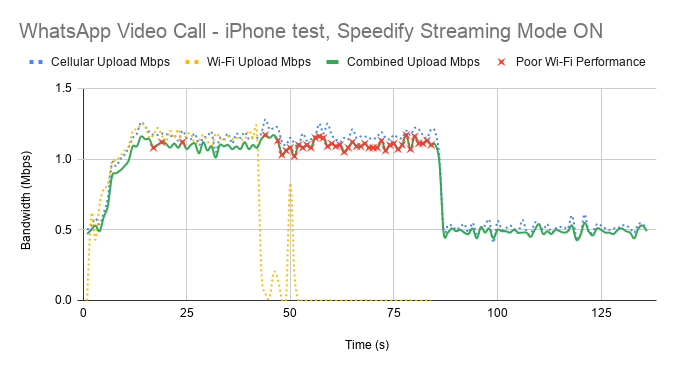
First of all, Speedify makes it possible to use both Wi-Fi and cellular at the same time. That’s why you see both connections being used together on the graph above. When Wi-Fi start failing, you notice that with the help of Speedify cellular takes over. The general bandwidth is constant, switching from 1.2 Mbps to around 500 kbps when only cellular is used.
The little red x-es above symbolize the moments when packet loss over the Wi-Fi connection was very high – over 5%. If Speedify would not have been running, then you would have ended up like in the first case – buffering and automatically ending broadcast.
What about WhatsApp with Speedify in Enhanced Streaming Mode on Android?
The Android test with Speedify Enhanced Streaming Mode was similar to the iPhone one – video was good in the sense that quality was good and it didn’t break.

As you can see, when Wi-Fi is good and strong enough, cellular stops being used. However, cellular kicks back in as soon as Speedify detects that Wi-Fi is flaky. Notice the steady bandwidth around 1 Mbps while there’s a “hint” of Wi-Fi. Then, it drops to 0.5 Mbps, as in the case of the iPhone. And Speedify keeps that fairly constant. Again – the red x-es symbolize the high Wi-Fi packet loss rate.
Here’s the raw average data from testing:
|
iOS |
Android |
|||||
|
Bandwidth (Mbps) |
Average |
Minimum |
Maximum |
Average |
Minimum |
Maximum |
|
Overall |
0.89 |
0.39 |
1.24 |
0.70 |
0.16 |
1.31 |
After looking at this table and the results above, we can conclude that Speedify was able to prevent the WhatsApp video call to drop or encounter any issues. Thanks to the intelligent dynamic traffic prioritization of its new Streaming Mode.
Test Conclusion: Speedify Enhanced Streaming Mode Solves WhatsApp Video Call Issue Related to Unreliable Internet
There you have it – when looking at how to improve WhatsApp calls, one of the must-haves is to use Speedify. Speedify’s Streaming Mode makes a huge difference for your WhatsApp calls.
To put it in context, here’s what happens under the hood of Streaming Mode. Speedify monitors statistics in real-time about how each of your Internet connections is performing. As connections change, and other apps start or stop sending data, Speedify adjusts its strategies on the fly. So, if you’re IRL streaming, you’re no longer chained around your router. Or that good public Wi-Fi hotspot you know in the city. You can walk around without dropping the stream. You don’t need to worry about it. Just start streaming: Speedify will make it happen.
To learn more about Streaming Mode and how to enable it check out the Speedify Knowledge Base article.
If you’re still wondering how to fix WhatsApp video call issues – get Speedify!


Speed
Stability
Security
Speedify devs love talking tech on YouTube, Tiktok, and Instagram!
Alex Gizis and the Speedify devs discuss and explain technology including Starlink satellites, Wi-Fi 7 routers, Apple networking features, fiber optics, broadband internet, 5G mobile networks, AI, networking protocols, and much more. Follow Speedify on YouTube, TikTok, Instagram, and LinkedIn!
Alex and the Speedify team are always exploring the latest in networking and security technology—like 5G, 6G, WiFi 7, laser and satellite internet—and sharing it in new discussion content across YouTube, TikTok, Instagram, and LinkedIn every week.
Got a tech question? Let's go deeper! Pop into Speedify Office Hours live every Wednesday at 10 AM Eastern. Speedify CEO Alex Gizis and our network engineers are standing by to break down your questions about networks, tech updates, and Speedify features.
