
Android Slow Wi-Fi? Use Wi-Fi and 4G / 5G Cellular at Once with Speedify
When the internet is so slow on your phone, the usual cause on Android is Wi-Fi: the phone uses one internet connection at a time and holds on to a weak Wi-Fi signal long after the 4G/5G cellular beside it would be quicker. That is why the same phone feels fast in one room and unusable in the next. If the phone has no internet at all, see why internet stops working on an Android phone.
Speedify is an app that runs Wi-Fi and 4G/5G cellular at the same time on your Android phone or tablet, so it stops depending on whichever connection it happened to pick. The speed gain needs both connections at once: on Wi-Fi alone, Speedify works as an encrypted VPN and can be a little slower.
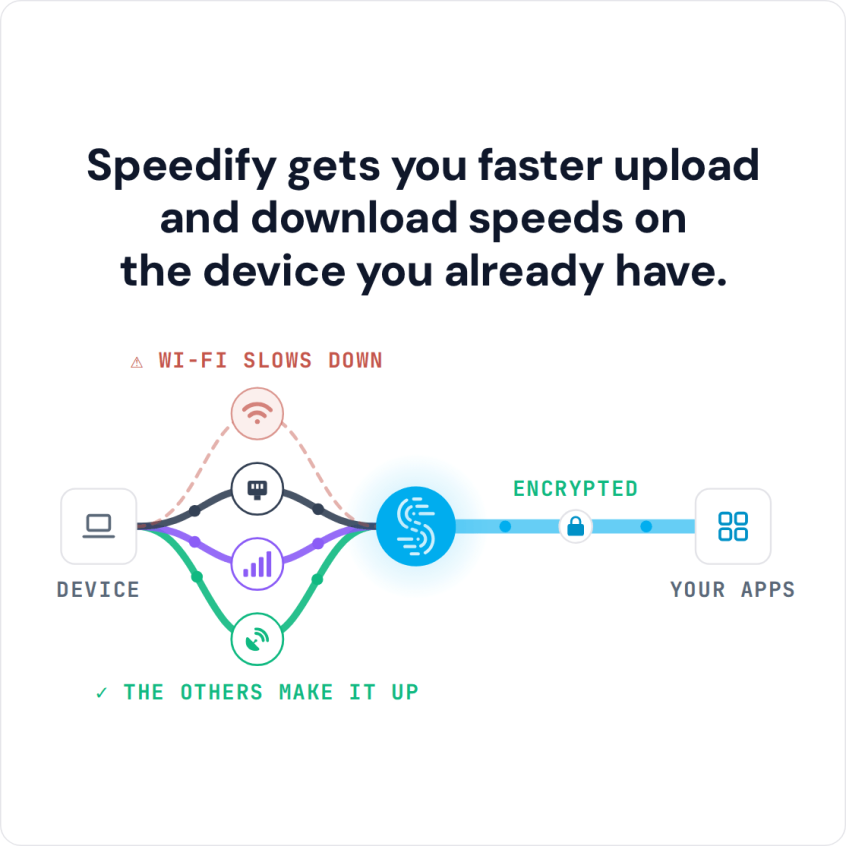
Speedify gets you faster upload and download speeds on the device you already have.
Read on to see what makes Android connections slow, how to troubleshoot them, and how running both internet connections together keeps the phone fast when one of them weakens.
How to Fix Slow Android Phone Internet with Speedify
- Download Speedify from Google Play on your Android phone or tablet (it needs Android 9 or later).
- Open Speedify and create a free account (the free tier includes 5 GB per month), or sign in.
- Keep Wi-Fi on and turn on Mobile data, so the phone has a second internet connection.
- Tap Connect and allow the VPN connection request when Android asks. Speedify sends traffic over Wi-Fi and 4G/5G cellular at once and moves it to the working connection when one weakens.
- Open the app or browser that was slow and use it as usual.
Phone Wi-Fi Slow on Android: Common Causes of Slow Wi-Fi and 4G/5G Cellular
There are several factors that contribute to poor internet performance on Android devices. These include:
- Poor Network Signal: a weak Wi-Fi or cellular signal slows down internet speeds. Walls and other electronic devices also weaken Wi-Fi.
- Network Congestion: too many devices on the same network (especially at peak times) slow everyone down. Public Wi-Fi hotspots often suffer from this.
- Data Throttling: carriers may limit your speed after you use a certain amount of data, especially on unlimited plans.
- Background Apps Using Data: apps running in the background may use bandwidth (for example cloud sync, updates and social media apps).
- Outdated Software: an outdated Android version or apps can cause compatibility and performance issues. New versions bring their own bugs too: on Pixel 7 to 10 phones, Android 17 has a reported bug where Wi-Fi shows connected but apps only work on 4G/5G cellular.
- Malware or Adware: malicious apps or adware can use resources and bandwidth, slowing down your device.
- Incorrect Network Settings: misconfigured DNS, proxy or APN settings can affect connectivity.
How to Troubleshoot Your Android Wi-Fi or 4G/5G Issues
Here is what you can try to fix your slow internet on Android problems:
- Restart your device and router: this clears temporary glitches in connections.
- Check your signal strength: move closer to the router for a better Wi-Fi signal, and look for at least 2 to 3 bars of 4G/5G cellular signal. You can also turn Airplane Mode on and off to reset the connection.
- Test the speed of your connection: open a browser and try several websites and other apps (YouTube, WhatsApp) to see if the slow internet is app-specific. Run a Speedtest by Ookla.


- Toggle network settings: turn Wi-Fi off and on, then do the same with Mobile data. Switch between Wi-Fi and 4G/5G cellular to find out which one is slow.
- Check for data limits: see if you’ve hit a data cap from your mobile carrier, and check whether Data Saver is on.
- Clear cache: do this for the apps where the internet is slow, such as your browser.
- Update software: install any available updates for your Android system and apps from the store.
Combine Wi-Fi and 4G/5G Cellular on Android with Speedify
When troubleshooting does not fix slow internet on your Android phone, the connection itself is usually the limit. Speedify adds 4G/5G cellular to your Wi-Fi and uses both at the same time.
Speedify combines Wi-Fi, 4G/5G cellular, Ethernet, Starlink and satellite internet connections at the same time to increase overall bandwidth and keep you online when one drops. On a phone, that means Wi-Fi and 4G/5G cellular together.
When Wi-Fi becomes congested or unreliable, Speedify’s technology for combining internet connections sends more of the traffic over cellular, so pages and videos keep loading. Traffic sent over cellular counts against your data plan.
On one connection, Speedify works like any encrypted VPN and can be a little slower. With two or more, Speedify sends data over multiple pathways simultaneously, splitting packets across the connections according to how each one is performing, so the combined bandwidth is higher than either connection alone.
Speedify’s cellular sharing feature lets nearby phones running Speedify share their 4G/5G cellular connections with each other over the same Wi-Fi network, or over one phone’s Personal Hotspot when there is no Wi-Fi.
Speedify
Get started with Speedify today.
Speedify combines Wi-Fi, 4G/5G cellular, Ethernet, Starlink and satellite into one faster, more reliable internet connection. Free to try: 5 GB a month with a free account. No credit card required.
🚀 Speed
Faster uploads and downloads, because Speedify uses all your internet connections at once.
📶 Stability
If one internet connection drops, Speedify moves your traffic to the others in milliseconds.
🔒 Security
AES-256 encryption on every internet connection, on any network you join.



15M+ downloads worldwide. 75K+ five-star reviews on iOS and Android.