

Slack Not Updating New Messages? Speedify Helps You Fix It: Join Multiple Internet Connections Together – Like Starlink, Wi-Fi, 4G, 5G, and DSL
Messages that only appear when you click into a channel, or a Slack window that sits unchanged for minutes, point to short gaps where data is not reaching your device. Slack holds a live link open for new messages, and a weak Wi-Fi signal or a network that drops for a moment breaks that link quietly. The same gaps can leave Slack messages stuck and not sending.
Speedify is an app that draws on Wi-Fi, 4G/5G cellular, wired Ethernet, Starlink and other internet connections all at once, so the live link Slack depends on survives a dropout on any one of them. With only one connection, Speedify works as an encrypted VPN and cannot stop that connection from dropping.
What follows explains why Slack stops updating, and how using Speedify keeps messages arriving.
How to Keep Slack Updating with Speedify
- Download Speedify on the computer or phone you use Slack on (Windows, macOS, iOS, Android).
- Open Speedify and create a free account (the free tier includes 5 GB per month), or sign in.
- Give Speedify a second internet connection: on a phone, keep Wi-Fi on and turn on 4G/5G cellular. On a computer on Wi-Fi, add Ethernet or a phone tethered over USB (on a Mac, an iPhone or a supported Android phone); on a computer on Ethernet, you can also join your phone’s Personal Hotspot over Wi-Fi.
- Connect. Speedify uses both connections at once and moves your traffic to the working one when one drops.
- Open Slack and keep working as usual.
Why Slack Messages Are Not Showing Up or Updating
Slack needs a steady connection to show new messages, whether you are on the go or at your home office. If Slack is not updating new messages, your connection is the most likely cause. Slack’s own help center has a guide to troubleshooting connection issues.
Slack not loading new messages looks a little different but has the same cause: a channel that stays empty, replies stuck loading, or message history that never finishes. Start with the quick fixes: check status.slack.com for an outage, reload Slack (Ctrl+R on Windows, Cmd+R on a Mac), and if that fails, use Help > Troubleshooting > Clear Cache and Restart in the desktop app.
Keep Slack Messages Arriving on a Weak Connection with Speedify
In order to use Slack as a real time live chat tool (including calling and messaging), what you need to do is fix the way your phone or computer uses the spotty Internet connections you may be connected to.
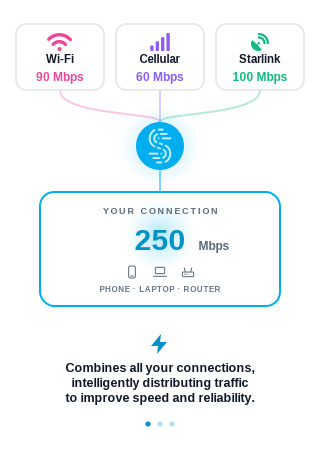
Speedify puts every internet connection on your computer or phone to work. Instead of only using Wi-Fi or 4G/5G cellular, Speedify uses both connections at the same time (on a computer, the cellular can come from a phone connected by USB), for a faster and more reliable internet connection.
When you are using Speedify, if you accidentally go out of range of Wi-Fi while on a Slack call, Speedify will automatically begin using your other working Internet connections. The same goes for messages: with two connections, a drop on one does not stop Slack, so it can update new messages right away.
Encrypt Slack Chats and Calls on Public Wi-Fi
Speedify does more than improve your Slack connection: Speedify also protects the privacy of your online data from cyber threats and prying eyes on unprotected networks. Even on public Wi-Fi networks, your traffic stays encrypted.
For Slack users, Speedify offers more reliability and speed, plus encryption for text chat, file transfer, media sharing, and VoIP calling from wherever you may be. Get started now for FREE: the free tier includes 5 GB per month with a free account.
Speedify
Get started with Speedify today.
Speedify combines Wi-Fi, 4G/5G cellular, Ethernet, Starlink and satellite into one faster, more reliable internet connection. Free to try: 5 GB a month with a free account. No credit card required.
🚀 Speed
Faster uploads and downloads, because Speedify uses all your internet connections at once.
📶 Stability
If one internet connection drops, Speedify moves your traffic to the others in milliseconds.
🔒 Security
AES-256 encryption on every internet connection, on any network you join.


15M+ downloads worldwide. 75K+ five-star reviews on iOS and Android.