
You Can Combine Multiple Internet Connections Together – Like Starlink, Wi-Fi, 4G, 5G, and DSL – with Speedify, to Fix Slow Facebook Messenger
Facebook Messenger is usually slow for one of three reasons: Messenger itself is having problems, the app is out of date or short of storage, or your internet connection keeps stalling. The last one is behind most calls that break up and messages that sit on a spinning circle while the other person waits: one internet connection drops for a second or two, and Messenger has nothing to send through in that gap.
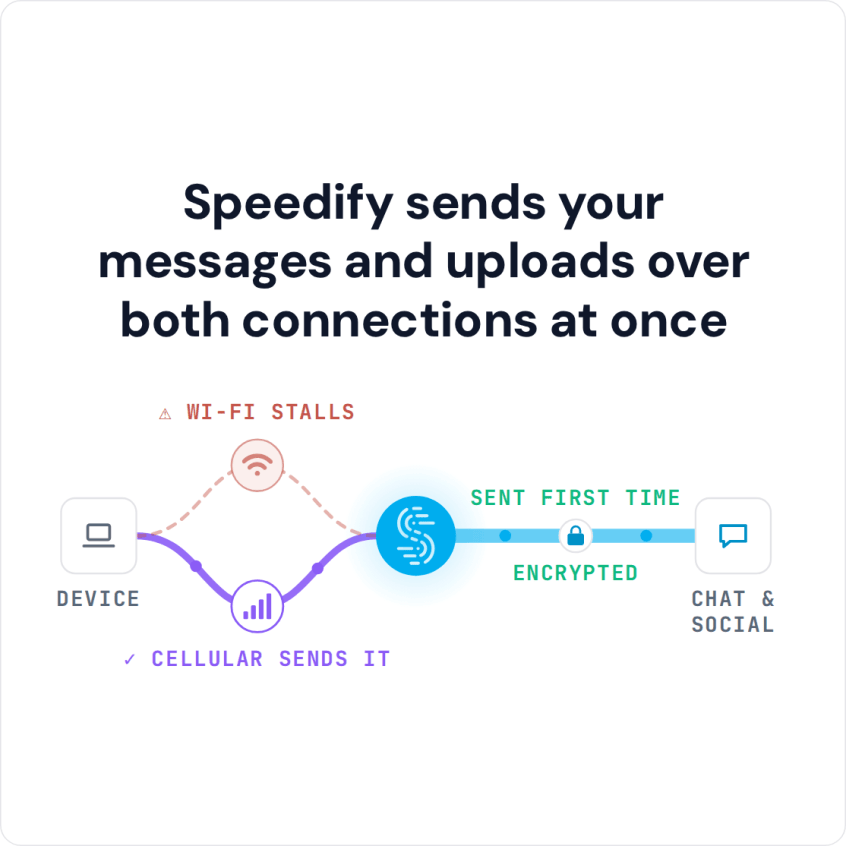
Speedify is an app that carries your internet traffic over two or more internet connections at the same time (Wi-Fi, 4G/5G cellular, wired Ethernet, Starlink and others), so a stumble on one of them does not stall the conversation. Speedify needs that second internet connection to help: on a single connection it works as an encrypted VPN, does not make the connection faster and can be a little slower.
Speedify sends your messages and uploads over both connections at once
Read on to see what a steadier internet connection changes for Facebook Messenger, and how Speedify keeps your messages and calls private on the way.
How to Fix Slow Messenger with Speedify
- Download Speedify on your phone or computer (Windows, macOS, iOS, Android).
- Open Speedify and create a free account (the free tier includes 5 GB per month), or sign in.
- Give Speedify a second internet connection: on a phone, keep Wi-Fi on and turn on cellular data; on a computer, add Ethernet or a phone connected over USB.
- Connect. Speedify sends traffic over both connections at once and moves it to the working one when one weakens.
- Open Messenger and chat or call as usual.
Why Messenger Is Lagging and What to Check First
Check three things first. See whether other people report Messenger problems on Downdetector, update the Messenger app, and on Android clear the app’s cache in Settings. If Messenger is still lagging, the problem is the connection: Wi-Fi that fades between rooms, or cellular that stalls in a weak spot.
Speedify fixes the connection side on your phone. Instead of using only Wi-Fi or only your 4G/5G cellular, Speedify uses both connections at the same time, so a message or call keeps moving when one of them stalls.
If you walk out of Wi-Fi range during a Messenger call, Speedify moves the call to your 4G/5G cellular connection without you doing anything.
Speedify Encrypts Messenger Traffic on Public Wi-Fi
Speedify also encrypts your traffic, which protects the privacy of your online data on unprotected networks such as hotel or café Wi-Fi, and Speedify keeps no record of the sites you visit. Even on public Wi-Fi networks, other people on the network cannot read what you send.
For Facebook Messenger users, Speedify keeps text chat, file transfers, photos, and voice and video calls moving when one connection stalls. Get started now for FREE: a free Speedify account includes 5 GB per month.
Speedify
Get started with Speedify today.
Speedify combines Wi-Fi, 4G/5G cellular, Ethernet, Starlink and satellite into one faster, more reliable internet connection. Free to try: 5 GB a month with a free account. No credit card required.
🚀 Speed
Faster uploads and downloads, because Speedify uses all your internet connections at once.
📶 Stability
If one internet connection drops, Speedify moves your traffic to the others in milliseconds.
🔒 Security
AES-256 encryption on every internet connection, on any network you join.



15M+ downloads worldwide. 75K+ five-star reviews on iOS and Android.