

You Can Combine Multiple Internet Connections Together – Like Starlink, Wi-Fi, 4G, 5G, and DSL – with Speedify, to Fix YouTube Error Loading Issues
‘Error Loading. Tap to Retry’ appears on YouTube when your device asks for the next piece of video and nothing comes back in time. Tapping retry works briefly because the internet connection recovered briefly; the real problem is one internet connection that keeps faltering.
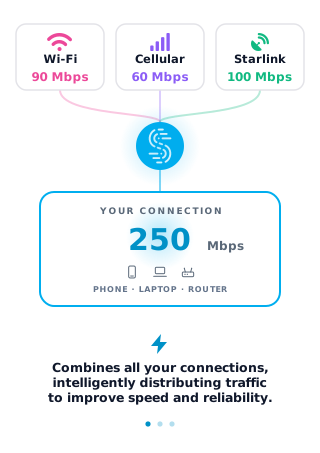
Speedify is an app that runs your internet over Wi-Fi, 4G/5G cellular, wired Ethernet, Starlink and other internet connections simultaneously, so a gap on one internet connection is covered by the others. With only one connection, Speedify works as an encrypted VPN and cannot stop that connection from dropping. This article troubleshoots that YouTube error and shows how using Speedify steadies everything else on your device too.
How to Stop YouTube “Error Loading” with Speedify
- Download Speedify on the phone, tablet or computer you watch YouTube on (iOS, Android, Windows or macOS).
- Open Speedify and create a free account (the free tier includes 5 GB per month), or sign in.
- Give Speedify a second internet connection: on a phone, keep Wi-Fi on and turn on 4G/5G cellular. On a computer on Wi-Fi, add Ethernet or a phone tethered over USB (on a Mac, an iPhone or a supported Android phone); on a computer on Ethernet, you can also join your phone’s Personal Hotspot over Wi-Fi.
- Connect. Speedify uses both connections at once and moves your traffic to the working one when one drops.
- Open YouTube and play the video again.
Why YouTube Keeps Saying “Error Loading, Tap to Retry”
The reason for YouTube’s error loading message is most likely your Internet connection. In most cases, just refreshing the page solves the issue, but in other cases, it’s not enough. For example, your mobile device only uses one Internet connection at a time: either Wi-Fi or your 4G/5G cellular connection. Computers also use one connection at a time. This means if your connection is spotty or intermittent, you will have a poor YouTube experience. It is also behind YouTube saying “No Internet Connection”.
Your device isn’t able to get the data packets from the server fast enough to load the video. It is a little like being stuck in a traffic jam because only one lane is open on the freeway.
Troubleshoot “Error Loading. Tap to Retry”
Start with the quick checks: close and reopen the YouTube app, update it, restart your phone, and turn Wi-Fi off and on again. On Android you can also clear the YouTube app’s cache in Settings. If the error keeps coming back, the internet connection itself keeps faltering, and that is where Speedify helps.
Speedify unlocks the full power of your devices. Speedify combines multiple internet sources into one more stable and secure connection for streaming, video calling, and web browsing. Speedify allows you to use Wi-Fi and your 4G/5G cellular connection simultaneously on smartphones, or all available connections on computers (4G/5G, Wi-Fi, Ethernet). With two or more connections, that gives you a faster YouTube connection.
Speedify combines connections to increase the bandwidth your device has available for video streaming, or anything else you may be doing online. It used to be that you had to be a company with a lot of money to spend on special hardware to get the advantages of combining connections. But Speedify makes it as easy as downloading an app.
Speedify also comes with auto failover. This means that if one of your connections fails, Speedify automatically reroutes all the traffic through your available connection. This happens in the background without you having to do anything. You just get to keep enjoying your YouTube videos.
Speedify Makes Your Whole Connection Better, Not Just YouTube
Speedify is built on connection combining technology. This means that not only do you get a faster internet connection when you combine two or more; your connection is also more secure. Speedify protects you from compromised wifi networks and snooping hackers. Speedify uses cutting-edge encryption to make sure your private data stays under your control. Before Speedify, users often had to choose between security and speed. With two or more internet connections, Speedify gives you both.
Speedify works on iOS, Android, Windows, Linux and macOS.
Stop seeing the YouTube error loading message. Get started with Speedify today for FREE: the free tier includes 5 GB per month with a free account.
Speedify
Get started with Speedify today.
Speedify combines Wi-Fi, 4G/5G cellular, Ethernet, Starlink and satellite into one faster, more reliable internet connection. Free to try: 5 GB a month with a free account. No credit card required.
🚀 Speed
Faster uploads and downloads, because Speedify uses all your internet connections at once.
📶 Stability
If one internet connection drops, Speedify moves your traffic to the others in milliseconds.
🔒 Security
AES-256 encryption on every internet connection, on any network you join.


15M+ downloads worldwide. 75K+ five-star reviews on iOS and Android.