
PokerStars Disconnecting Is Never Fun!
PokerStars kicks you out while a hand is live, and a tournament position built over hours is at risk. Disconnects like that almost always start at your end: a brief gap where no data arrives, a home internet connection loaded by other people, or a laptop moving between Wi-Fi and 4G/5G cellular mid-hand.
Speedify is an app that puts Wi-Fi and 4G/5G cellular to work at once, so a gap on one internet connection does not empty your seat. Speedify can only keep you online through a drop when it has two or more internet connections to work with, for example Wi-Fi plus your phone’s 4G/5G cellular. On a single connection, Speedify works as an encrypted VPN and cannot stop that connection from dropping. You will learn which usual suspects cause PokerStars to keep disconnecting, the simple steps that rule each one out, and what using Speedify does for hands you have money in.
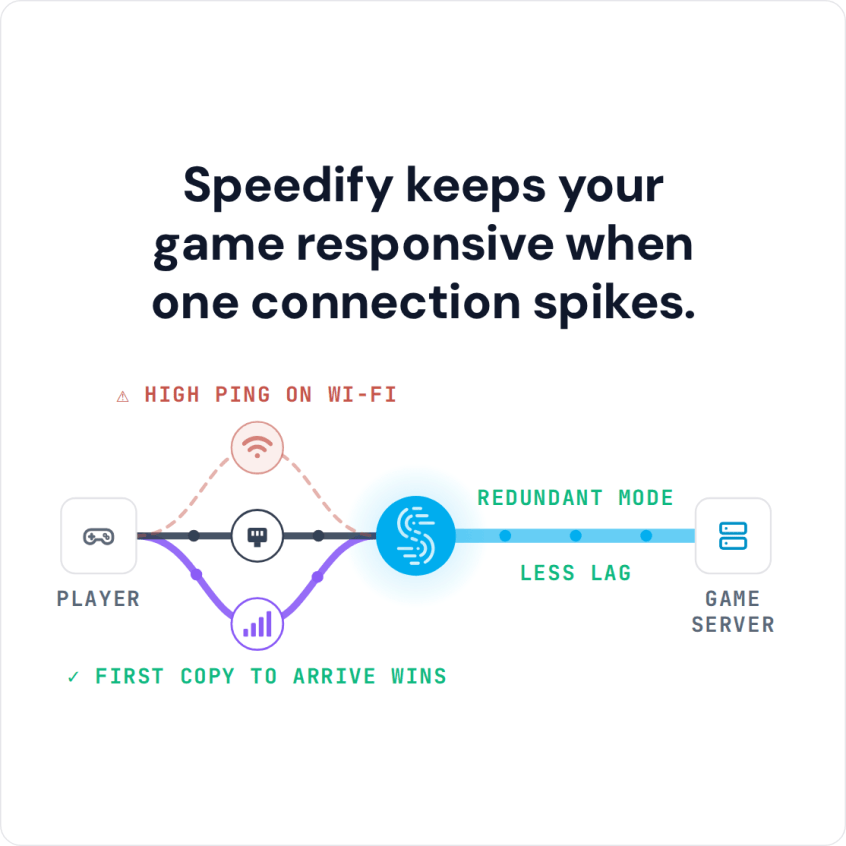
Speedify keeps your game responsive when one connection spikes.
The Usual Suspects When PokerStars Keeps Disconnecting
Internet connections tend to drop right when you need them most, and PokerStars is no exception. That can be fine for other activities, but in a PokerStars tournament your money is at stake, so solve potential connection issues before you log in to PokerStars. Here are the usual fixes when PokerStars disconnects.
The causes when PokerStars keeps disconnecting fall into 3 main categories:
- Platform server problems (when it’s not you, it’s them)
- Device issues: software conflicts (with security or firewall software) or an out-of-date PokerStars app
- Internet connectivity problems on your part: slow or laggy connection.
Troubleshooting any of these during an ongoing game is not recommended. You can do this while in the app lobby or when you’re not using PokerStars. Keep reading to see a list of potential fixes.
When PokerStars is not connecting at all, or says “Your connection to PokerStars update server has failed” as it starts, the app cannot reach PokerStars’ servers. The cause falls in the same three groups: a server restart or outage, a firewall or security program blocking the app, or your internet connection.
PokerStars lag, where the table stalls just as you act and catches up a moment later, usually starts at home too: an internet connection busy with other people’s streams and downloads, or a weak Wi-Fi signal.
Here are the Simple Steps You Can Do to Get Rid of PokerStars Disconnects
Let’s see how you can troubleshoot your PokerStars issues:
- Check the PokerStars Support Twitter account for any news on outages and planned server restarts. The good news is that according to their policy, all amounts from an unfinished hand will be rolled back to each player.
- Restart all your network equipment: router, modem, repeater and so on.
- Make sure you have the latest version of the PokerStars app installed and restart it.
- If you have a firewall or security software, make sure it allows the PokerStars app to access the Internet.
- Restart your PC / smartphone.
- Reinstall the PokerStars app
- Contact PokerStars directly from the app or website.
The alternative to all the above: using 2 or more connections available to you at once, to keep you connected when one of them disconnects. You can easily do that by using the Speedify app while you play poker.
How Speedify Stops One Dropped Internet Connection from Disconnecting PokerStars
Speedify is an app that combines all of your internet connections at once and encrypts your traffic like a VPN. With two or more internet connections you get more bandwidth, and failover when one of them drops. Speedify also gives you protection against DDoS attacks that target poker players, because your home IP address stays hidden behind the Speedify server. If you have been targeted before, you might also think about getting your own dedicated server for online games.
If you think you don’t have any other connections available, here are a few ideas:
- on your smartphone you can combine Wi-Fi and cellular together.
- on your computer you can use the Ethernet or Wi-Fi from the home network with a USB cellular dongle and/or your tethered smartphone.
Speedify automatically detects all active internet connections on your device and combines them to keep you online while maintaining the session. If one of your internet connections drops, Speedify moves the traffic to the others, so PokerStars keeps receiving your moves and the hand goes on.
For lag, Speedify’s Redundant mode sends the same data over every internet connection and uses whichever copy arrives first, so a stall on one connection does not hold up your move. Speedify cannot shorten the route to the PokerStars servers, but with two or more connections in Redundant Mode it sends each packet over every connection and uses the copy that arrives first, so your ping follows whichever connection is faster at that moment.
Keep the PokerStars app updated, even with Speedify running. PokerStars’ terms ban using a VPN to hide your location, so keep Speedify on a server in the country you are actually in, and check the PokerStars VPN usage recommendations before you play. For more on privacy, see using a VPN with PokerStars.
In short, Speedify gives you a simple way to solve and avoid PokerStars disconnection issues by using all of your available internet connections at once.
Speedify
Get started with Speedify today.
Speedify combines Wi-Fi, 4G/5G cellular, Ethernet, Starlink and satellite into one faster, more reliable internet connection. Free to try: 5 GB a month with a free account. No credit card required.
🚀 Speed
Faster uploads and downloads, because Speedify uses all your internet connections at once.
📶 Stability
If one internet connection drops, Speedify moves your traffic to the others in milliseconds.
🔒 Security
AES-256 encryption on every internet connection, on any network you join.



15M+ downloads worldwide. 75K+ five-star reviews on iOS and Android.