
Unblock Youtube When Restricted and Fix Laggy YouTube
YouTube fails in two different ways at work or school: it is blocked outright by whoever runs the network, or it loads but stutters badly because that network is overloaded.
Speedify is an app that fixes both. It encrypts your traffic and routes it past the restriction, and it uses more than one internet connection at once so the video has enough bandwidth to play cleanly.
This guide covers how to bypass a YouTube block set by a network administrator, and how to stop YouTube lagging once you are in.
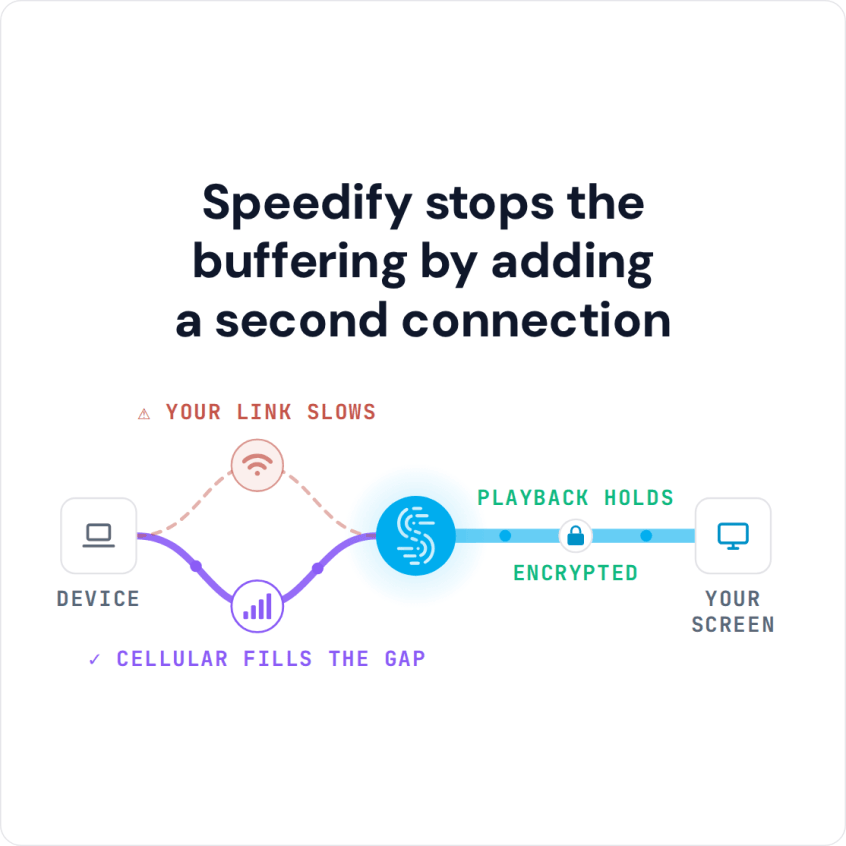
Speedify stops the buffering by adding a second connection
Why Networks Block YouTube and How Speedify Gets Past the Block
Schools and offices cannot shut down the internet or YouTube itself. What they can do is block YouTube.com on their Wi-Fi network, so YouTube stops loading for everyone connected to it.
Speedify unblocks YouTube by encrypting your traffic, so the network you connect through cannot see which sites you visit. Speedify is a mobile VPN that also works by combining internet connections, so YouTube gets the bandwidth of every connection you have, and you can keep using your school or office network (Wi-Fi or wired) as usual.
How to Bypass a YouTube Block at School with Speedify
- Download Speedify on the phone or computer you use at school. Speedify runs on Windows, macOS, iOS, Android and Linux.
- Open Speedify and create a free account (the free tier includes 5 GB per month), or sign in.
- On a phone, tap Allow when your phone asks to add a VPN configuration.
- Speedify connects to a Speedify server automatically. The school network now sees only an encrypted connection to that server, not the apps and sites you open.
- Open YouTube in your browser or the YouTube app and watch as usual.
How Speedify Fixes YouTube Lagging Issues
The reason for your slow YouTube experience is most likely your Internet connection. Your desktop or mobile device is a powerful piece of technology, but by default some of its powers are not in use. For example, your device only uses one Internet connection at a time: wired Ethernet, Wi-Fi or 4G/5G cellular. So if that one connection is spotty or intermittent, you will have a poor YouTube experience. It is a little like being stuck in a traffic jam because only one lane is open on the freeway.
Speedify lets your device use multiple connections simultaneously, such as Wi-Fi and 4G/5G cellular together. YouTube gets the bandwidth of both, so you see less buffering and fewer frozen videos, even when one connection is weak.
Speedify works by combining internet connections, which increases the bandwidth your device has for video streaming or anything else you do online. Getting that used to require special hardware, which mostly companies paid for. Speedify does it with an app you download.
How Speedify Keeps YouTube Unblocked and Running in the Background
Speedify runs in the background on your device, checking the quality of your connections and signal strength. Once you download the app and connect, Speedify handles the encryption and combines your connections without you having to do anything.
Speedify also uses automatic failover: if one of your connections fails or becomes unreliable, your YouTube streaming experience isn’t compromised. Speedify moves your traffic to the connection that still works, then uses both again once the failed one recovers.
Bypass YouTube Restrictions and Fix Lagging Issues with Speedify
Speedify is a simple, secure way to connect to the internet. The app encrypts your traffic like a VPN and combines your connections, so you get that privacy without the slowdown an ordinary VPN adds on a single connection. Your data stays safe from prying eyes, and you are protected on compromised Wi-Fi networks.
For more ways to keep YouTube playing on a crowded school or office network, see how to get YouTube unblocked and avoid slow internet.
Speedify gives you a simple way to bypass blocked YouTube and fix lagging issues. Get started with Speedify today for free: the free tier includes 5 GB per month with a free account.
Speedify
Get started with Speedify today.
Combine Wi-Fi, 4G/5G cellular, Ethernet, Starlink, and more into one faster, steadier connection. Free to try — no credit card required.
🚀 Speed
Faster uploads and downloads by bonding all your connections at once.
📶 Stability
Automatic failover in under a second when any connection drops.
🔒 Security
AES-256 encryption on every connection, on every network you join.



15M+ downloads worldwide. 75K+ five-star reviews on iOS and Android.