
Use Both WiFi and Cellular at the Same Time on Your iPhone and iPad
Plenty of iPhone owners look for a dual Wi-Fi setting and do not find one: an iPhone joins only one Wi-Fi network at a time. What you can do is run Wi-Fi and 4G/5G cellular at the same time, plus wired Ethernet through a USB-C or Lightning Ethernet adapter, for faster downloads and uploads and a connection that stays up when Wi-Fi drops. That also helps if your iPhone’s Apple C1 modem is slow.
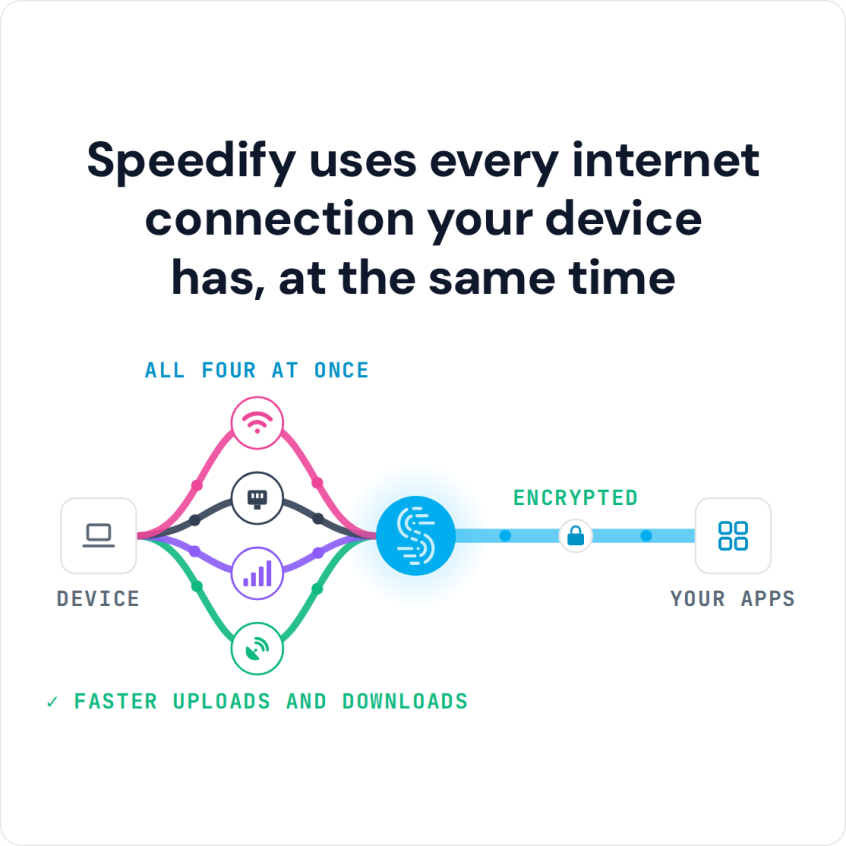
Speedify is an app that combines two or more internet connections at once, such as Wi-Fi and 4G/5G cellular, so you get faster uploads and downloads and stay online if one connection drops out. On Wi-Fi alone, Speedify works as an encrypted VPN and cannot make that Wi-Fi faster.
Speedify uses every internet connection your device has, at the same time
How do I use WiFi and 4G/5G cellular at the same time with Speedify?

Pick your two internet connections and your device below and we'll take you to the step-by-step setup guide.


How to Combine Wi-Fi and 4G/5G Cellular on an iPhone or iPad
Speedify can combine any number or combination of internet connections and splits your traffic across them packet by packet. If one connection drops in the middle of an important video call or file transfer, Speedify moves the traffic to your other working connections without dropping the call. The call also keeps the same public IP address, because your traffic leaves through the Speedify server.
NOTE: For best results, use Internet connections from different sources. In general, joining the same upstream network multiple times (such as the same router via Ethernet and Wi-Fi) will not improve performance.
Here’s what you have to do to combine connections on iOS:
- Make sure your 4G/5G cellular connection is on and working. Go to Settings > Cellular and flip the Cellular Data switch to on.
- Connect to a Wi-Fi network. Verify that your Wi-Fi is enabled on your iPhone or iPad and connected to a network. Go to Settings > Wi-Fi and flip the switch to on. You can then select a network from the list that appears. Keep in mind, private networks may require you to enter a password before connecting. Here’s a brief guide from Apple.
- Get Speedify from the App Store. Open Speedify, and it detects your Wi-Fi and 4G/5G cellular connections and combines them for faster downloads and uploads, encryption and failover.
How Speedify Uses Wi-Fi and 4G/5G Cellular Together on an iPhone
Speedify uses your Wi-Fi and 4G/5G cellular connections on your iPhone or iPad at the same time instead of switching between them, and encrypts your traffic like a VPN. Combining internet connections this way works differently from load balancing. Newer hardware raises the stakes, because the iPhone Duo puts two apps online at the same time on its 7.6 inch inner display.
You get the bandwidth of both connections for faster downloads and uploads. Speedify runs in the background and checks the quality of each connection. With auto failover, when your Wi-Fi drops, Speedify moves all traffic to 4G/5G cellular until Wi-Fi comes back. You do not have to do anything, and in most cases you will not notice the switch.
Speedify also adds VPN-style encryption to your traffic, and the combined bandwidth of Wi-Fi and 4G/5G cellular makes up for the small overhead of that encryption. For the iOS and iPadOS versions Speedify supports, check the current system requirements on the Speedify download page.
Speedify is also available in the App Store. Setup takes a few minutes and needs no technical knowledge.
Speedify
Get started with Speedify today.
Speedify combines Wi-Fi, 4G/5G cellular, Ethernet, Starlink and satellite into one faster, more reliable internet connection. Free to try: 5 GB a month with a free account. No credit card required.
🚀 Speed
Faster uploads and downloads, because Speedify uses all your internet connections at once.
📶 Stability
If one internet connection drops, Speedify moves your traffic to the others in milliseconds.
🔒 Security
AES-256 encryption on every internet connection, on any network you join.



15M+ downloads worldwide. 75K+ five-star reviews on iOS and Android.