
How to Fix Packet Loss and Rubber-Banding in Online Games
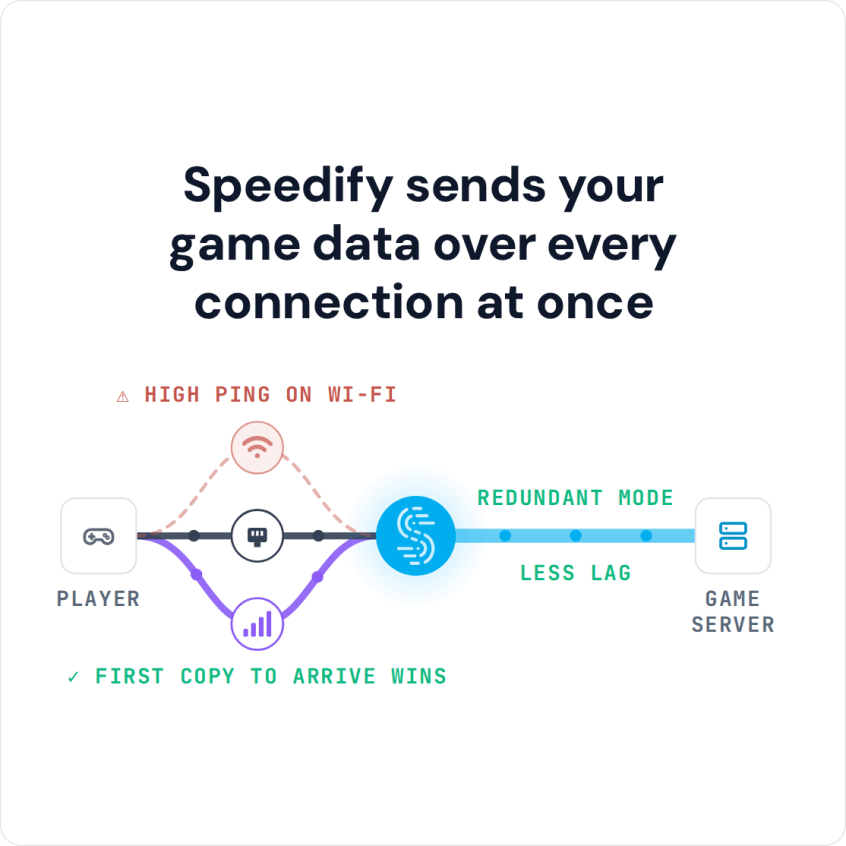
Rubber banding in games is when your character snaps back to an earlier position because the game lost some of its network packets and had to correct itself. The usual cause is packet loss on a single flaky internet connection, which is also behind games that disconnect on Wi-Fi. Speedify is an app that combines two or more internet connections at once, for example home Wi-Fi plus 4G/5G cellular, and can send the same game traffic over both connections at the same time.
When a packet is lost on one connection, a copy is still arriving on the other, so a hit registers on time and a character no longer snaps backward mid-match. If a game like The Division 2 drops you entirely, see how to stop Division 2 disconnecting.
Speedify sends your game data over every connection at once
How do I use WiFi and 4G/5G cellular at the same time with Speedify?

Pick your two internet connections and your device below and we'll take you to the step-by-step setup guide.


Packet Loss vs. Lag: What Causes Rubber Banding in Games
Lag, or high ping, means data takes longer to arrive but still arrives intact and in order. Packet loss means some of that data never arrives at all, forcing a game client to predict what should have happened and then snap a character or a hit back into place once the real update finally lands, which is exactly what rubber-banding looks like. A connection can have excellent ping and still produce miserable rubber-banding if even a small percentage of packets go missing along the way.
Why One Flaky Internet Connection Causes Rubber Banding
A single Wi-Fi network or ISP line that drops even one or two percent of packets creates a steady trickle of these correction events throughout a match, and there is no way to fix that from inside the game’s own settings. Lowering graphics settings or changing a game’s network settings does nothing for packets that never reach the client in the first place. The internet connection itself needs a second path to fall back on, not a workaround inside the game.
How Speedify’s Redundant Mode Sends Packets over Two Internet Connections
Speedify’s redundant mode duplicates outgoing and incoming game traffic across two connections simultaneously, so if one connection drops a packet, the duplicate arriving over the other connection covers the gap. This costs some bandwidth efficiency, since the same data crosses both connections rather than being split between them, but for latency-sensitive game traffic that trade is worth making. Speedify’s Streaming Mode, which is on by default, is a lighter option for less competitive sessions: it prioritizes game traffic over background downloads without duplicating every packet.
Setting Up 4G/5G Cellular Failover for Gaming, and Its Limits
Pairing a phone’s cellular hotspot alongside an existing Wi-Fi or Ethernet connection gives a gaming setup a genuine second path for redundant mode to use. A short setup gets this running:
- Download Speedify on the gaming PC. A console cannot run Speedify itself; for a console, Speedify has to run on a supported router, which needs a Router License.
- Add a phone’s 4G/5G cellular as the second internet connection alongside Wi-Fi or Ethernet, by USB tethering or by joining the phone’s hotspot if the PC is on Ethernet.
- Switch on redundant mode before starting a competitive session.
- Confirm both connections show active before queuing into a match.
Combining connections fixes packet loss and dropped sessions, not raw ping. Speedify cannot shorten the physical distance data travels to a game server, so a connection with high latency still has that latency with Speedify running. What Speedify does solve is the packet loss and outright disconnects that turn a high-ping match into an unplayable one, which is often the actual problem behind rubber banding.
Which Speedify Mode to Use for Shooters, MMOs and Starlink Gaming
Fast-paced shooters benefit most from redundant mode, since even brief packet loss registers immediately as a missed shot or a delayed reaction. Larger open-world or MMO titles cope better with a slightly delayed update, so Streaming Mode is usually enough for them. For satellite-based setups specifically, gaming on Starlink covers how combining connections works with satellite’s naturally higher baseline latency compared to cable or fiber.
Packet Loss and Rubber-Banding: FAQ
Does Speedify lower ping in online games?
No. Speedify cuts packet loss and dropped connections rather than raw ping, since ping is mostly set by the physical distance to a server.
What is redundant mode and when should it be used for gaming?
Speedify’s redundant mode duplicates game traffic across two connections, best reserved for competitive sessions where a single dropped packet matters most.
Can a phone’s hotspot work as a second internet connection for gaming?
Yes. Speedify combines a phone’s 4G/5G cellular hotspot with Wi-Fi or Ethernet, giving redundant mode a second path to protect against packet loss.
Does combining connections help with rubber banding on satellite internet?
Yes. Speedify combines a satellite connection with a second internet connection to cut the packet loss that causes rubber banding, though satellite’s baseline latency stays largely unchanged.
Speedify
Get started with Speedify today.
Speedify combines Wi-Fi, 4G/5G cellular, Ethernet, Starlink and satellite into one faster, more reliable internet connection. Free to try: 5 GB a month with a free account. No credit card required.
🚀 Speed
Faster uploads and downloads, because Speedify uses all your internet connections at once.
📶 Stability
If one internet connection drops, Speedify moves your traffic to the others in milliseconds.
🔒 Security
AES-256 encryption on every internet connection, on any network you join.



15M+ downloads worldwide. 75K+ five-star reviews on iOS and Android.