
Use Speedify to Join Multiple Phones’ Personal Hotspots at the Same Time for Faster, more Reliable and Secure Internet Connectivity at Events
Event Wi-Fi at a crowded conference or trade show is slow because thousands of people share it, and you can get faster uploads and downloads by running your team’s phone connections at the same time.
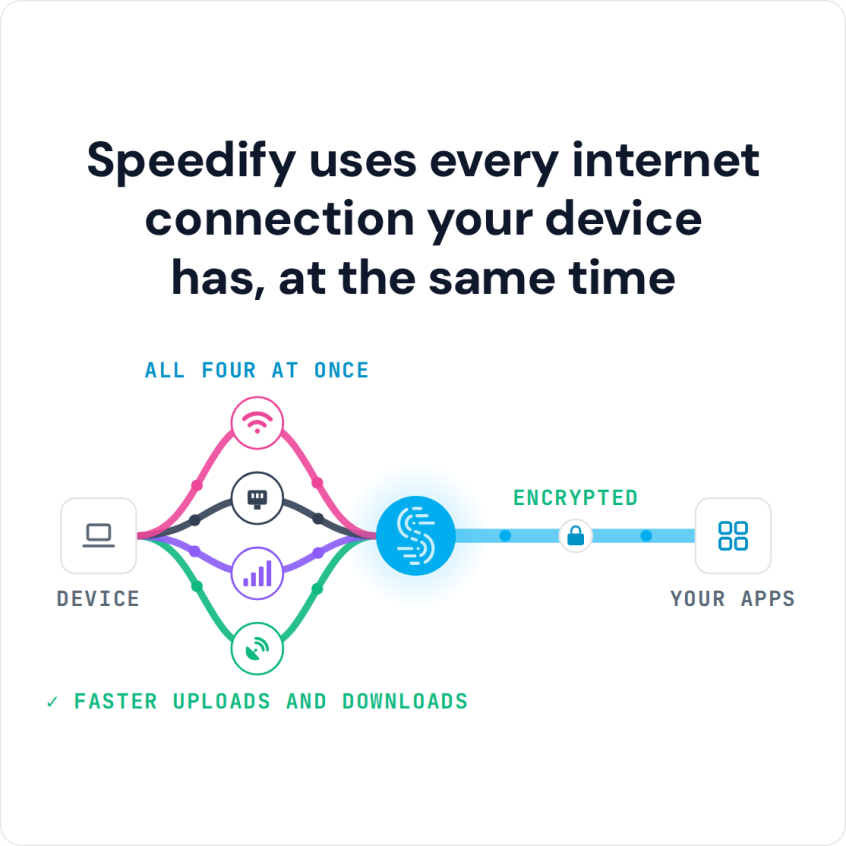
Speedify is an app that combines two or more internet connections at once, such as Wi-Fi and several phones’ 4G/5G cellular, so you get faster, more reliable internet and stay online if one connection drops out. With only one internet connection, Speedify works as an encrypted VPN and cannot make that connection faster or stop it from dropping. Speedify’s cellular sharing feature pools the 4G/5G cellular connections from everyone’s phones, with no cables or new data plans.
Speedify uses every internet connection your device has, at the same time
How do I use WiFi and 4G/5G cellular at the same time with Speedify?

Pick your two internet connections and your device below and we'll take you to the step-by-step setup guide.


Why Internet Connectivity at Events Is Often Slow and Unreliable
Event venues, from a large fairground to a conference room, can have anywhere from hundreds to tens of thousands of people on site at once. That crowd is the main reason event Wi-Fi is often slow and unreliable: every person uses part of a limited amount of bandwidth, so each person gets less.
4G/5G cellular does not do much better at large events. Just like at a stadium, thousands of people using the same cell towers in a small area congest the cellular network.
Combining several internet connections with Speedify helps: if one of them slows down or drops, Speedify moves your traffic to the others, so you stay online.
For exhibitors specifically, a booth needs to upload leads, run video calls, and send large files all day from one spot, which is exactly where pooling the team’s 4G/5G cellular connections pays off. For more, see the deep dive on reliable internet at a trade show booth, and read why you get full bars but no internet.
3 Steps to Get Faster, More Reliable and Secure Internet Connectivity at Events
The easiest way to get faster internet at an event is Speedify’s cellular sharing feature, which combines the 4G/5G cellular connections of several phones to increase bandwidth for everyone.
Speedify’s cellular sharing feature works like a new kind of personal hotspot. Instead of one device sharing its internet, every paired device can share its connection and use the others’ at the same time. Cellular sharing works best with a second phone or hotspot device, or when you attend the event with colleagues or friends who also run Speedify.
Here is how to use Speedify’s cellular sharing feature:
- Install Speedify on all your devices and connect them to the same Wi-Fi network. One of your phones can create that network with its personal hotspot, or you can use the venue’s public Wi-Fi.
- Turn on cellular sharing in Speedify on every device, then pair the devices so they can share and receive internet connections.
- Speedify now uses your own connection and the connections the other devices share at the same time, for faster, more reliable and secure internet at the conference or event.
Traffic between devices is fully encrypted, and you always control which devices can do what: set permissions and limits, or unpair from other devices at any time.
For more details, see Speedify’s knowledge base articles on cellular sharing.
Speedify’s Cellular Sharing Helps with Slow, Unreliable Event Internet
With more than one phone sharing its 4G/5G cellular connection, ideally on different carriers, Speedify’s cellular sharing feature can give you faster uploads and downloads than the crowded event Wi-Fi alone, and keeps you online if one connection drops.
Speedify
Get started with Speedify today.
Speedify combines Wi-Fi, 4G/5G cellular, Ethernet, Starlink and satellite into one faster, more reliable internet connection. Free to try: 5 GB a month with a free account. No credit card required.
🚀 Speed
Faster uploads and downloads, because Speedify uses all your internet connections at once.
📶 Stability
If one internet connection drops, Speedify moves your traffic to the others in milliseconds.
🔒 Security
AES-256 encryption on every internet connection, on any network you join.



15M+ downloads worldwide. 75K+ five-star reviews on iOS and Android.