
Unblock Snapchat at School or Work While Also Getting Faster Upload and Download Speeds for Stories and Videos with Speedify
Is Snapchat blocked at your school, college or workplace? Does your company policy restrict Snapchat? Schools and offices often block Snapchat on their Wi-Fi, so you are not the only one who cannot open the app.
Even when Snapchat does open, it can be slow: photos and videos take ages to send.
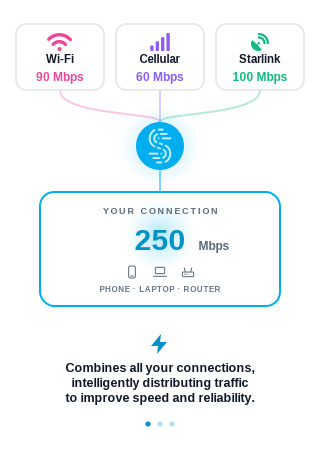
You can get Snapchat unblocked at school or work and fix slow, laggy Snapchat at the same time with Speedify. Speedify is an app that combines Wi-Fi, 4G/5G cellular, Ethernet, Starlink and satellite internet connections into one faster, more reliable internet connection, and encrypts your traffic like a VPN. The speed gain needs two or more internet connections, such as Wi-Fi plus your phone’s 4G/5G cellular; on Wi-Fi alone, Speedify works as an encrypted VPN and can be a little slower.
In this article and video below, you will see how to get Snapchat unblocked at school or work and fix slow Snapchat. Check your school’s or employer’s internet rules before you get around a block, because doing so may break them.
Why Schools Block Snapchat and How Speedify Gets Past the Block
Schools and offices cannot shut down the internet or Snapchat itself. What they can do is block the addresses Snapchat uses on their Wi-Fi network, so Snapchat stops loading for everyone connected to it.
Speedify unblocks Snapchat by encrypting everything your phone sends, so the school or office Wi-Fi cannot see which apps you open. The network sees only an encrypted connection to a Speedify server, so its filter has no Snapchat address to match. It can still see that you are using a VPN, and some networks block VPN connections, which stops Speedify too. On a school- or work-managed device, monitoring software on the device can still see what you do. Speedify also lets you combine Wi-Fi and 4G/5G cellular at the same time on your smartphone, so snaps and videos get more bandwidth than either internet connection gives alone.
How to Get Snapchat Unblocked at School with Speedify
- Download Speedify on the phone or computer you use at school. Speedify runs on Windows, macOS, iOS, Android and Linux.
- Open Speedify and sign in, or create a free account (5 GB a month on Windows, macOS, iOS and Android; Linux needs a paid plan).
- On a phone, tap Allow when your phone asks to add a VPN configuration.
- Speedify connects to a Speedify server automatically. The school network now sees only an encrypted connection to that server, not the apps and sites you open.
- Open Snapchat, or Snapchat Web in your browser, and send snaps as usual.
Snapchat on a School Computer
On a computer, Snapchat runs in a web browser as Snapchat Web, so a school computer can reach it once the network filter is out of the way. Speedify only helps if you are allowed to install apps on that computer, and school-owned computers usually do not allow it. On a school-managed computer or account, the school’s settings and monitoring software still apply, whatever network you are on. Your own laptop or phone on the school Wi-Fi is the setup that works.
How Speedify Fixes Laggy Snapchat Videos and Slow Snaps
The reason for your slow Snapchat experience is most likely your Internet connection. Your smartphone is a powerful piece of technology, but by default some of its powers are not in use. For example, your phone normally sends traffic over one internet connection at a time: Wi-Fi or 4G/5G cellular. On iOS 27, Connectivity Assist can bring in cellular data when Wi-Fi is weak, and Android settings such as Samsung’s Switch to mobile data move you to 4G/5G when Wi-Fi gets bad, but these are fallbacks, not a way to add the two speeds together. So if that one internet connection is spotty or intermittent, you will have a poor Snapchat experience. It is a little like being stuck in a traffic jam because only one lane is open on the freeway.
Speedify lets your phone use multiple internet connections simultaneously: Wi-Fi and 4G/5G cellular together. Snapchat gets the bandwidth of both, so photos and videos send faster, and if one internet connection weakens, the other keeps your snaps moving.
Before Speedify, combining internet connections required special hardware, which mostly companies paid for. Speedify does it with an app you download.
How Speedify Keeps Snapchat Running in the Background
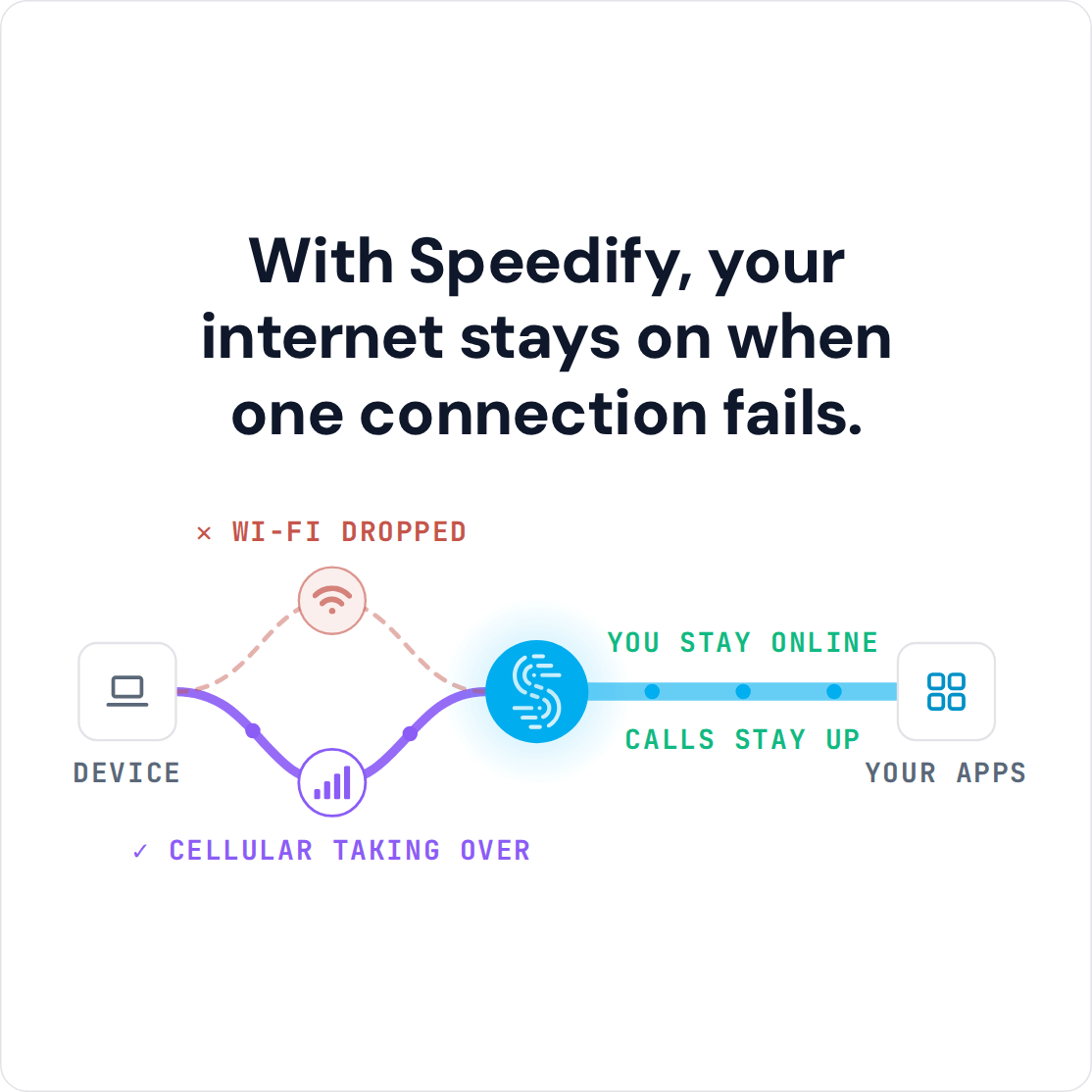
Speedify also runs in the background, checking the quality of each internet connection. With automatic failover, if Wi-Fi or 4G/5G cellular drops or becomes unreliable, Speedify moves your Snapchat traffic to the internet connection that still works and goes back to using both once the weak one recovers.
Get Snapchat Unblocked at School or Work Without Slowing It Down
Speedify is a simple, secure way to connect to the internet. The app encrypts your traffic like a VPN and combines your internet connections, so you get that privacy without the slowdown an ordinary VPN adds on a single internet connection. Your data also stays protected on compromised Wi-Fi networks.
Speedify’s encryption applies to every internet connection the app uses, so your snaps stay private on school Wi-Fi and on 4G/5G cellular.
Speedify gives you a simple way to get Snapchat unblocked at school or work. Get started with Speedify today for free: the free tier includes 5 GB per month with a free account.
Speedify
Get started with Speedify today.
Speedify combines Wi-Fi, 4G/5G cellular, Ethernet, Starlink and satellite into one faster, more reliable internet connection. Free to try: 5 GB a month with a free account. No credit card required.
🚀 Speed
Faster uploads and downloads, because Speedify uses all your internet connections at once.
📶 Stability
If one internet connection drops, Speedify moves your traffic to the others in milliseconds.
🔒 Security
AES-256 encryption on every internet connection, on any network you join.


15M+ downloads worldwide. 75K+ five-star reviews on iOS and Android.