
You Can Combine Multiple Internet Connections Together – Like Starlink, Wi-Fi, 4G, 5G, and DSL – with Speedify, to Fix Snapchat Freezing
Snapchat glitching, lagging or freezing, with frozen snaps and a camera that will not respond, usually means data has stopped arriving, not that your phone is broken. An out-of-date app or a full cache can cause it too, but Snapchat needs bandwidth in both directions, and a flaky Wi-Fi or cellular signal loses small pieces of data, which you see as glitches part way through an upload. When the app closes outright, see why Snapchat keeps crashing.
Speedify is an app that combines Wi-Fi, 4G/5G cellular, Ethernet, Starlink and satellite internet connections and encrypts your traffic like a VPN. On a phone it combines Wi-Fi and 4G/5G cellular, so the missing pieces arrive over whichever signal is strong. On a single connection, Speedify works as an encrypted VPN and cannot stop that connection from dropping. The sections here explain why Snapchat lags and what to try first.
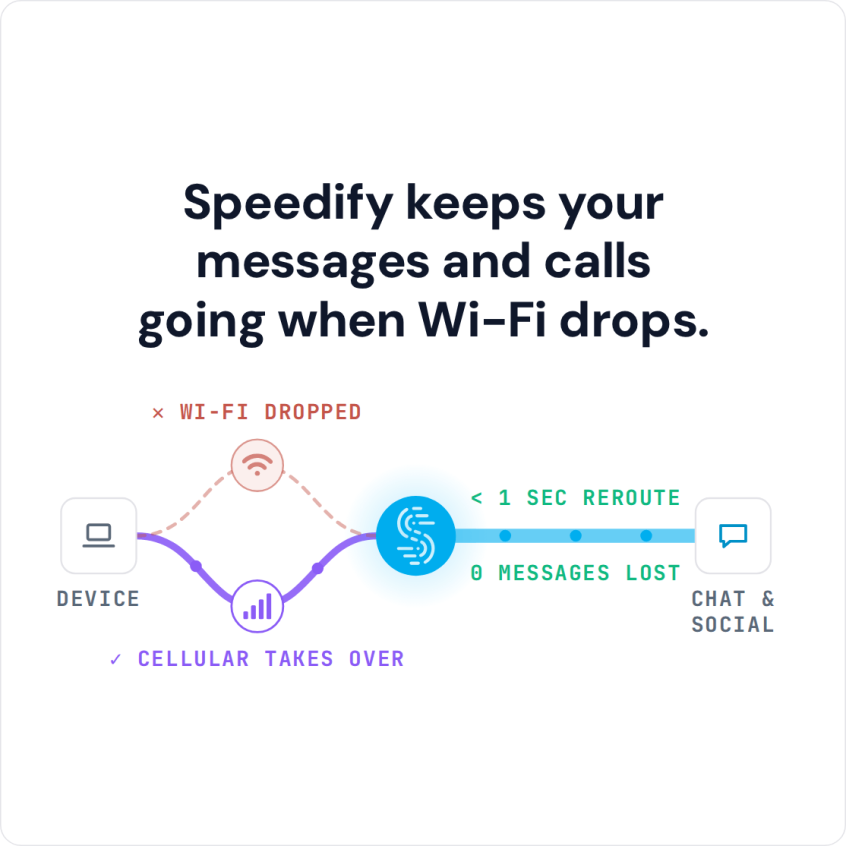
Speedify keeps your messages and calls going when Wi-Fi drops.
How to Stop Snapchat Lagging with Speedify
- Download Speedify on your iPhone or Android phone.
- Open Speedify and create a free account (the free tier includes 5 GB per month), or sign in.
- Keep Wi-Fi on and turn on 4G/5G cellular too, so Speedify has two internet connections to work with.
- Connect. Speedify uses both connections at once and moves your traffic to the working one when one drops.
- Open Snapchat and use it as usual.
Why Snapchat Is Lagging, Glitching or So Slow
Snapchat needs steady bandwidth in both directions, so when Snapchat is bugging out, look at your internet connection. Either the internet is too slow and does not have enough bandwidth, or the connection is flaky and losing data, which is called packet loss. Both get worse on the move, because a phone cannot easily transition between different Wi-Fi networks or cell towers without a short gap. Before you blame the connection, update Snapchat and try these:
- Restart the device
- Clear the cache of the Snapchat app
- Reinstall the app
Phones are built to use one internet connection at a time, even when Wi-Fi and 4G/5G cellular are both switched on. Using both at once gives Snapchat their combined speed and a second route when one of them drops.
How Speedify Stops Snapchat Lagging on a Weak Connection
Speedify is an encrypted VPN that changes the way your phone connects to the internet. Instead of one connection, Speedify lets your phone connect to the internet over both Wi-Fi and 4G/5G cellular at the same time. That adds bandwidth and a second route, so a weak signal on one no longer freezes Snapchat. Speedify cannot fix glitches that come from the app itself.
Speedify also watches the quality of each internet connection. When a signal gets weak or too slow, Speedify moves the data to the other connection, in milliseconds according to Speedify, and starts using the first one again once it recovers, without you doing anything.
Secure Your Snapchat Stories with Speedify
Speedify also encrypts all the data sent to and from your device, which keeps you safe from compromised Wi-Fi networks, snooping ISPs, and other threats. To keep cellular use down, you can set 4G/5G cellular to Secondary priority in the app so Speedify can send as much data as possible through Wi-Fi, and add a data cap for cellular if your plan is small.
With Wi-Fi and 4G/5G cellular working together, a Snapchat Story keeps uploading when one signal fades, at home, in class, at work or on the way there.
Why Snapchat Is So Slow on a VPN
Most VPN providers tell users to expect a slower connection while the VPN is on, and the slowdown is larger when conditions are not ideal.
They explain that because all of the data being uploaded and downloaded to the device must be encrypted on their VPN servers, the connection has to run slower.
What most VPNs are really saying is that you have to choose between speed and security, between safety and usability.
If your VPN slows your connection down, Snapchat video uploads get stuck and your friends’ snaps keep buffering. Speedify is a VPN too, and on a single connection it can also be a little slower; with Wi-Fi and 4G/5G cellular together, Speedify adds the capacity of a second connection instead.
Speedify
Get started with Speedify today.
Speedify combines Wi-Fi, 4G/5G cellular, Ethernet, Starlink and satellite into one faster, more reliable internet connection. Free to try: 5 GB a month with a free account. No credit card required.
🚀 Speed
Faster uploads and downloads, because Speedify uses all your internet connections at once.
📶 Stability
If one internet connection drops, Speedify moves your traffic to the others in milliseconds.
🔒 Security
AES-256 encryption on every internet connection, on any network you join.



15M+ downloads worldwide. 75K+ five-star reviews on iOS and Android.