
Use Speedify as Your Starlink Companion
A weak Starlink signal usually means something is blocking your Starlink dish’s view of the sky, like trees, buildings or snow. Rain and heavy snow can weaken the signal too. When the signal stays weak, the Starlink app shows the “SNR Persistently Low” alert. SNR stands for signal-to-noise ratio: how strong the satellite signal is compared to the background noise. A low SNR means a weak signal, and a weak signal means slow internet and short drops.
Speedify is an app that uses your Starlink internet connection together with a second internet connection, like your phone’s 4G/5G cellular connection, so you stay online even when your Starlink signal is weak.
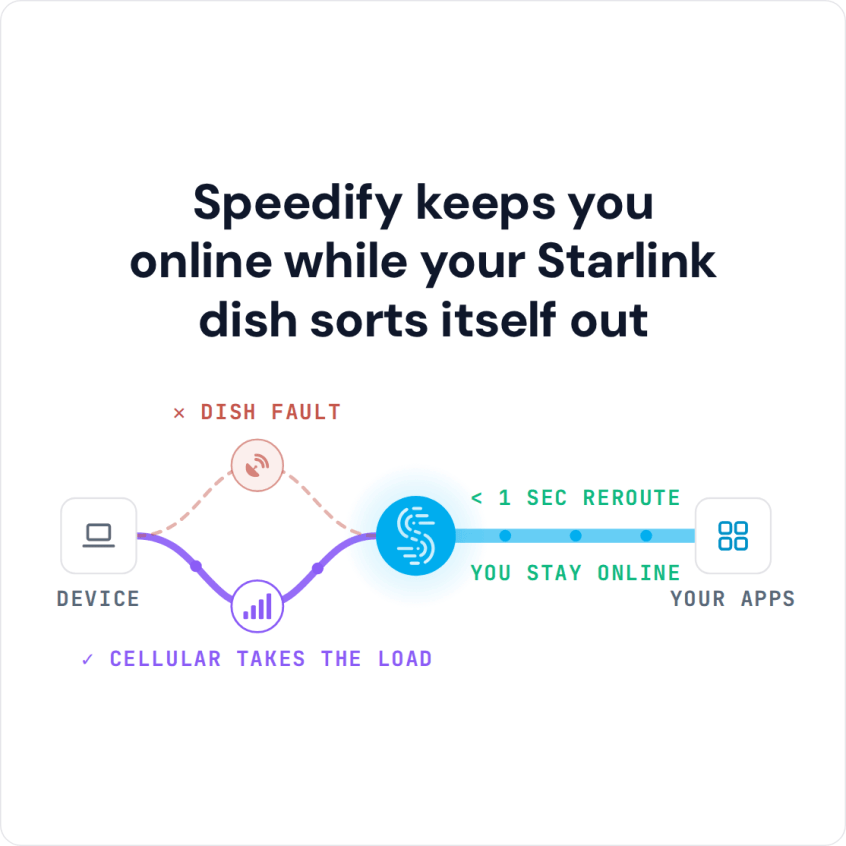
Speedify keeps you online while your Starlink dish sorts itself out
Starlink Internet Connection Dropouts Happen to Everyone
Speedify measures thousands of Starlink users in more than 150 countries. From 29 September to 12 October 2026, fixed Starlink dishes went offline for about 37 minutes a day on average, and Starlink dishes on RVs and boats for about 61 minutes a day.
Starlink also switches each dish to a new satellite every 15 seconds, and a switch can cause a short dropout. Even a perfectly installed Starlink dish goes offline, and about 7 in 10 Starlink users on Speedify use Starlink together with a second internet connection, like 4G/5G cellular.
Why Your Starlink Signal Is Weak
The SNR (Signal-to-Noise Ratio) Persistently Low alert most often means something is blocking your Starlink dish: trees, buildings or anything else (cats included) standing between your Starlink dish and the satellites. Even a small obstruction can cause:
- Video meetings that keep disconnecting
- Videos that buffer while you stream
- Online games that drop out
- Important downloads that stop halfway
How to Improve a Weak Starlink Signal
- Check the Starlink app first. If it shows a Starlink outage in your area, the problem isn’t at your home and there’s nothing to fix. If it shows a different alert, go through the Starlink not working troubleshooting steps.
- Look at the obstruction map in the Starlink app to see which part of the sky is blocked. There’s more on this in how to fix Starlink obstructions.
- Clear snow or debris off your Starlink dish.
- Move your Starlink dish higher, or to a spot with a clearer view of the sky, or trim the branches in the way.
- Wait out the weather. A signal weakened by rain or snow comes back when the storm passes.
Moving your Starlink dish or trimming trees isn’t always practical or possible, though.
Why a Second Internet Connection Helps When the Starlink Signal Is Weak
You can’t clear an obstruction in the middle of a video call, a live stream or an online game, at the exact moment your Starlink signal gets weak. That’s why you need a second internet connection that takes over on its own.
Speedify uses your Starlink internet connection together with any other internet connection you have:
- 4G/5G cellular
- A DSL or cable line
- Public Wi-Fi in range
- A mobile hotspot
When a weak signal slows down or cuts your Starlink internet connection, Speedify moves your internet traffic to your other internet connection right away, so you stay online without a break.
How to Stay Online When Starlink SNR Is Persistently Low, with Speedify
- Get the Speedify app on your devices. It runs on Windows, Mac, Linux, Android, iOS and even on OpenWrt routers.
- Connect your computer or phone to Starlink and to your second internet connection at the same time. On a phone, stay on your Starlink Wi-Fi and keep the phone’s cellular connection turned on. On a computer, use your Starlink Wi-Fi plus an Ethernet cable to your other internet line, or your phone plugged in with a USB cable to share its cellular connection.
- Turn Speedify on. It uses both internet connections at the same time on its own, with no settings to change.
- Stay online, even when your Starlink signal is weak.


You also get nearly the full speed of both internet connections combined, not only failover when Starlink drops.
Trees, buildings and storms don’t have to take you offline. Speedify needs that second internet connection: if both are down at once, you are offline either way.
Download Speedify now and stay online when your Starlink signal is weak.
Speedify
Get started with Speedify today.
Combine Wi-Fi, 4G/5G cellular, Ethernet, Starlink, and more into one faster, steadier connection. Free to try — no credit card required.
🚀 Speed
Faster uploads and downloads by bonding all your connections at once.
📶 Stability
Automatic failover in under a second when any connection drops.
🔒 Security
AES-256 encryption on every connection, on every network you join.



15M+ downloads worldwide. 75K+ five-star reviews on iOS and Android.