

Speedify Reduces Starlink Lag and Latency Spikes for Gaming by Combining Starlink With 4G/5G Cellular, Wi-Fi, Ethernet
On average, Starlink games fine. Latency in 2026 sits around 25 to 50 ms, which is playable for Fortnite, Apex, Call of Duty, and most MMOs. The problem is not the average. It is the spike. Every few seconds the Starlink dish hands off from one satellite to the next, and during that handoff the connection can drop packets and send ping jumping to 80 to 120 ms. That is the rubber-banding, the warp, the shot that should have landed.
This guide covers why Starlink lags during games, which games feel it most, what you can fix on your own, and how Speedify smooths out the spikes by combining Starlink with another internet connection, such as 4G/5G cellular, Wi-Fi, wired Ethernet, or a second Starlink.
Quick answer
Should you get a backup connection for Starlink?
Yes. Starlink goes down every day — an always-on dish averages about 34 minutes of downtime daily from routine satellite handoffs. A second connection keeps you online when Starlink drops.
What’s the best backup connection for Starlink?
A 4G/5G cellular hotspot or SIM is the most practical backup for most Starlink users — it works anywhere Starlink works, requires no installation, and uses a different network so outages rarely overlap. Cable or DSL broadband is a strong option if you have it at a fixed location. A second Starlink dish is also possible if you need maximum throughput.
How do you use two internet connections at once with Starlink?
Speedify combines Starlink with any other connection — cellular, cable, Wi-Fi, or a second dish — into one bonded connection. Speedify runs on your phone, laptop, or router. When Starlink drops, Speedify moves your traffic to the backup instantly, so calls don’t cut out and downloads don’t stall. Speedify is free to try.
71% of Speedify’s Starlink users already run a second connection. The data below shows why.
Try Speedify free →Speedify Starlink Index — real-world performance from 6,209 Starlink users: 2.4% downtime, about 34 minutes a day for always-on connections
Starlink goes down every day.
Here’s what that actually looks like.
Speedify passively monitors every connection it bonds. These figures come from 6,209 Starlink users over 14 days — compared in real time against the other connections on the same devices. No speed tests, no lab conditions.
Daily downtime
~34 min
2.4% of connected time unreachable
Median latency
60 ms
p90 spikes to 257 ms
Avg packet loss
0.17%
vs 0.08% on T-Mobile
71% ran at least one other connection simultaneously — 4,381 of 6,209 users. Cellular is the most common backup.
Use Speedify to stay online during satellite handoffs every 15 seconds
Research confirms Starlink switches between satellites every 15 seconds on a fixed schedule. Each satellite handoff is a potential dropout, and on a congested network or with any obstruction, those Starlink dropouts become real interruptions.
Speedify fixes Starlink connection drops by combining your Starlink internet connection with another satellite dish, Wi-Fi, 4G/5G cellular, or wired Ethernet at the same time. When Starlink drops, Speedify keeps your traffic moving on the backup internet connection instantly.

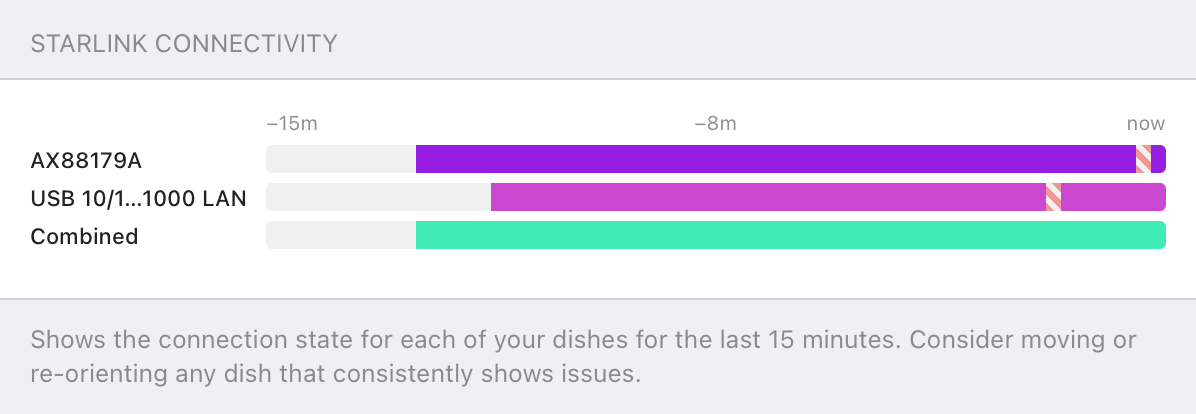
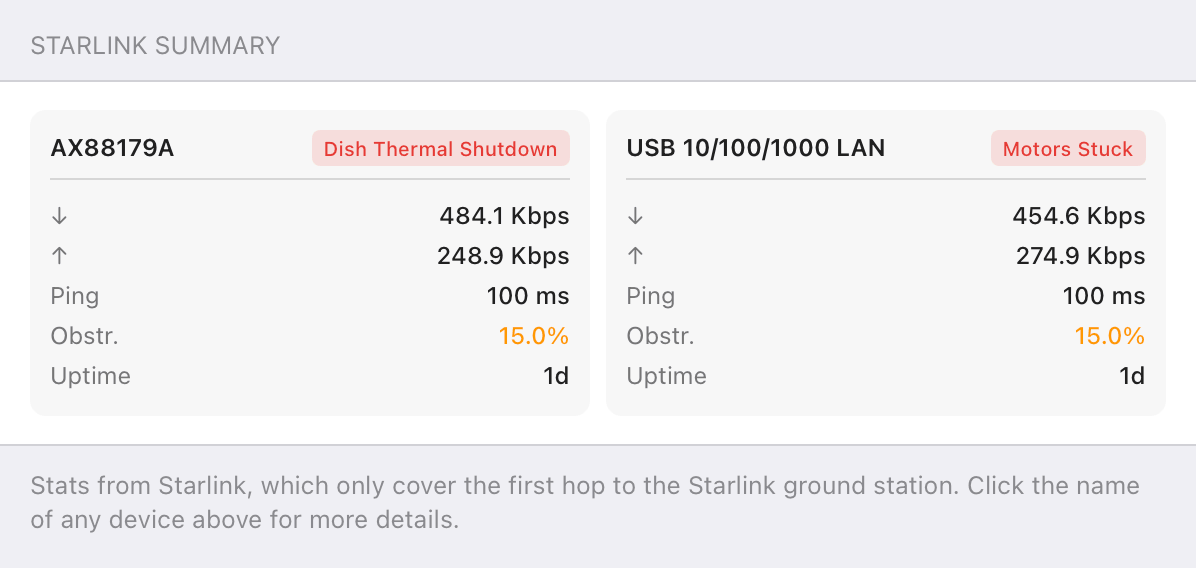
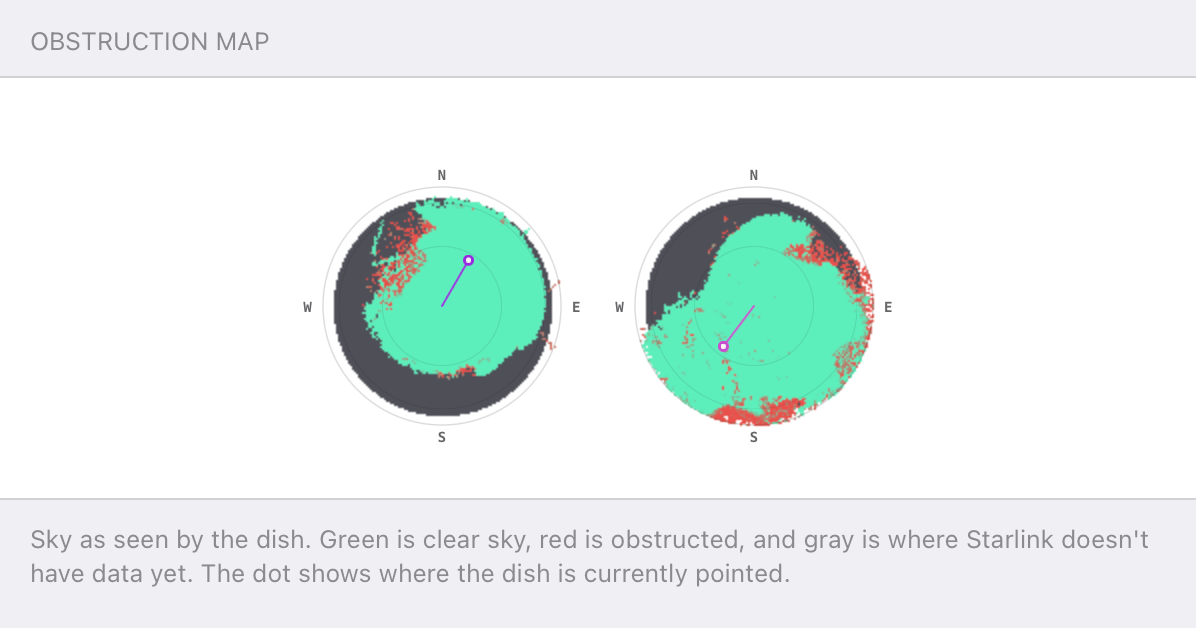
Speedify alerts you about your Starlink dish status
Speedify software alerts you about your Starlink dish status as soon as your dish experiences an issue - e.g. when your actuator motor is stuck, the mast is not vertical or there's a thermal throttle.
Speedify's Starlink Control Center helps you monitor all your Starlink dishes, read obstruction maps, and align multiple dishes all in the Speedify app. Get a real-time view of each dish's health and optimize the position of each Starlink dish, so you get the best possible performance out of your Starlink connections.
Speedify makes your uploads and downloads faster, more reliable, and more secure.
Speedify combines Wi-Fi, 4G / 5G cellular, Ethernet, Starlink, and other satellites for faster internet uploads and downloads
Speedify is the only software app that combines Wi-Fi, 4G / 5G cellular, Ethernet, Starlink and other satellites at once for secure, faster, and more reliable internet uploads and downloads so you stay online without interruptions.
Speedify will automatically detect and start using any available Internet connections on your device while intelligently distributing your online traffic between them for optimal performance. If you need help we have quick start guides available for most common set ups.
Speedify gets you faster uploads and downloads from the devices around you
Speedify's Pair & Share feature lets you and the devices around you pair up and share 4G/5G cellular both ways, so every paired device gets faster uploads, faster downloads, and a steadier internet connection. All sides share and use each other's cellular at once, unlike a personal hotspot, where one device gives and the rest take.
Speedify's Pair & Share feature runs over the local network between devices already running Speedify, with no extra hardware and no new data plans. Speedify creates an encrypted pool of shared 4G/5G cellular connections across all paired devices. Each device taps into that shared pool of combined connections for faster upload and download speeds and a more reliable internet connection.
See how you can use Speedify to combine different Internet connections:


Why Starlink Lags During Games
- Satellite handoffs. A Starlink dish switches satellites roughly every 15 seconds. Each switch can cost a few packets, and in a fast game a few lost packets is a visible stutter.
- Jitter. Even when average ping looks fine, the variation between packets is what breaks aim and timing. Starlink jitter runs higher than fiber or cable.
- Peak-hour congestion. Evening play lands right when the most dishes in your cell are active, so ping climbs and stays there.
- Obstructions and weather. A partly blocked view of the sky or heavy rain causes retransmits that read as lag.
- Weak uploads. Starlink upload speeds are far lower than download speeds, which hits voice chat and game streaming before it hits anything else.
Which Games Feel Starlink Lag Most
Competitive first-person shooters like Valorant and Counter-Strike feel every spike, since a single dropped packet at the wrong moment loses the duel. Fighting games and rhythm games are just as unforgiving. Cloud gaming on GeForce Now or Xbox Cloud Gaming is the most sensitive of all, because the entire video feed depends on a steady connection. Casual games, turn-based games, and most MMOs ride out the spikes without much trouble.
Quick Wins Before You Bond Connections
Plug into the dish with wired Ethernet instead of Wi-Fi to cut local latency. Turn on Quality of Service on the router to prioritize game traffic. Play off-peak where the schedule allows, clear anything the obstruction map flags, and pause cloud backups and large downloads while playing. These steps recover the latency Starlink already has. None of them remove the handoff spike, because that spike is built into how a single satellite link works.
Who Notices Starlink Gaming Lag Most
- Competitive players. Anyone playing ranked FPS or fighting games against opponents on fiber.
- Cloud gamers. GeForce Now and Xbox Cloud Gaming need steady latency, not just a good average.
- Rural gamers. Players with no fiber or cable option, for whom Starlink is the only fast connection.
- Streamers. Anyone gaming and live-streaming at once, where weak Starlink uploads bite hardest.
Speedify and Starlink: Smooth Out Gaming Lag by Combining Connections
A handoff spike happens on one link at a time. Speedify combines Starlink with 4G/5G cellular, Wi-Fi, wired Ethernet, or a second Starlink into one bonded connection, then splits gaming traffic across all of them at the packet level. When Starlink drops packets during a handoff, the other connection carries them, so the game never sees the gap. For the most latency-sensitive sessions, Speedify can send the same packets over two connections at once and use whichever arrives first, which is how Speedify cuts the spikes a single dish cannot avoid. Where 5G is available, bonding Starlink with 5G home internet covers those same spikes from a second connection.
To see why those gaps happen in the first place, read how Speedify handles Starlink satellite handoffs every 15 seconds, then learn how Speedify’s channel bonding combines connections.

Get started with Speedify today!
With Speedify you can combine Wi-Fi, 4G / 5G cellular, Ethernet, Starlink and other satellites into one bonded super-connection to improve livestreaming, video calling, gaming, web browsing, and everything else you do online.


Speed
Stability
Security
Speedify engineers love talking tech on YouTube, Tiktok, and Instagram!
Alex Gizis and the Speedify engineers discuss and explain technology including Starlink satellites, Wi-Fi 7 routers, Apple networking features, fiber optics, broadband internet, 5G mobile networks, AI, networking protocols, and much more. Follow Speedify on YouTube, TikTok, Instagram, and LinkedIn!
Alex and the Speedify team are always exploring the latest in networking and security technology—like 5G, 6G, WiFi 7, laser and satellite internet—and sharing it in new discussion content across YouTube, TikTok, Instagram, and LinkedIn every week.
Got a tech question? Let's go deeper! Pop into Speedify Office Hours live every Wednesday at 10 AM Eastern. Speedify CEO Alex Gizis and our network engineers are standing by to break down your questions about networks, tech updates, and Speedify features.
