

Speedify Adds Your Phone’s 4G/5G to a Starlink Mini or Mini 2, So Calls Keep Going When the Dish Loses the Sky
The Starlink Mini 2 is the Starlink Mini with a battery. Starlink announced the Mini 2 on 10 November 2026: the new dish adds a removable 71 Wh battery rated for up to 4.5 hours, Wi-Fi 6 in place of Wi-Fi 5, USB-C power and a thinner body, and it weighs more with the battery attached. Starlink has not published speed figures or a standalone price for the Mini 2, and in November 2026 only invited customers in the US could preorder one. The original Starlink Mini stays on sale, with no battery but with an Ethernet port.
If you are trying to decide between the two, you are not the only one: Google’s suggestions for “Starlink Mini 2” are price, release date, battery, speed and “vs Mini”. Below: both dishes side by side, what the battery changes, what a missing Ethernet port means for laptops, and how to stay online when either dish loses its view of the sky. Speedify, an app that uses Starlink and 4G/5G cellular at the same time, covers that last part. On a single internet connection, Speedify works as an encrypted VPN but can’t add speed or stop drops. With a Mini or Mini 2 and your phone’s 4G/5G, Speedify moves your calls and streams to cellular whenever the dish loses the sky, so download Speedify on the phone or laptop you take with you.
Starlink Internet Connection Dropouts Happen to Everyone
Speedify measures thousands of Starlink users in more than 150 countries. From 29 September to 12 October 2026, fixed Starlink dishes went offline for about 37 minutes a day on average, and Starlink dishes on RVs and boats for about 61 minutes a day.
Starlink also switches each dish to a new satellite every 15 seconds, and a switch can cause a short dropout. Even a perfectly installed Starlink dish goes offline, and about 7 in 10 Starlink users on Speedify use Starlink together with a second internet connection, like 4G/5G cellular.
Starlink Mini 2 vs Starlink Mini: Specs Side by Side
The Starlink Mini column comes from Starlink’s Mini specification sheet. The Mini 2 column comes from Starlink’s 10 November announcement as reported by Digital Trends and the Mobile Internet Resource Center. As of 27 November 2026, Starlink had not released speed or power figures for the Mini 2.
| Starlink Mini | Starlink Mini 2 | |
|---|---|---|
| Battery | None built in | Removable 71 Wh battery, up to 4.5 hours |
| Power input | 12 to 48 V DC plug; a USB-C power bank must supply 100 W (20 V at 5 A) through Starlink’s USB-C cable | USB-C, 60 W charger in the box |
| Wi-Fi | Wi-Fi 5, up to 112 m² (1,200 sq ft), up to 128 devices | Wi-Fi 6, up to 167 m² (1,800 sq ft) |
| Ethernet port | One (cable sold separately) | Not listed |
| Size | 298.5 x 259 x 38.5 mm | About 314 x 263 x 23.1 mm |
| Weight | 1.16 kg with kickstand | 1.6 kg with battery and kickstand |
| Weather rating | IP67 | IP67 |
| Average power use | 25 to 40 W | Not published |
| Operating temperature | -30°C to 50°C (-22°F to 122°F) | Not published |
The original Mini has no motors: you aim it by hand with help from the Starlink app. The Mini 2 also gets a physical power button and a standard tripod thread, according to Digital Trends.
Starlink Mini 2 Battery Life: What 4.5 Hours Covers
Starlink rates the Mini 2 battery for up to 4.5 hours of use. The battery clips off the back of the dish without tools and has its own USB-C port, so a spare can charge while the other one runs the dish, as The Next Web describes it. The Mobile Internet Resource Center works out that two batteries running close to their rating would cover a typical eight-hour working day.
The original Mini has no battery at all. Away from a wall socket, the Mini runs from a car socket, a portable power station or a USB-C power bank, and Starlink’s spec sheet asks for a power bank that delivers 100 W over USB-C Power Delivery. A weaker power bank or car socket can make the Mini restart, and every restart is a few minutes offline while the dish finds the satellites again.
The battery matters most for short trips away from power: a hike, a day at the beach, a sports field, a car with no spare socket. If your Mini already runs all day from an RV or a campsite hookup, the battery adds weight and little else.
Starlink Mini 2 Price and Release Date
Starlink opened Mini 2 preorders on 10 November 2026 to selected customers in the US, by invitation only. According to the invitation terms reported by the Mobile Internet Resource Center, the preorder is a bundle with 12 months of prepaid Roam Unlimited service, a Mini 2 bought this way can’t be moved onto an existing service line, and the first shipments are expected from mid-December.
As of 27 November 2026, Starlink had not announced a standalone Mini 2 price, a price for a spare battery, a date for wider availability or any country outside the US. For the current Mini price and the Roam plans where you live, see Starlink’s Roam page.
Starlink Mini 2 Speed: No Published Figures Yet
Starlink hasn’t published download or upload figures for the Mini 2, and the launch coverage includes no speed tests. Until there are, no source supports a speed difference between the two dishes in either direction. The Wi-Fi 6 router reaches further across a large RV or a campsite, but Wi-Fi range doesn’t change how fast the satellite link is.
What both dishes share is the weak point of any small Starlink dish: it needs a clear view of the sky. A Mini on a car roof or a kickstand passes trees, overpasses and buildings, and on hot days it can slow down or shut off to cool (see how to stay online while a Starlink Mini overheats). Dishes on the move drop out more than dishes on a roof, as the Speedify Starlink Index shows from thousands of real Starlink dishes.
Starlink Mini 2 Without an Ethernet Port: What Changes for Laptops
The original Mini has one Ethernet port. With the separately sold Mini Ethernet cable and a laptop with an Ethernet port or a USB-C Ethernet adapter, the laptop gets Starlink over the cable and keeps its built-in Wi-Fi free for your phone’s hotspot. That gives the laptop two internet connections with no extra hardware.
The Mini 2 materials show no Ethernet port, so the laptop’s built-in Wi-Fi has to join the Mini 2’s Wi-Fi network. Built-in Wi-Fi joins one network at a time, so your phone’s 4G/5G has to reach the laptop another way:
- USB tethering: connect the phone to the laptop with a cable and turn on USB tethering (iPhone: Personal Hotspot). The laptop sees the phone’s 4G/5G as a wired internet connection.
- Speedify’s Pair & Share feature: with Speedify on the phone and the laptop, both joined to the Mini 2’s Wi-Fi, the phone shares its 4G/5G cellular with the laptop over that Wi-Fi network.
- A USB Wi-Fi adapter on a Windows PC: the adapter joins the phone’s hotspot while the built-in Wi-Fi stays on the Mini 2. Apple Silicon Macs don’t support USB Wi-Fi adapters.
On the phone itself nothing changes: Speedify on an iPhone or Android phone uses the dish’s Wi-Fi and the phone’s own 4G/5G together, on either dish (see how to use Starlink and 5G on an iPhone at the same time). If your setup feeds the Mini into a travel router or an enclosure over Ethernet, check that it still works before you switch to a Mini 2.
Which to Buy: Starlink Mini or Starlink Mini 2
- The Mini 2 if you use Starlink for a few hours at a time away from any power, and you are in the US with an invitation, or can wait for wider availability.
- The Mini if the dish runs from a vehicle or campsite power all day anyway, you need the Ethernet port, or you want a dish now in a country where the Mini 2 isn’t sold yet.
- Either one if you also plan for drops: a battery keeps the dish running, not connected. See van life internet that works for a full setup on the road.
Keep Calls Going When a Starlink Mini or Mini 2 Loses the Sky
Neither dish can see through a tree. On the road and at campsites, short drops come from trees, overpasses, hills and buildings, and one badly timed drop is enough to freeze a video call. The causes and fixes are in why Starlink keeps disconnecting; what remains after those fixes needs a second internet connection.
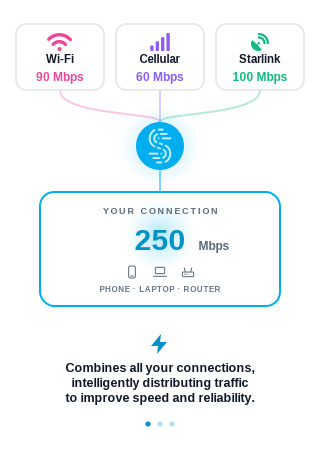
Speedify uses the Mini’s Starlink internet connection and your phone’s 4G/5G cellular at the same time. When the dish drops, Speedify moves your calls, streams and games to 4G/5G, in milliseconds according to Speedify. Your traffic leaves through a Speedify server, so the public IP address the other side sees stays the same and a call doesn’t have to reconnect. With both internet connections up, Speedify combines them for up to 95% of their combined speed, per Speedify. To save phone data, set 4G/5G to Backup in Speedify, so cellular carries traffic only when Starlink drops.
Download Speedify on the laptop or phone you travel with. The free tier includes 5 GB a month with a free Speedify account, enough to try it on your next trip.
Speedify
Get started with Speedify today.
Speedify combines Wi-Fi, 4G/5G cellular, Ethernet, Starlink and satellite into one faster, more reliable internet connection. Free to try: 5 GB a month with a free account. No credit card required.
🚀 Speed
Faster uploads and downloads, because Speedify uses all your internet connections at once.
📶 Stability
If one internet connection drops, Speedify moves your traffic to the others in milliseconds.
🔒 Security
AES-256 encryption on every internet connection, on any network you join.


15M+ downloads worldwide. 75K+ five-star reviews on iOS and Android.