
What to Do to Unblock YouTube When It’s Restricted
To get on YouTube when it’s blocked, whether by a school or work network policy or by internet censorship, connect through a fast VPN: the network can no longer see that you are opening YouTube, so it cannot block it.
A VPN sends your connection through a server somewhere else, so YouTube loads as if you were in a place where it is not blocked. Most VPNs slow down your Internet connection, though, because they encrypt all traffic and add overhead, and slow internet means buffering videos.
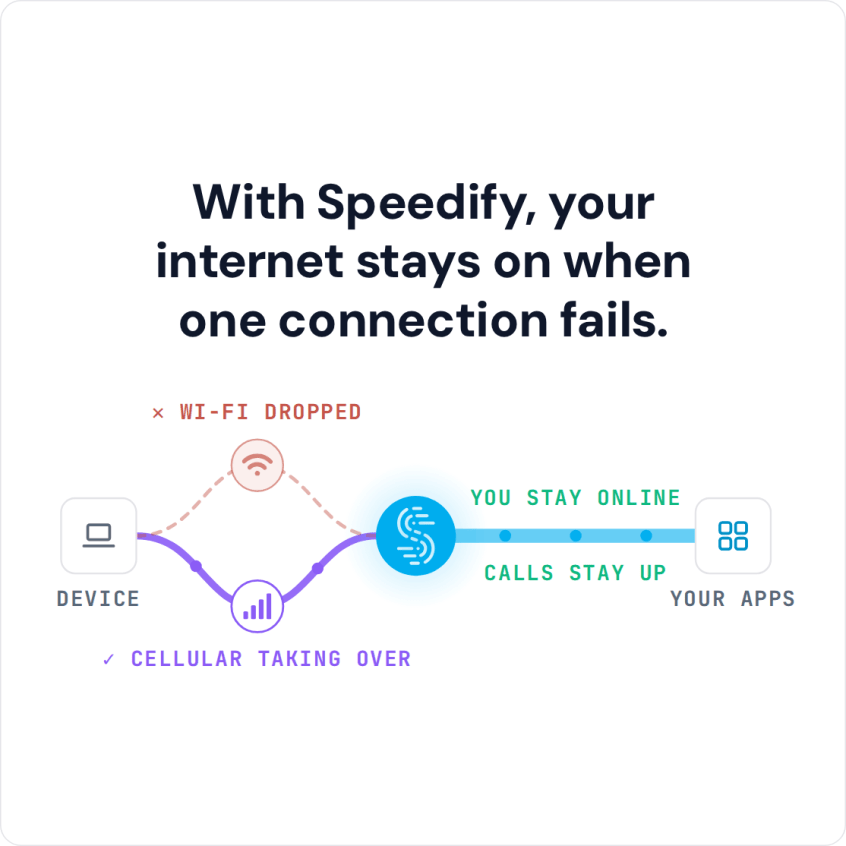
With Speedify, your internet stays on when one connection fails.
Speedify is an app that encrypts your traffic like a VPN and can combine multiple internet sources, such as Wi-Fi and 4G/5G cellular, into one faster, more reliable connection. Speedify splits traffic per packet across all of them, which works differently from load balancing, so using Speedify to unblock YouTube also means fewer choppy or laggy videos.
If YouTube is blocked on your school, work or home network, you are not the only one. Below: the steps to get YouTube back with Speedify, why networks block YouTube, and how Speedify also fixes buffering and slow loading.
How to Get on YouTube When It’s Blocked in Five Steps
- Download Speedify on the phone or computer you use. Speedify runs on Windows, macOS, iOS, Android and Linux.
- Open Speedify and create a free account (the free tier includes 5 GB per month), or sign in.
- On a phone, tap Allow when your phone asks to add a VPN configuration.
- Speedify connects to a Speedify server automatically. The school or work network now sees only an encrypted connection to that server, not the sites you open.
- Open YouTube in the app or in your browser and watch as usual.
How to Get on YouTube When It’s Blocked at School, at Work or When Your Internet Is Censored
Schools, offices and governments usually do not shut off the internet entirely or make websites and apps shut down. What they do instead is block certain URLs on their networks, in this case the specific URLs YouTube uses.
Speedify unblocks YouTube by hiding the sites you visit from the Wi-Fi network you use to connect. Speedify combines your available internet connections for speed, and lets you use your school or office network (Wi-Fi or wired) to visit the websites you want without the network blocking them. The network sees only an encrypted connection to the Speedify server.
Speedify Gets You on YouTube When It’s Blocked, but Also Fixes Buffering and Slow Loading
The reason for your slow YouTube experience is most likely your Internet connection. Your computer and mobile device are powerful pieces of technology, but by default some of their powers are not in use. For example, your smartphone only uses one Internet connection at a time: Wi-Fi or 4G/5G cellular. If that connection is spotty or intermittent, you will have a poor YouTube experience, a little like being stuck in a traffic jam because only one lane is open on the freeway.
Speedify lets your device use multiple connections at the same time, such as Wi-Fi and 4G/5G cellular on a phone, for a faster YouTube connection with less buffering, slow loading and choppy video.
Combining internet connections increases the bandwidth your device has for video streaming and everything else. Combining used to require expensive special hardware, but Speedify makes it as easy as downloading an app.
Speedify also has auto failover: if one of your connections fails or becomes unreliable, Speedify reroutes all traffic through your other working connection until the first one recovers, so YouTube keeps playing.
The Simple, Secure, and Speedy Solution to Get on YouTube When It’s Blocked
Speedify was designed to give you the security of a VPN connection without sacrificing speed. Your data is safe from prying eyes, you are protected on compromised Wi-Fi networks, and you can open YouTube on networks that block it.
Before you rely on Speedify’s encryption on a school or work network, check that network’s rules on VPN apps.
To get on YouTube when it’s blocked on college Wi-Fi, at work or by a government that restricts the world’s most popular video platform, Speedify is a simple and secure way to do it.
Speedify
Get started with Speedify today.
Speedify combines Wi-Fi, 4G/5G cellular, Ethernet, Starlink and satellite into one faster, more reliable internet connection. Free to try: 5 GB a month with a free account. No credit card required.
🚀 Speed
Faster uploads and downloads, because Speedify uses all your internet connections at once.
📶 Stability
If one internet connection drops, Speedify moves your traffic to the others in milliseconds.
🔒 Security
AES-256 encryption on every internet connection, on any network you join.



15M+ downloads worldwide. 75K+ five-star reviews on iOS and Android.