
Unbreakable VPN Connection to Fix ProtonVPN Disconnects by Combining Starlink, Wi-Fi, 4G, 5G, and DSL with Speedify
A VPN app that drops in the middle of a file transfer leaves your traffic exposed for the seconds before it reconnects, and on a video call it simply ends the call. ProtonVPN disconnects happen because one internet connection is carrying everything.
Speedify protects your traffic the way any VPN app does, but uses Wi-Fi, wired Ethernet and a phone’s 4G/5G cellular data together, so when one of them wobbles the call or the transfer carries on over the others. Five fixes for ProtonVPN come first here, followed by what using Speedify gets you: calls and uploads that stay up.
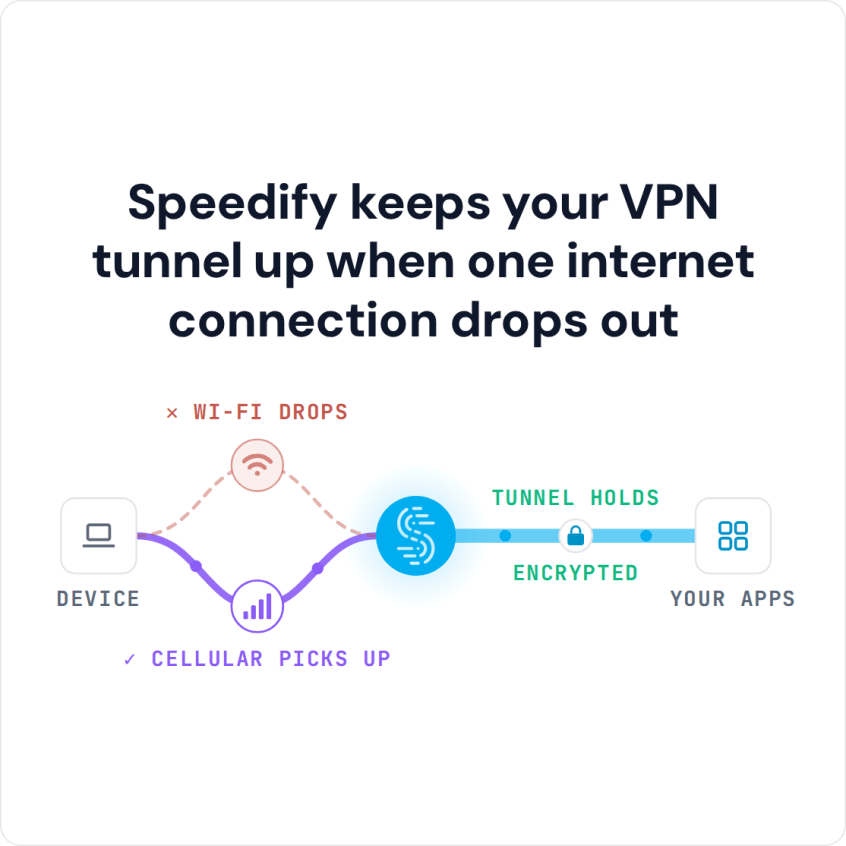
Speedify keeps your VPN tunnel up when one internet connection drops out
Why Does My ProtonVPN Keep Disconnecting?
The reason Proton VPN keeps disconnecting is the way it, and most other VPN services, was designed. It is also why SurfEasy keeps disconnecting. ProtonVPN only uses one Internet connection to route all the data to the VPN server. Even if your laptop, iPhone or Android device has multiple Internet connections, ProtonVPN will only use one of them. When connecting to the VPN server it uses a single socket. This means that your Internet connection will run slower because all the data being sent to and from your device must first be sent to the VPN server for encryption through one channel only.
This uses up a lot of your bandwidth. But, not only does it slow down your Internet experience, it also makes the VPN connection vulnerable. One change to your Wi-Fi signal or a fluctuation in your cell signal and you are disconnected from the ProtonVPN server. If you are traveling (by train, bus or car) or on the move, your connection is even more prone to frequent disconnects, as you get passed between multiple Wi-Fi networks and/or cell towers.
5 Steps to Deal with Situations Where Proton VPN Keeps Disconnecting
So, what can you do to stay connected to ProtonVPN? There are a few steps you can take to minimize your chances of getting disconnected. But, because the problem is a design issue in the way ProtonVPN and other legacy VPN services are designed, you will always be vulnerable to getting disconnected while using these other services.
To avoid situations where Proton VPN keeps disconnecting, you can:
- Only connect through Wi-Fi where you have a strong, stable signal and where no one else is sharing the connection.
- Remain stationary while connected to ProtonVPN.
- Plan on using ProtonVPN for only short amounts of time.
- If you have to connect to ProtonVPN using your mobile data connection, make sure you do so from a location where you have the strongest signal possible.
- Limit your data use while connected to ProtonVPN. Videos and images use a lot more data to transmit than text.
But… Why Deal with It when You Can Do Better?
If these steps are not practical for you there is an alternative. The developers at Speedify have created a new fast bonding VPN service. The Speedify connectivity protocol was designed from the ground up to be three things:
- Fast
- Secure
- Reliable
Speedify uses a completely different design from the traditional VPNs. It uses multiple Internet connections and multiple parallel sockets. Your data travels to and from the VPN server faster and it is encrypted faster.
Proton VPN Keeps Disconnecting? Here’s Why Speedify Fast Bonding VPN is Better
Speedify uses the magic of channel bonding technology to allow your desktop, laptop or mobile device to connect to the Internet using multiple Internet connections simultaneously – e.g. via Wi-Fi and mobile data simultaneously. Speedify has auto failover so that should one of your Internet connections fail, you stay connected to the VPN through the other connection.
Speedify takes care of monitoring the quality of your connections, rerouting traffic, and keeping you online. You don’t have to worry anything except using the Internet your way.
If you are tired of Proton VPN disconnecting or having connectivity issues, why not try a different kind of VPN? Get started with Speeedify now for FREE – available in the AppStore, Google Play and on our website to download and install!
Speedify
Get started with Speedify today.
Combine Wi-Fi, 4G/5G cellular, Ethernet, Starlink, and more into one faster, steadier connection. Free to try — no credit card required.
🚀 Speed
Faster uploads and downloads by bonding all your connections at once.
📶 Stability
Automatic failover in under a second when any connection drops.
🔒 Security
AES-256 encryption on every connection, on every network you join.



15M+ downloads worldwide. 75K+ five-star reviews on iOS and Android.