
“Reconnecting” Often on Lichess? Avoid Connection Problems in the First Place
Nothing ruins an online chess game like Lichess lagging or showing “Reconnecting” while your clock keeps running. Lichess needs little bandwidth, but it needs it without interruption. Chess.com is the same: see how to fix Chess.com lag.
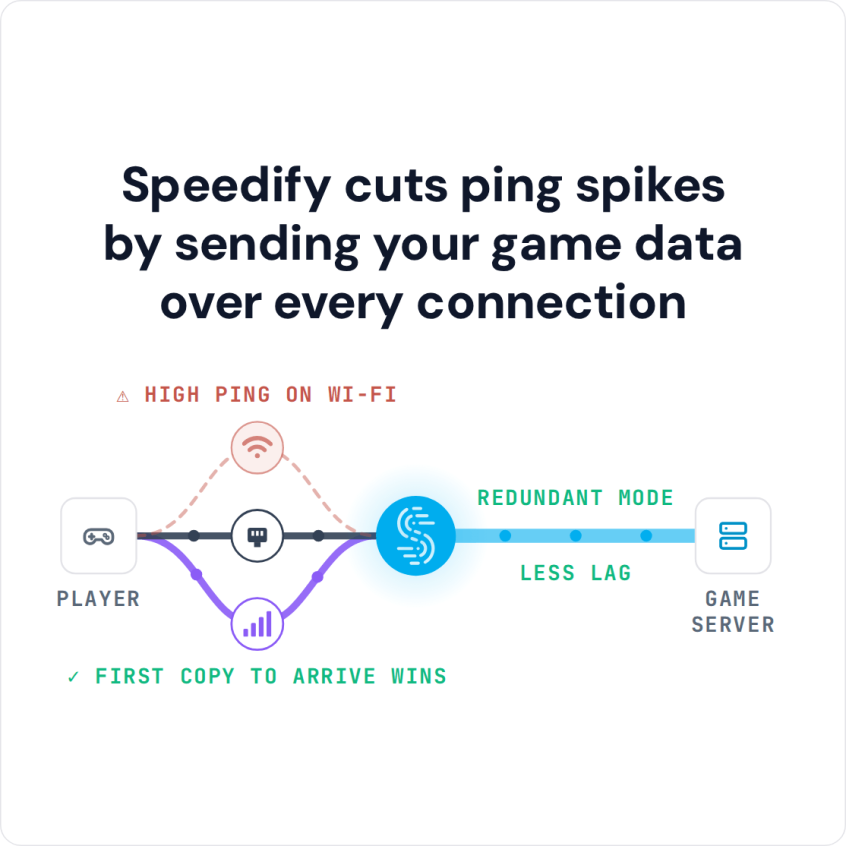
Speedify is an app that keeps a second internet connection running alongside your main one, so a momentary drop does not cost you the game on time. That needs two connections at once: on one connection, Speedify works as an encrypted VPN and can be a little slower; with two connections in Redundant Mode, your ping follows whichever connection is faster at that moment.
Speedify cuts ping spikes by sending your game data over every connection
Read on to see why the reconnect message appears, five steps to avoid it, and how a second internet connection keeps the game going when one connection drops.
Why You Get Lichess Connection Problems
If you play on lichess.org, you may have seen connection problems: messages that you lost the internet connection, or bullet and blitz games you cannot play properly. It is most frustrating when you’re in a winning position.
When you have a bad connection to Lichess, it’s highly likely you will get disconnected. And that will register as you abandoning the game, thus losing it. Even if you were one move away from victory.
There are multiple causes why this could happen:
- lichess.org servers are down or are laggy
- temporary infrastructure issues with your ISP
- slow and flaky internet on your side, such as being too far from the Wi-Fi router or having poor cellular coverage
5 Steps When Lichess Is Stuck on Reconnecting
To rule out Lichess related connection issues, check their Twitter account for announcements regarding outages.
If you see lichess.org losing connection and it’s not them, then it’s you. You can view the latency between you and Lichess servers on their website. Also test your online speed. Is the speed close enough to what you’re paying for? And, most important, is your lag (latency) higher than 1000ms (1 second)?
Assuming that everything is fine, here’s how you can avoid / fix Lichess losing connection and “reconnecting”:
- Restart your modem, router and the device you play Lichess on (computer or smartphone). You may also update your router’s firmware, if an update is available.
- Move closer to the Wi-Fi router or, better yet, use a wired Ethernet connection if possible.
- Move around till you get better cellular coverage, if no other connections are available.
- For best results, make sure no other apps are hogging bandwidth or memory on your device.
- Check if your ISP is having temporary issues. They should have a status page or at least a social media account to communicate that.
If the steps above do not stop the reconnects, use two internet connections at once. This is what the Indian chess team did to deal with their connectivity issues at the Online Olympiad of 2020, which they also won.
Most likely, you have 4G/5G cellular on your smartphone, so you can combine it with your home internet. You’ll need an app that combines internet connections, like Speedify, for that.
Keep Lichess Connected with Wi-Fi and 4G/5G Cellular at Once
Speedify uses a technology for combining internet connections that lets you use multiple Internet connections at once. On your smartphone, that means Wi-Fi and 4G/5G cellular together. On a computer, there’s more flexibility about the number and type of connections.
Speedify also moves your data when something happens to one of your connections. When you stumble upon a bad Wi-Fi hotspot, or your connection suddenly goes out, Speedify automatically reroutes your data through the other available connection until both networks are back, so the game stays connected.
Speedify also works as a VPN: it encrypts all of the data you send and receive from your device, which keeps your private information and conversations secure from digital eavesdroppers on the network.
Speedify
Get started with Speedify today.
Speedify combines Wi-Fi, 4G/5G cellular, Ethernet, Starlink and satellite into one faster, more reliable internet connection. Free to try: 5 GB a month with a free account. No credit card required.
🚀 Speed
Faster uploads and downloads, because Speedify uses all your internet connections at once.
📶 Stability
If one internet connection drops, Speedify moves your traffic to the others in milliseconds.
🔒 Security
AES-256 encryption on every internet connection, on any network you join.



15M+ downloads worldwide. 75K+ five-star reviews on iOS and Android.