
Sticky WiFi – What’s the Problem?
Your phone stays glued to the coffee shop Wi-Fi long after that network has slowed to a crawl, because a phone judges a Wi-Fi network by signal strength and never checks whether data is actually moving. Meanwhile the 4G/5G cellular data in your pocket sits unused. Speedify is an app that spreads your internet traffic across Wi-Fi and 4G/5G cellular data at once, so one slow Wi-Fi network is no longer the only thing carrying your uploads and downloads. Below you will find a real example of how this happens, the basic fixes for it, and the faster, steadier speeds you get from running Speedify on your phone. That needs both connections turned on: on Wi-Fi alone, Speedify works as an encrypted VPN and cannot make a slow network faster.
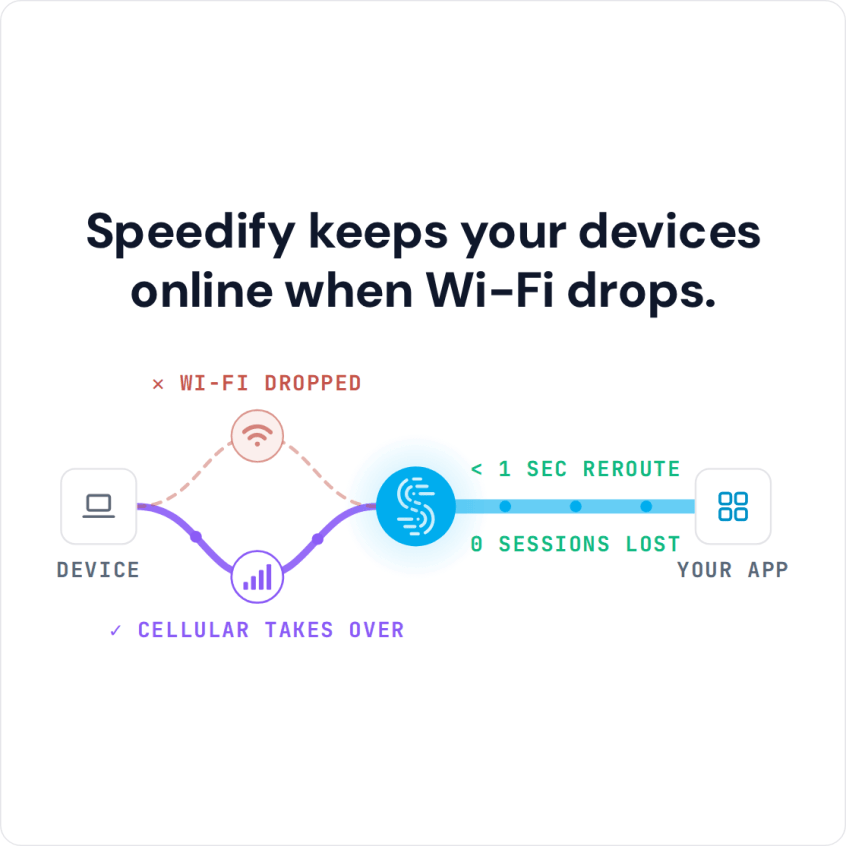
Speedify keeps your devices online when Wi-Fi drops.
WiFi Sticky Clients: How it Happens (Real Life Example)
In a perfect world, your laptop or smartphone would:
- look for the best WiFi signal,
- test out its connectivity
- test out its performance
- connect to the one that’s best for you.
This is especially important when moving around. Unfortunately, it doesn’t work that way just yet. Here’s a real life example: imagine yourself getting out of your home to walk the dog.
- You’ll be connected to your home WiFi network up to a point.
- After that, you may get in the coverage area of a public WiFi hotspot like Xfinity.
- And then another Xfinity hotspot. Or a Starbucks WiFi.
The issue is that usually once your smartphone connects to a WiFi hotspot, it will stick to it. The phone will not constantly search for a better hotspot to connect you to, even though that might exist. Instead, it will cling to the one it connected until it will get out of its range. This means that you will not get the full performance that you could.
When you are near the edge of the WiFi hotspot coverage area, speeds drop and latency is getting higher. You may encounter issues with transfers, VoIP calls on WhatsApp or Google Meet, streaming from Spotify, YouTube and other websites.
How to Fix the Sticky WiFi Issue – Basic Solutions
As explained in this article, the decision to look for another WiFi hotspot and connect to it if it’s better lies on the client device. So, it’s your computer or mobile device that decides when to switch between WiFi hotspots or from WiFi to cellular. There are some methods service providers can use to force that decision, but it’s not that simple. The simplest way is to make your device smart enough to search for those better connections and connect to them.
Some manufacturers have included functionalities to help with the WiFi hotspot decisions. Apple’s WiFi Assist and Samsung’s Adaptive WiFi / smart network switch are incipient solutions. But they still don’t solve those offline seconds while the device disconnects from one network and connects to the other.
On your own phone, three habits help: turn off Auto-Join for weak networks you pass often, forget networks you no longer use, and turn Wi-Fi off and on when the phone hangs on to a dying hotspot.
The next WiFi standard should help more with the WiFi sticky clients issue. But, until that is proven and rolls out on a large scale…
Speedify Fixes the WiFi Sticky Clients Issue
Speedify takes a different approach to solve the sticky WiFi problem. Speedify is an app that combines internet connections and manages the connectivity of your computer or mobile device. First, it allows your device to use multiple connections at the same time and combine them into one faster connection. Speedify tests the connectivity of each connection and routes your online traffic intelligently so that you will get the fastest connection.
It works by sending all those little network packets that make up your web traffic through different connections in parallel. This requires a permanent connection to a remote server, which is encrypted.
In the example above, while walking your dog and using Speedify, you stay online as long as one of the two connections works. That’s because Speedify will use both your WiFi and cellular connection at once. Naturally, it will prioritize WiFi traffic, but when that’s not performing, it’ll send more to cellular. Once your phone finds a better WiFi hotspot, it’ll send more traffic to WiFi again.
Your public IP address stays the same throughout, so calls and logged-in apps carry on.
Speedify Is Improving WiFi Client Connectivity Management and Protecting Your Online Privacy
Given its architecture, Speedify is not only a great way to solve the sticky WiFi issue. Speedify is also a VPN that keeps no record of the sites you visit and protects your online privacy from prying eyes of cyber criminals and Internet service providers. It even works if you have to go through a captive portal (login page). Security threats on public WiFi networks are on the rise, so it’s a good idea to always use a VPN.
Because Speedify encrypts your traffic, it is also a great help when it comes to avoiding ISP throttling.
Fix the WiFi sticky clients issue now with Speedify! Enjoy the Internet in your own terms.
Speedify
Get started with Speedify today.
Speedify combines Wi-Fi, 4G/5G cellular, Ethernet, Starlink and satellite into one faster, more reliable internet connection. Free to try: 5 GB a month with a free account. No credit card required.
🚀 Speed
Faster uploads and downloads, because Speedify uses all your internet connections at once.
📶 Stability
If one internet connection drops, Speedify moves your traffic to the others in milliseconds.
🔒 Security
AES-256 encryption on every internet connection, on any network you join.



15M+ downloads worldwide. 75K+ five-star reviews on iOS and Android.