
Why your Starlink is Slow
Does Starlink slow down with multiple devices? Yes. Every device in your home shares the speed of your one Starlink internet connection, so the more phones, TVs and computers are streaming at once, the less each one gets. Starlink also slows down when more users in your area are online at the same time.
Speedify is an app that adds speed by using Starlink together with a second internet connection, like a second Starlink dish or your phone’s 4G/5G cellular data. Below: why Starlink and other satellite internet get slow, what you can fix yourself, and how Speedify helps.
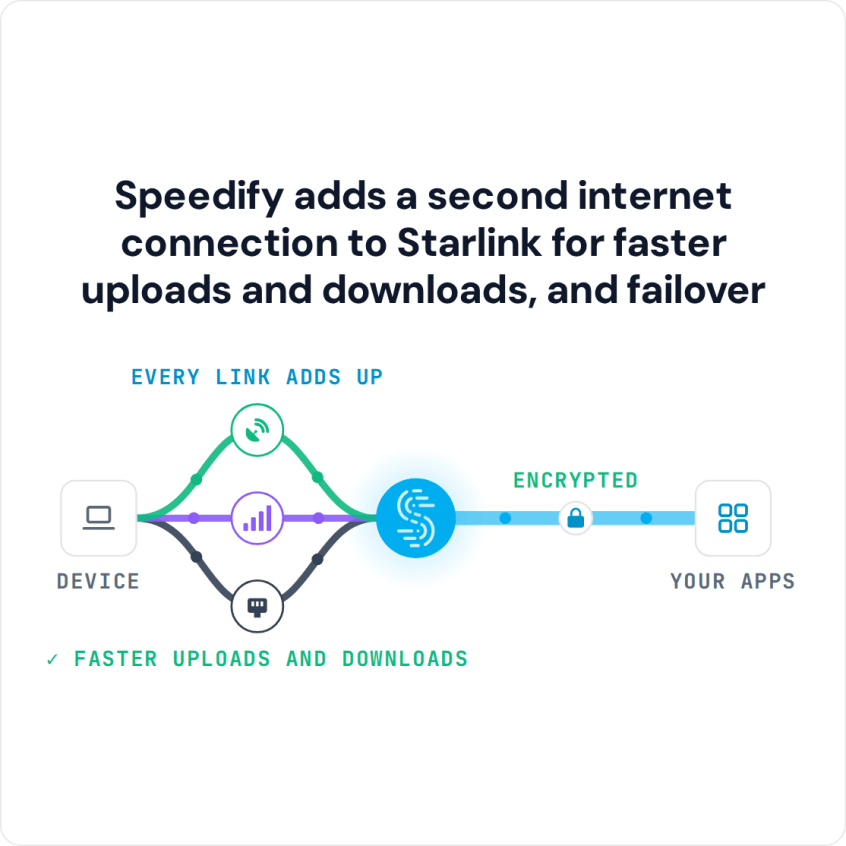
Speedify adds a second internet connection to Starlink for faster uploads and downloads, and failover
Starlink Internet Connection Drops Happen to Everyone
Speedify measures thousands of Starlink users in more than 140 countries. In September 2026, fixed Starlink dishes went offline for about 38 minutes a day on average, and Starlink dishes on RVs and boats for about 46 minutes a day.
All Starlink dishes also see short dropouts roughly every 15 seconds as the Starlink internet connection switches from one moving satellite to the next. Even a perfectly installed Starlink dish goes offline, and about 7 in 10 Starlink users on Speedify use Starlink together with a second internet connection, like 4G/5G cellular.
Why Starlink Slows Down with More Devices and More Users
More devices at home. Your Starlink dish brings one internet connection into your home, and every device on your Starlink Wi-Fi shares it. Starlink lists downloads of 45 to 280 Mbps, and most users get over 100 Mbps. That is plenty for one person, but a 4K stream, a video call, a game download and a few phones all at once split it several ways.
More users in your area. Starlink satellites share their capacity among all the Starlink dishes they serve nearby. When many people in your area are online at the same time, Starlink serves plans in a set order: Priority plans first, then Residential Max, then Residential 100 Mbps, Residential 200 Mbps and Roam. Residential Lite is always slowed down first. So yes, Starlink slows down with more users, and how much depends on your plan.
Why Satellite Internet Is Slower Than Cable or Fiber
Starlink works through three parts: satellites, ground stations that connect the satellites to the internet over fiber, and the Starlink dish at your home. Older satellite internet uses satellites much farther from Earth, so every request takes a long trip up and back, which is why it always felt slow. Starlink’s satellites are much closer, so the delay is 25 to 60 milliseconds on land.
Satellite internet still has limits that cable and fiber don’t. The signal has to reach the sky, so trees, buildings and heavy weather weaken it, and your Starlink dish switches satellites about every 15 seconds, which causes short drops.
Common Causes of Slow Starlink Speeds and How to Fix Them
Slow Starlink shows up as pages that load slowly, or as internet that cuts out at random. You notice it most when streaming or live streaming: the video stutters, starts buffering, then stops. Assuming you’re inside Starlink’s coverage area, here are the usual causes:
|
Cause |
Fix |
|
The Starlink dish isn’t set up right, or something blocks its view of the sky |
Set up your Starlink dish following the instructions in your kit. Use the Starlink app to check for obstructions before you mount it. Even one tree or pole can interrupt your service. |
|
Starlink is down or having problems |
Check your status in the Starlink app, and look for reported outages. See how to check your Starlink status. Use your backup internet connection until it’s fixed. |
|
Many users online at busy times |
Check your Starlink plan in the Starlink app. Residential Lite is slowed first when the Starlink network is busy. Add a second internet connection for more speed. |
|
Bad weather: storms, heavy rain or thick clouds |
Use your backup internet connection until the weather clears. |
|
A faulty router, modem or device |
Restart your Starlink router, modem or device. Make sure you’re connected to the right Wi-Fi network. |
For more ways to speed things up, see 11 fixes for slow Starlink and how to fix a slow internet connection.
A second internet connection helps with most of these: your smartphone’s cellular data, a USB cellular modem, nearby public Wi-Fi, or any other internet connection you have around.
The problem with switching to a backup is that it breaks what you’re doing. Your computer or phone won’t use Starlink and the backup together on its own. In the middle of a live stream or an online game, you have to reconnect over the backup, and then switch back to Starlink when it works again. Speedify fixes that.
How Speedify Uses Two Internet Connections to Fix Slow Starlink Speeds
Speedify is the only app that can combine multiple internet connections into one, for steadier and more secure live streaming, video calls and web browsing. Here’s how it works with Starlink:
- Speedify can combine 2 or more internet connections at the same time, like Starlink and your phone’s cellular data, so you get more speed than Starlink alone.
- If Starlink slows down or drops, Speedify moves your traffic to your other internet connection on its own, so your video call or stream keeps going.
- Speedify puts streams, calls and games first, ahead of other traffic.
Speedify needs that second internet connection. With Starlink alone, Speedify can’t add speed or stop drops.
Speedify also encrypts all your internet traffic, which protects your privacy and personal data from anyone snooping on the network.
Speedify on one computer or phone speeds up that device. To give every device on your Starlink Wi-Fi more speed, run Speedify on a compatible router.
Speedify
Get started with Speedify today.
Combine Wi-Fi, 4G/5G cellular, Ethernet, Starlink, and more into one faster, steadier connection. Free to try — no credit card required.
🚀 Speed
Faster uploads and downloads by bonding all your connections at once.
📶 Stability
Automatic failover in under a second when any connection drops.
🔒 Security
AES-256 encryption on every connection, on every network you join.



15M+ downloads worldwide. 75K+ five-star reviews on iOS and Android.