
How to Deal when Public WiFi Hotspot is Not Working
You can’t connect to public Wi-Fi, or it connects and then shows no internet, for a few common reasons: the sign-in page never loaded, the hotspot is overloaded, the signal is weak where you are sitting, or your phone joined a saved network name that is not working here. Speedify is an app that adds your 4G/5G cellular to whatever public Wi-Fi you are on and uses both at once, so a broken hotspot cannot take you offline. That failover needs both connections: on public Wi-Fi alone, Speedify works as an encrypted VPN and cannot keep a bad hotspot from dropping. Below: why public hotspots fail, quick checks to get connected, and what Speedify adds, including encryption that keeps your browsing private on a network you do not control.
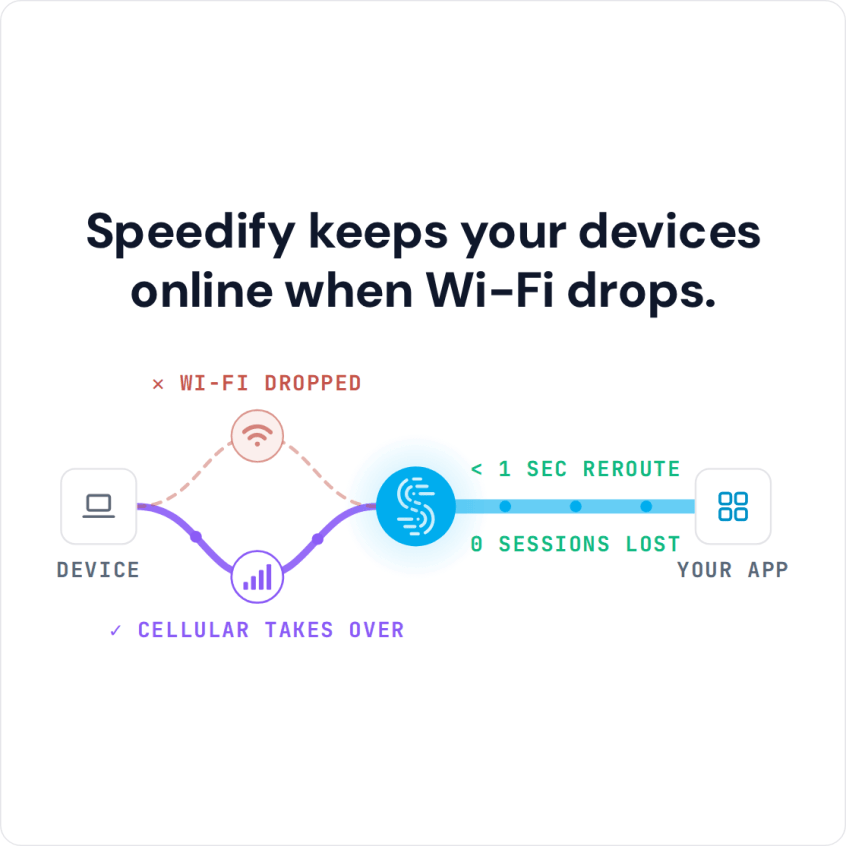
Speedify keeps your devices online when Wi-Fi drops.
Why Public Wi-Fi Hotspots Stop Working
Some public Wi-Fi hotspots sit where the signal is spotty or drops out completely, which creates “zombie” hotspots and sticky Wi-Fi: your phone shows it is connected to the public Wi-Fi network, but no website loads.
If you are on the move (on the street or a bus), your iPhone or Android phone also hops from one Wi-Fi hotspot to the next (Xfinitywifi, CableWiFi, OptimumWiFi, Starbucks, McDonald’s and so on), so the odds of landing on a non-working Wi-Fi hotspot go up.
As you move around, you are also passed from hotspot to hotspot, much like on a cellular network. Phones do not handle these Wi-Fi handoffs smoothly, which is one reason public Wi-Fi keeps disconnecting. Phones are also bad at spotting a poor Wi-Fi network and stay on it instead of switching to 4G/5G cellular, and a bad Wi-Fi hotspot is often the same as no internet at all.
iPhone Not Connecting to Public Wi-Fi: Checks That Fix Most Cases
On an iPhone, the network’s sign-in page normally pops up on its own. If it does not, open Safari and go to any plain http:// address (not https), which usually brings it up. If that fails, go to Settings > Wi-Fi, tap the info button next to the network, choose Forget This Network and join it again. Turning Airplane Mode on and off clears a stuck connection too.
If one hotspot keeps disconnecting, or joins and then loads nothing every time you pass it, stop your phone from picking it. On an iPhone, go to Settings > Wi-Fi, tap the info button next to the network and turn off Auto-Join. On Android, open the network’s details and turn off auto reconnect (the name of the setting varies by phone). Your phone then stays on 4G/5G cellular instead of joining that network, but it also skips every other hotspot with the same name.
How to Fix Public Wi-Fi Not Working with Speedify in Three Steps
Constant problems with public Wi-Fi hotspots lead most people either to tell their phones to “Forget” certain Wi-Fi networks or to turn Wi-Fi off to get away from a broken hotspot. But once they do this, the phone will not join working Wi-Fi hotspots either, and everything runs on the 4G/5G cellular data plan.
Speedify is an app built for combining Wi-Fi and 4G/5G cellular: it securely combines two or more internet connections and uses them at the same time for more speed and reliability.
Here are three steps to fix a public Wi-Fi hotspot that is not working:
- Get Speedify on your desktop or mobile device.
- Leave all your internet connections active. On an iPhone or Android phone, turn on both Wi-Fi and 4G/5G cellular. You can set data caps in the Speedify app, so you do not go over your plan and pay extra. On a laptop, turn on a second connection too, such as a 4G/LTE USB modem, a built-in cellular card or a phone connected by USB.
- Connect and use the internet as usual. Speedify detects every active internet connection and uses them together, and when the public Wi-Fi stops working, Speedify moves your traffic to 4G/5G cellular.
How Speedify Keeps You Online When Public Wi-Fi Keeps Disconnecting
Because Speedify uses several internet connections at the same time, your iPhone, cellular iPad, Android phone or laptop avoids the drops that happen when you are handed from one public Wi-Fi hotspot to another. If your device joins a hotspot with no internet, Speedify keeps you online over the other connection, and your public IP address stays the same, so logged-in sessions and calls do not see a new address. Your Spotify will not stop, your work call will not jitter and your video stream will still be online.
Public Wi-Fi Security: Speedify Encrypts Your Traffic on Any Hotspot
Speedify also encrypts your traffic like a VPN, which matters on public Wi-Fi you do not control, and protects you against fake hotspots, snooping ISPs and other cyber threats on shared networks. On networks with captive portals (the Wi-Fi sign-in page), Speedify detects the sign-in page and lets you log in without disconnecting.
Other VPNs can be clunky and slow because they push all your traffic through one internet connection. With public Wi-Fi and 4G/5G cellular connected, Speedify uses both at once; on a single connection, Speedify works as an encrypted VPN and can be a little slower.
If you use public Wi-Fi hotspots often, get started with Speedify today: the free tier includes 5 GB per month with a free account, enough to try it on the hotspots you use.
Speedify
Get started with Speedify today.
Speedify combines Wi-Fi, 4G/5G cellular, Ethernet, Starlink and satellite into one faster, more reliable internet connection. Free to try: 5 GB a month with a free account. No credit card required.
🚀 Speed
Faster uploads and downloads, because Speedify uses all your internet connections at once.
📶 Stability
If one internet connection drops, Speedify moves your traffic to the others in milliseconds.
🔒 Security
AES-256 encryption on every internet connection, on any network you join.



15M+ downloads worldwide. 75K+ five-star reviews on iOS and Android.