


DIY: IRL Streaming Backpack with a Raspberry Pi and Speedify Network Bonding Technology
IRL Live Streaming is a lot of fun, but it can be expensive to get the equipment necessary to keep a stable HD stream going while you’re out and about. In the labs here at Speedify, we’ve managed to put together our own low budget DIY live streaming backpack. Here’s how.
It uses the Speedify app to combine multiple Internet connections at the same time for faster, and more reliable connectivity. This allows you to fix issues like poor quality video streaming, live stream stuttering, buffering or even disconnecting.
Use Speedify to increase your upload and download speeds: combine internet connection sources like Wi-Fi, 4G, 5G, Starlink and wired broadband


Combine Wi-Fi, 4G, 5G, Starlink and wired broadband to fix slow upload and download speeds
Speedify is the only app that seamlessly combines all of your connections, including Wi-Fi, 4G, 5G, Ethernet, and Starlink, into one stronger connection to keep you online and secure.
In most cases, Speedify will automatically detect and start using any available Internet connections on your device while intelligently distributing your online traffic between them for optimal performance. If you need help we have quick start guides available for most common set ups.

Combine personal hotspots for better upload and download speeds
Speedify's Pair & Share feature enables you to connect to multiple hotspots at the same time and wirelessly share LTE, 4G, and 5G cellular connections back and forth between multiple Speedify users on the same local network to create a faster, more reliable connection for everyone.
For the first time, it's possible to share cellular data between multiple devices, including PCs, Macs, iPhones and Androids. Use multiple phones as hotspots for internet access and get increased bandwidth and mobile failover for all paired devices.
Use Speedify to combine...
Combine these connections on:





The Concept – Budget IRL Streaming Backpack
Our plan was to come up with a cheap, do-it-yourself version of the LiveU Solo ($995), the popular live-streaming hardware. This piece of equipment incorporates hardware channel bonding and real-time video transcoding for maintaining uninterrupted video quality while moving around outside.
Thus, we installed Speedify on a Raspberry Pi 4. With Speedify, we have the only VPN capable of software channel bonding, so we were able to incorporate the bonding part of the technology right off the bat.
Here were our requirements for this setup:
- we wanted to stay pretty close to a standard IRL streaming setup on the outside, keeping cables as concealed in the backpack as possible.
- to keep the stream stable and reliable while moving around outside, we wanted to incorporate channel bonding. This way, we could send data out over multiple 5G / 4G mobile connections from different carriers at the same time.
So, we needed a way to broadcasting the video from a camera or video through Speedify’s channel bonding VPN to Twitch.
Since we wanted all of this to happen in a backpack, it needed to be easy to control without a monitor or keyboard.
DIY IRL Streaming Backpack – Components List
We did a lot of research on streaming backpacks and camera equipment and finally settled on a smartphone, preferably one that has the video capabilities of an iPhone 11 Pro or newer - see here a few suggestions. We actually tested with an iPhone 7, which was more than adequate.
The cost for this can be $0, if you already have a smartphone with those capabilities. If not - just add the cost of an iOS or Android mobile phone - starting from a few hundred dollars. We’ll hook the smartphone up to the Internet via Wi-Fi from the Raspberry Pi.
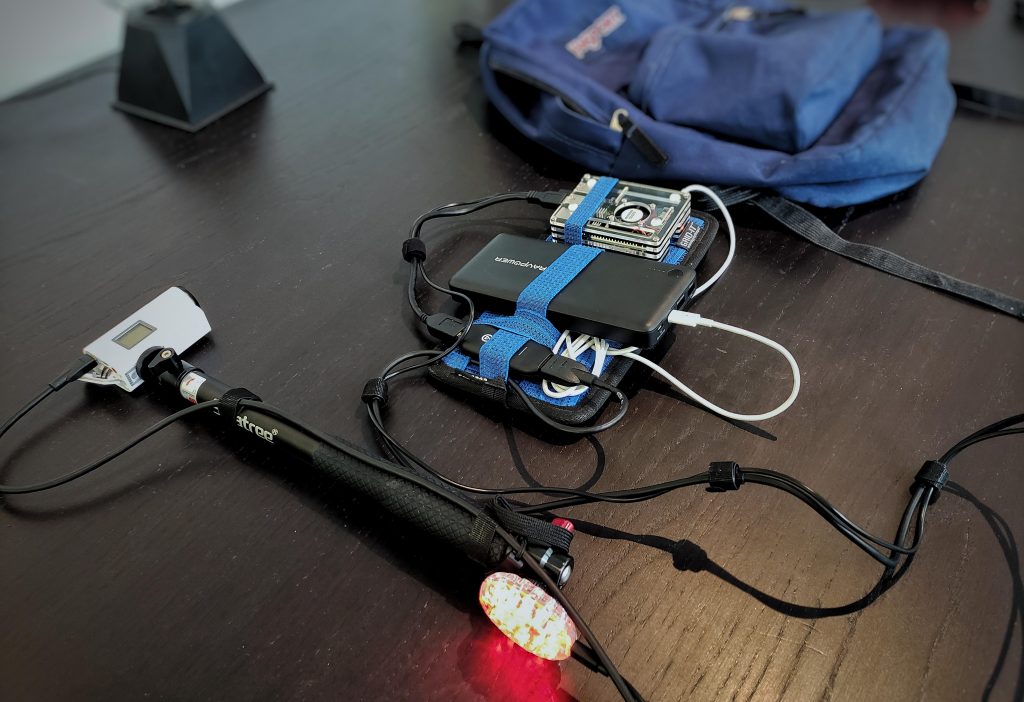
We’ll use a Raspberry Pi 4 for the computer, for an additional $55. To keep it cool and protected in the backpack, we purchased a $10 GeeekPi Acrylic RPi 4 Fan case.
We’ll also need a battery pack to power the whole setup, which we purchased for $38.
We decided to mount the smartphone on a $23 Smatree telescoping selfie stick. We’re holding everything together in a Cocoon GRID IT! Accessory Organizer we got for $11. For the backpack, we’re using this Jansport backpack we already had laying around.
Finally, we need our mobile connections. You can borrow some phones from friends to tether or plug in a few cellular adapters. We used a couple of phones tethered to the Raspberry Pi via USB.
Components and costs
- Smartphone: iPhone 11 Pro or newer / equivalent to that in terms of video – $0 if you already have that.
- Computer: Raspberry Pi 4 – $55
- Computer accessories: GeeekPi Acrylic Case with Fan RPi 4 – $10
- Battery pack: $38.
- Organizer: Cocoon GRID IT! Accessory Organizer – $11
- Camera support: Smatree telescoping selfie stick – $23
- Backpack: Jansport backpack – $30
- Mobile connections: USB cellular dongles, tethered smartphones
- Speedify channel bonding VPN – $4.99 / month
- [Optional] Dedicated streaming solution, if you want to multistream. You can also just live stream directly from the platform's app - YouTube, Facebook Live, Instagram, etc.
This brings the budget to about $175 plus the cost of the smartphone, if you don't have it, and the dedicated streaming software, if you need to livestream on multiple platforms at once. This is still cheaper than the Gunrun backpack. Plus – you may not need to purchase all of this equipment if you already have similar items available.
Of course, if you're looking to create a home studio for streaming, you'll have to go higher.
Raspberry Pi Based Live Streaming Backpack – Software You Need
As mentioned before, one of the core elements of this live streaming backpack is Speedify, the only app that can combine multiple internet sources into one bonded super-connection for more stable and secure live streaming, video calling, and web browsing. You can easily set up Speedify on your Raspberry Pi using the instructions here.
And, as mentioned above, if you want to live stream to more than one platform at once: Twitch, YouTube, Facebook Live, Instagram, etc. - you need a dedicated streaming solution. Here are some examples:
- Streamlabs OBS - apps for both iOS and Android
- Streamyard - runs in browser
- Melon - runs in browser
- Restream - runs in browser.
Final Steps: Get the IRL Streaming Backpack Up-and-Running
At first, we tried building OBS on the Raspberry Pi, but came to the conclusion that it is too unstable. Plus, the streaming quality is limited by the hardware capabilities of the Raspberry Pi.
So we decided to use the Raspberry Pi as a bonding router only, sharing the bonded Internet connection to the smartphone via Wi-Fi. This is ideal for being able to operate this setup, in a backpack.
You can use any streaming solution that supports the operating system you have on your smartphone - iOS or Android.
All you have to do is:
- connect your smartphone via Wi-Fi to the fast and reliable bonded Internet from the Raspberry Pi - check out this guide on how to set that up.
- start the livestream from your smartphone - either through the dedicated streaming solution or directly from the social media platform's app.


NEW!
Miri X510 Bonding Router
POWERED BY SPEEDIFY
Bond up to 7 Links Simultaneously
Combine wired, Wi-Fi, 5G, and LTE connections plus Pair & Share with other Speedify users.
Battery-powered Portability



Speed
Stability
Security
Speedify devs love talking tech on YouTube, Tiktok, and Instagram!
Alex Gizis and the Speedify devs discuss and explain technology including Starlink satellites, Wi-Fi 7 routers, Apple networking features, fiber optics, broadband internet, 5G mobile networks, AI, networking protocols, and much more. Follow Speedify on YouTube, TikTok, Instagram, and LinkedIn!
Alex and the Speedify team are always exploring the latest in networking and security technology—like 5G, 6G, WiFi 7, laser and satellite internet—and sharing it in new discussion content across YouTube, TikTok, Instagram, and LinkedIn every week.
Got a tech question? Let's go deeper! Pop into Speedify Office Hours live every Wednesday at 10 AM Eastern. Speedify CEO Alex Gizis and our network engineers are standing by to break down your questions about networks, tech updates, and Speedify features.

