
Takeaways on IRL Live Streaming from Dracula’s Castle
Halloween season is one of the most popular times of the year when people live stream IRL. That’s because everybody is looking for spooky things to highlight for their audience. And since we like to eat our own dog food for the Speedify Live show, we decided to have a couple of Halloween specials this year.
First, we caught some ghosts on camera at the Willard Public Library in Indiana. Then, we visited a 600 years old vampire’s fortress in the mountains - Dracula’s Castle in Transylvania, Romania - and we live streamed IRL from there.
Being a stone medieval fortress with 3.5 meters thick walls, neither Wi-Fi nor cellular work all that well. But that didn’t stop us from broadcasting live from there successfully. Find out how we pulled this off below.
Use Speedify to increase your upload and download speeds: combine internet connection sources like Wi-Fi, 4G, 5G, Starlink and wired broadband

Combine Wi-Fi, 4G, 5G, Starlink and wired broadband to fix slow upload and download speeds
Speedify is the only app that seamlessly combines all of your connections, including Wi-Fi, 4G, 5G, Ethernet, and Starlink, into one stronger connection to keep you online and secure.
In most cases, Speedify will automatically detect and start using any available Internet connections on your device while intelligently distributing your online traffic between them for optimal performance. If you need help we have quick start guides available for most common set ups.

Combine personal hotspots for better upload and download speeds
Speedify's Pair & Share feature enables you to connect to multiple hotspots at the same time and wirelessly share LTE, 4G, and 5G cellular connections back and forth between multiple Speedify users on the same local network to create a faster, more reliable connection for everyone.
For the first time, it's possible to share cellular data between multiple devices, including PCs, Macs, iPhones and Androids. Use multiple phones as hotspots for internet access and get increased bandwidth and mobile failover for all paired devices.
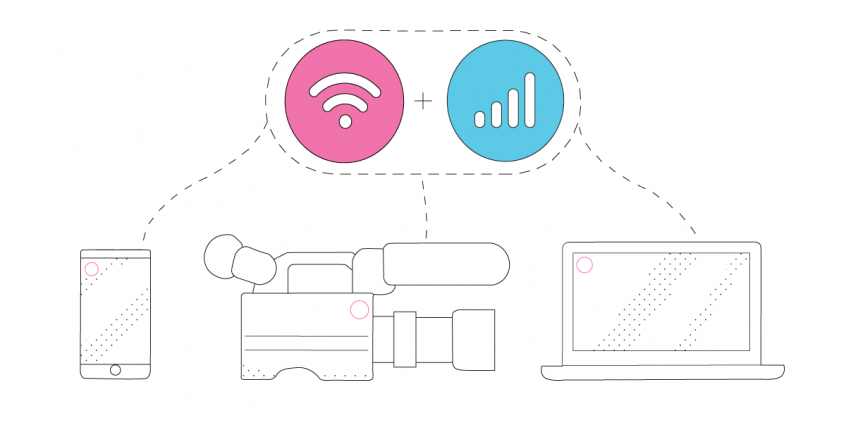
Use Speedify to combine...
Combine these connections on:



Essential IRL Streaming Gear to Live Stream from Anywhere
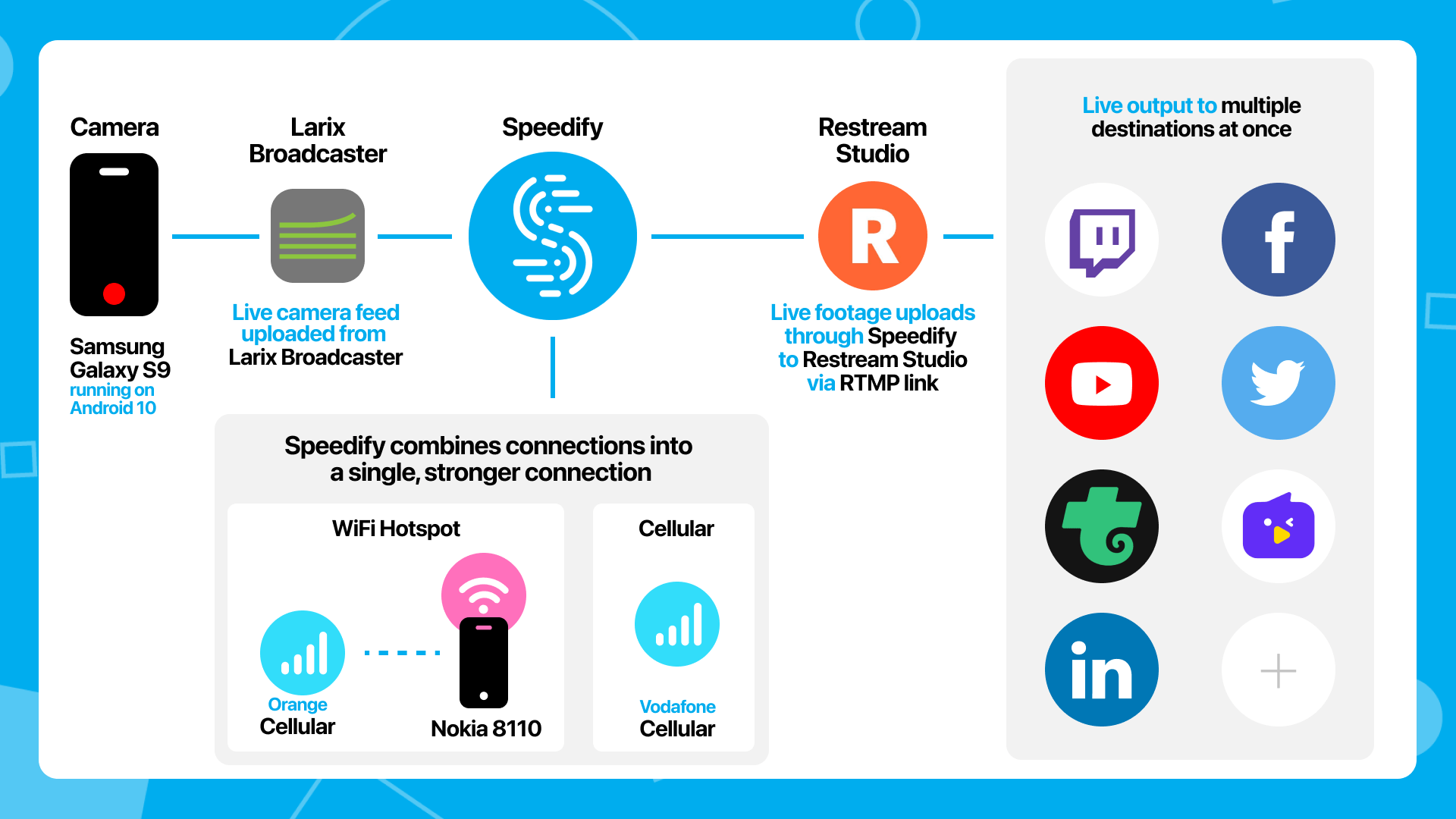
We used a typical IRL setup; the only difference is that instead of having a backup connection to switch to should anything go wrong, we will be using both connections at the same time with the help of Speedify - the connection bonding app that can combine multiple internet sources into one bonded connection for more stable and secure live streaming, video calling, and web browsing.
Here’s what we used:
- Streaming device: Samsung Galaxy S9 phone running Android 10, connected to the Vodafone Romania network
- Streaming software: Larix Broadcaster on the phone, streaming via RTMP
- Streaming platform in the cloud: Restream
- Connectivity:
- cellular data from Vodafone Romania on the streaming device,
- cellular data from Orange Romania via Wi-Fi tethering from a Nokia 8110 4G phone.
- Connection Bonding software: Speedify will combine the two cellular connections, packet-by-packet, into a single more reliable internet connection.
- Accessories: selfie stick, external battery pack (10,000 mAh), additional lighting via flashlight
- Audio for communication with the Restream studio: via local number dial-in on a Google Meet.
The way that guests work on most cloud based video studios is that the guests join a WebRTC session in the browser. But WebRTC in the browser on a phone has very poor image quality. It often appears to be 320x240 for no reason. The difference between what the web clients send on the same hardware vs what a native app like Larix, streaming RTMP, can send is shocking.
That really limited our choices on the cloud based video software. Restream Studio is really the only one that we know of that takes in an RTMP stream as a live guest.
A handy diagram of this setup is below.
Six Takeaways on How to IRL Live Stream from Anywhere
Here are our takeaways on streaming live IRL:
- Be at the place you’ll be live streaming from some time before you start. You can check for bad signal areas so you know how to avoid them. Or get some last minute accessories, in case you need them. As you become more familiar with the surroundings, you won’t have to do that the next time you live stream from there.
- Good connectivity is key. You can use the latest GoPro, professional camera or iPhone; if your Internet is bad, that will be reflected in poor video quality. There are multiple solutions for bonding connections together, but when you’re IRL streaming from your phone, by far the best solution is the Speedify bonding app.
- Use a live streaming app that can leverage your phone’s hardware capabilities directly. As mentioned earlier, we saw that live streaming with Larix Broadcaster (using RTMP) is way better than live streaming from the browser window (via WebRTC) on the phone. Which makes sense, with the differences between the two technologies.
- If your live streaming is a “studio” type show (as Speedify Live is), you should make sure you have a way to interact with the others in the studio. We connected to a Google Meet via a local dial-in number so we could interact via audio as well. There was quite a bit of latency involved, so we ended up talking via Slack in the end, as Larix allows continuous streaming even if the app is in the background. Should we have used Restream in the browser window, there would have been near real-time interaction with the studio.
- Start with as much as 100% battery on your streaming device and keep the battery pack permanently connected to it. Given we used a 3 year old phone with a non-removable internal battery, this was our biggest concern. But we ended up with 82% battery and 3/4 lines on my external battery pack after 80 minutes of continuous live streaming at about 10 degrees Celsius. Which is not bad at all. In theory, we could have easily streamed for 4 hours uninterrupted.
- When you’re using your smartphone as your live streaming device, don’t forget to disable the notifications sounds. It can make the experience more authentic to the viewers, but they’re not there to be happy that you have a new meeting coming up… or a new DM. Unless it’s part of your show of course.


Speed
Stability
Security
Speedify devs love talking tech on YouTube, Tiktok, and Instagram!
Alex Gizis and the Speedify devs discuss and explain technology including Starlink satellites, Wi-Fi 7 routers, Apple networking features, fiber optics, broadband internet, 5G mobile networks, AI, networking protocols, and much more. Follow Speedify on YouTube, TikTok, Instagram, and LinkedIn!
Alex and the Speedify team are always exploring the latest in networking and security technology—like 5G, 6G, WiFi 7, laser and satellite internet—and sharing it in new discussion content across YouTube, TikTok, Instagram, and LinkedIn every week.
Got a tech question? Let's go deeper! Pop into Speedify Office Hours live every Wednesday at 10 AM Eastern. Speedify CEO Alex Gizis and our network engineers are standing by to break down your questions about networks, tech updates, and Speedify features.
