

Use the Speedify App to Improve Facebook Live Streams Video Quality by Combining Starlink, Wi-Fi, 4G / 5G Cellular at the Same Time
Facebook Live video quality and frame rate depend on your upload speed: when the upload dips, the stream drops to a lower resolution or frame rate, or stops. Speedify is an app that combines Wi-Fi, 4G/5G cellular, Ethernet, Starlink and satellite internet connections into one faster, more reliable internet connection, so the broadcast gets more upload speed and keeps running if one internet connection drops. Those gains need two or more internet connections; on one, Speedify works as an encrypted VPN and cannot make that internet connection’s upload faster.
If your Facebook Live broadcasts look blurry or freeze, you are not the only one. This post explains why it happens and how to improve your Facebook Live broadcasts by using Wi-Fi and 4G/5G cellular together with Speedify.
How do I use WiFi and 4G/5G cellular at the same time with Speedify?
Pick your two internet connections and your device below and we'll take you to the step-by-step setup guide.


Why Facebook Live Streams Freeze, Blur or Drop Their Frame Rate
Most people run into slow Internet and disconnects at some point, and the cause is usually the internet connection, not Facebook. The problem hurts most in the middle of Facebook Live broadcasts.
Internet Connection problems during Facebook Live streams usually happen in these situations:
- On the move: on the street, bus or train, where you may be connected to a bad or spotty Wi-Fi hotspot.
- In crowded areas such as a stadium, a concert or a party, the available bandwidth may not be enough for everyone.
- At home: your internet provider may be doing maintenance right when you go live, or you may not be getting the download and upload speed you pay for.
Here’s what happens: on a slow internet connection, the stream cannot hold a high resolution or frame rate, so your video looks jittery / choppy. If the internet connection drops altogether, your viewers are left watching the Facebook loading screen.
How to Fix a Low Facebook Live Frame Rate and Video Quality with Speedify
To raise a low Facebook Live frame rate or video quality, first run a speed test and check your upload speed while nothing else uses the internet connection. If the upload is low or keeps dipping, you need more upload bandwidth, preferably from more than one internet connection. If the upload is fine and the frame rate is still low, the device encoding the stream may be short of processing power: close other apps or lower the resolution.
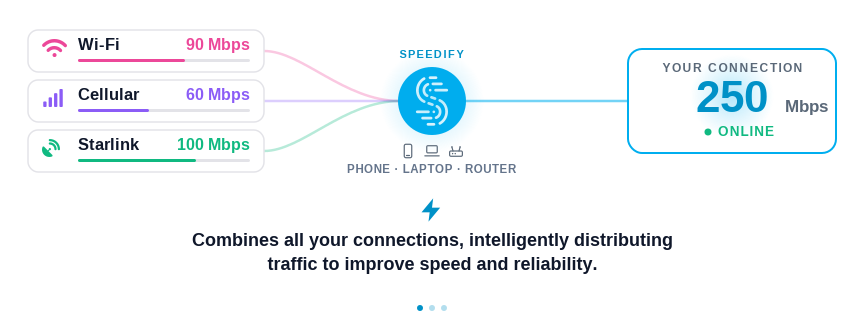
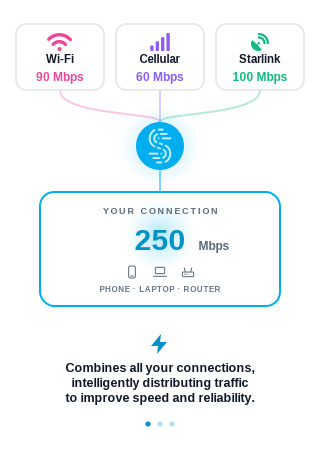
With Speedify, you use multiple Internet connections at the same time, so your Facebook Live broadcast gets more upload bandwidth, and an automatic failover mechanism keeps the stream going if one of your internet connections drops.
To combine 2 or more Internet connections at the same time, Speedify uses its own technology for combining internet connections, which splits your traffic per packet across all of them. Speedify runs on Windows, macOS, iOS, Android and Linux, so it works on a desktop or laptop computer, a smartphone or a tablet.
Failover happens in the background, without you having to do anything: Speedify moves the traffic to your other internet connections, and when the dropped internet connection is back online, Speedify picks it up and starts using it again.
Speedify Also Encrypts Your Facebook Live Broadcast Like a VPN
Speedify doesn’t just get you a faster, more reliable Internet connection when live streaming to Facebook: Speedify also encrypts your traffic like a VPN. Built as a true mobile VPN, Speedify keeps the internet connection protected as you move between networks, and strong encryption shields your broadcast from compromised Wi-Fi networks and snooping hackers.
Before Speedify, users often had to choose between security and speed. Because Speedify was designed with speed as one of its primary goals, with two or more internet connections you do not have to sacrifice speed for security. You can have both.
Whether your Facebook Live broadcasts suffer from internet problems or you simply want better video quality, run Speedify on the device you stream from. Get started with Speedify today: the free tier includes 5 GB per month with a free account.
Speedify
Get started with Speedify today.
Speedify combines Wi-Fi, 4G/5G cellular, Ethernet, Starlink and satellite into one faster, more reliable internet connection. Free to try: 5 GB a month with a free account. No credit card required.
🚀 Speed
Faster uploads and downloads, because Speedify uses all your internet connections at once.
📶 Stability
If one internet connection drops, Speedify moves your traffic to the others in milliseconds.
🔒 Security
AES-256 encryption on every internet connection, on any network you join.


15M+ downloads worldwide. 75K+ five-star reviews on iOS and Android.