
Why Is My Spectrum Internet Not Working?
Spectrum subscribers describe the same handful of faults over and over, and most of them end the same way: the video stops to reload part-way through, which is buffering. Some have quick fixes at home. Others are the line itself, and no amount of rebooting helps. If you are on Comcast, see how to stop Xfinity streaming from buffering.
Speedify is an app that runs one device over Wi-Fi, 4G/5G cellular data, wired Ethernet and other internet connections together, so a struggling Spectrum line has help carrying your show. You will get a checklist of six common Spectrum faults, the fix for each, and what adding a second internet connection with Speedify does for playback when Spectrum wobbles.
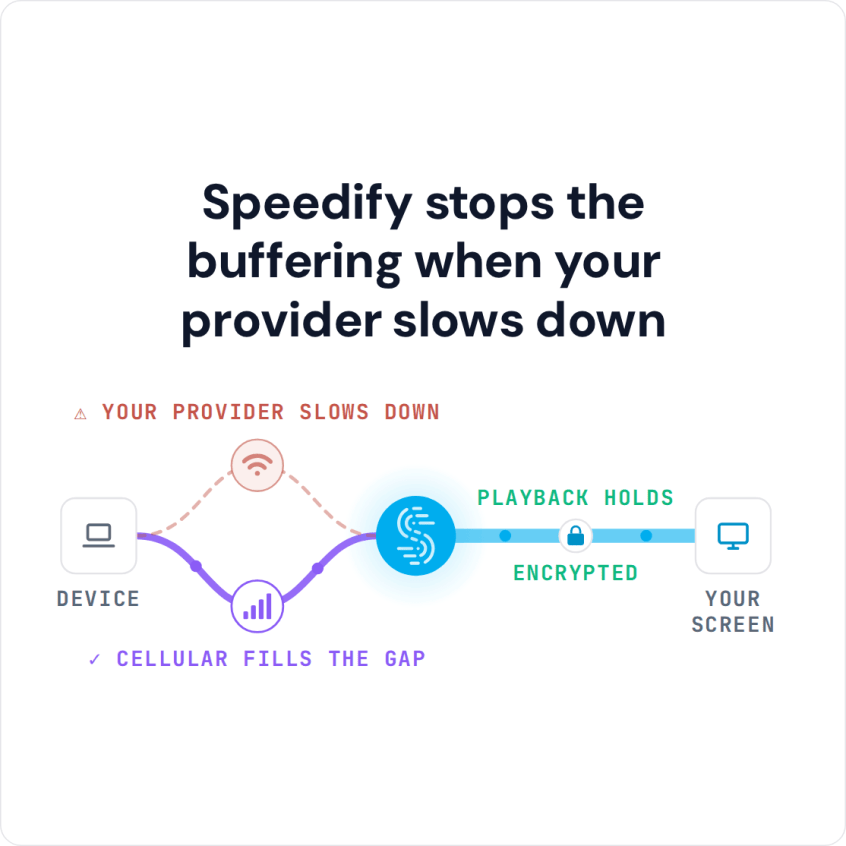
Speedify stops the buffering when your provider slows down
Streaming Services Issues or Spectrum Internet Down?
Before we start troubleshooting streaming issues with Spectrum Internet, there are two things you need to check:
- The origin for the Spectrum streaming problems. The streaming platform of your choice should be up and running without issues. Check and see if there’s any news of issues for Netflix, Hulu, HBO, Disney+, BBC, etc. If it’s not them, then it’s you.
- The speed of your connection – just run a speed test. Is your Internet bandwidth fast enough, within these recommendations: at least 5 Mbps for a HD quality video / 25 Mbps for an Ultra HD video?
All good with number 1 above? Then it’s you – start troubleshooting.
6 Common Spectrum Internet Issues & Fixes
When you get Spectrum Internet streaming issues, try using their troubleshooter first. Below is a list of things you should definitely try:
- Reboot your router and the device you’re streaming from (computer, tablet, phone, etc.). Sometimes that’s all you need to do.
- Move closer to the wireless router. Actually, use a wired connection, if available.
- Close any background programs that might be using bandwidth. These include backup programs, social networks, collaboration tools, etc.
- Check to see if there are any other devices on your home network using bandwidth. Maybe your kids are streaming something themselves. Or playing games online.
- Try disabling hardware acceleration in your browser / streaming app’s settings. Certain combinations of devices and streaming platforms may not work well together.
- Do you have a second Internet connection available (e.g. public WiFi, mobile data, backup connection)? Just use that extra connection along with your home Internet simultaneously for faster, more stable Internet. All you need is a channel bonding service like Speedify – the only app that can combine multiple internet sources into one bonded super-connection for more stable and secure live streaming, video calling, and web browsing.
Avoid Spectrum Internet Streaming Problems with Speedify
As a fast bonding VPN, Speedify allows you to combine multiple Internet connections at once. This happens through a VPN-grade encrypted tunnel, so your privacy and data security is protected.
If one of the connections you’re using becomes slower or even disconnects, Speedify will automatically start moving traffic to the other working connection(s). When the initial connection is back, it starts using it again.
And don’t worry – just because it’s also a VPN doesn’t mean you can’t access your favorite streaming platforms. Speedify’s bypass feature allows only trusted traffic from Netflix, HBO, Hulu, Disney+ and more to go around the encrypted tunnel.
We hope to have answered your question on fixing Spectrum Internet streaming issues. Try Speedify for free.
Speedify
Get started with Speedify today.
Combine Wi-Fi, 4G/5G cellular, Ethernet, Starlink, and more into one faster, steadier connection. Free to try — no credit card required.
🚀 Speed
Faster uploads and downloads by bonding all your connections at once.
📶 Stability
Automatic failover in under a second when any connection drops.
🔒 Security
AES-256 encryption on every connection, on every network you join.



15M+ downloads worldwide. 75K+ five-star reviews on iOS and Android.