

Live Stream on X with Best Video Quality
Choppy, jittery video is the usual complaint from people broadcasting live on X, and the bottleneck is nearly always your internet connection. Live video needs a steady upload (the rate at which footage leaves your device), and one Wi-Fi or cellular signal rarely holds that rate for a whole broadcast. The same is true when you live stream from a phone over cellular data.
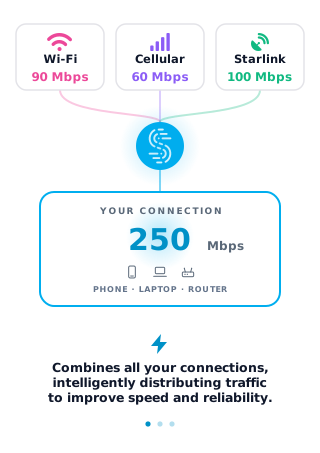
Speedify is an app that runs one internet session across two or more internet connections at the same time (Wi-Fi, 4G/5G cellular, wired Ethernet, Starlink and others), so video keeps moving when one internet connection weakens. The gain needs two or more internet connections: on a single connection, Speedify works as an encrypted VPN and cannot stop that connection from dropping. Here you will see what X live video quality depends on, and how using Speedify protects that quality.
Why X Live Streams Get Choppy: Slow Uploads and Dropped Connections
It’s not only you, and it’s not caused by X live streaming itself: slow internet and disconnects hit everyone at some point. They just hurt most when you’re streaming live video to X.
The most common situations where you might run into these connectivity issues with X live streams include:
- On the move or traveling: on the street, on a bus or on a train, you may be connected to a bad / spotty WiFi hotspot.
- In crowded areas: the available bandwidth may not be enough for everyone at a stadium, a concert or a packed party.
- At home: your ISP may be doing maintenance right when you’re broadcasting live to X, or you may be paying for a certain download/upload speed and not getting it.
If the connection is slow, your X live stream drops to a lower resolution because bandwidth is limited, so your video may appear jittery / choppy. If your internet connection drops, your viewers get X video errors.
How to Go Live on X with Speedify Running
- Download Speedify on the phone or computer you stream from (Windows, macOS, iOS or Android).
- Open Speedify and create a free account (the free tier includes 5 GB per month), or sign in.
- Give it a second internet connection: on a phone, keep Wi-Fi on and turn on cellular data; on a computer, add Ethernet or a phone tethered with a USB cable (an iPhone works on Windows and Mac; an Android phone on Windows and often on a Mac).
- Connect. Speedify uses both connections at once and moves your stream to the working one when one drops.
- Open the X app (or your streaming software on a computer) and start your live video as usual.
How Speedify Improves X Live Streaming Video Quality
If the Internet connection speed and latency causes issues with your X live video streams, then you should get more bandwidth, preferably from more sources.
Speedify is a software app that gets you faster, more reliable and secure Internet by allowing you to use multiple Internet connections at the same time. By doing that, you’re not only solving the bandwidth and latency issues related to X live streaming videos, but also the need for an automatic failover mechanism that needs to kick in should anything happen to one of your connections.
Speedify combines two or more internet connections by splitting traffic per packet across all of them. Because Speedify is software, it runs on the devices you already stream from: Windows and macOS computers, iPhones, Android phones and tablets.
If one of your connections fails, Speedify automatically reroutes all the traffic through your other available connection(s). This happens in the background without you having to do anything. When the dropped connection is back online, Speedify will pick it up and start using it again.
Speedify Encrypts Your X Live Stream Like a VPN
Speedify doesn’t just get you a faster, more reliable internet connection when live streaming to X. Speedify also works as a mobile VPN: it protects you from compromised wifi networks and snooping hackers by sending your traffic through an encrypted tunnel, using encryption (AES-256-GCM or ChaCha20-Poly1305) that keeps your private data under your control.
Before Speedify, users often had to choose between security and speed. Speedify was designed with speed as one of its primary goals, so with two or more connections combined you do not have to give up speed for security.
If you’re live streaming to X, you want the best quality you can get, and that takes a fast, reliable and encrypted internet connection. Get started with Speedify today.
Speedify
Get started with Speedify today.
Speedify combines Wi-Fi, 4G/5G cellular, Ethernet, Starlink and satellite into one faster, more reliable internet connection. Free to try: 5 GB a month with a free account. No credit card required.
🚀 Speed
Faster uploads and downloads, because Speedify uses all your internet connections at once.
📶 Stability
If one internet connection drops, Speedify moves your traffic to the others in milliseconds.
🔒 Security
AES-256 encryption on every internet connection, on any network you join.


15M+ downloads worldwide. 75K+ five-star reviews on iOS and Android.