
Speedify Makes Starlink a Reliable Internet Connection for First Responders
Yes, first responders can use Starlink for emergencies. Fire departments, law enforcement, emergency medical services and search and rescue teams can set up a Starlink dish at incident command posts and on mobile command vehicles, where wired internet is down or was never there.
In life-safety work, one Starlink internet connection is one thing that can fail. Speedify is an app that uses Starlink and 4G/5G cellular at the same time, so when Starlink drops, incident software, video feeds and maps keep working over cellular. Without that cellular connection, Speedify works as an encrypted VPN and cannot stop Starlink from dropping.
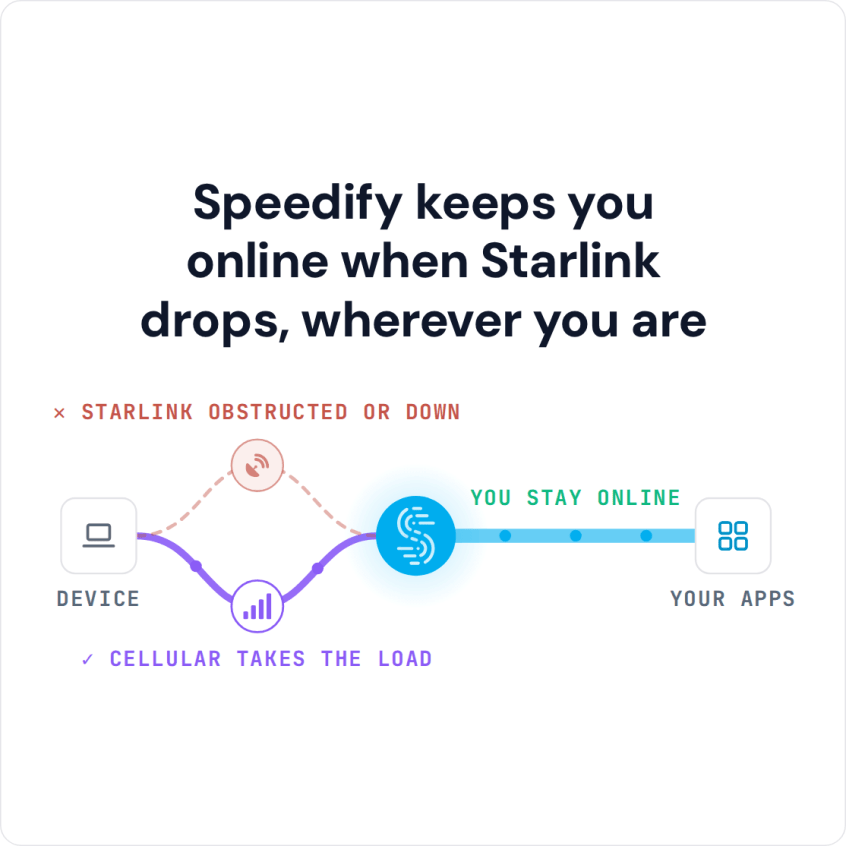
Speedify keeps you online when Starlink drops, wherever you are
Watch now
How Speedify combines internet connections on any hardware
Get started with Speedify for your business
Speedify offers three commercial paths. They work together, and most enterprise customers use two or more.
01
Speedify Teams
Speedify on every supported OS for every team member
Centralized dashboard for billing, user provisioning, and usage analytics
CSV import/export and a RESTful management API
02
Speedify for Routers
License for supported OpenWrt routers
Powered by Speedify hardware lineup ready to deploy out of the box
Miri, GL.iNet and other partner models
Covers every device on the network, with no per-device install
03
Embed Speedify into your product
A · DIY
Build it yourself with the Speedify SDK.
Integrate Speedify into your iOS, Android, Windows, macOS, Linux or QNX product. Full developer documentation, sample code and supported integration paths. Your team owns the build, and the Speedify SDK handles combining the internet connections.
B · CUSTOM ENGINEERING
Have the Speedify team build it for you.
How Starlink Works for First Responders in the Field
Fire departments, police, emergency medical services and search and rescue teams use Starlink at incident command posts, in mobile command vehicles and at staging areas. The Starlink internet connection runs incident management software, video feeds, live maps, calls between agencies and updates to the regional emergency operations center.
Starlink downloads run from 45 to 280 Mbps and uploads from 10 to 30 Mbps, with a delay of 25 to 60 milliseconds on land. That is fast enough for live video calls and cloud apps, which older satellite internet could not handle well.
The weak spot is that it is still one internet connection. Trees, heavy rain, a bumped Starlink dish or the short drops when the Starlink dish switches satellites (about every 15 seconds) can cut a video feed during an active incident. In life-safety work, that is not acceptable.
Which Starlink Plan Suits First Responder Agencies
Residential plans are for one fixed address. For command vehicles and teams that move between incidents, Starlink’s Roam and Priority plans work on the move. When the Starlink network is busy, Priority plans are served first, ahead of every Residential and Roam plan, and they reach 135 to 310 Mbps down and 20 to 44 Mbps up. Plan names are Local Priority and Global Priority, and they vary by country.
Keep an eye on your data: a Priority plan that has used up its data runs at just 1 Mbps down and 0.5 Mbps up. Starlink sets its own prices and any discounts for public safety agencies, so ask Starlink directly before you buy.
How Speedify Keeps First Responders Online When Starlink Drops
Speedify runs on first responder laptops and phones, or on the router in a mobile command vehicle. When Starlink and 4G/5G cellular are both working, Speedify uses them together, so you get faster uploads and downloads than either one gives you alone. See how Speedify combines internet connections.
When Starlink drops, Speedify moves all your traffic to cellular on its own. Video feeds, cloud apps and file transfers keep going, because your traffic keeps the same public IP address at the Speedify server. When Starlink is back, Speedify uses both again. News crews filing from the field use the same setup: see Starlink for journalists in the field.
Speedify needs that second internet connection. With Starlink alone, Speedify can’t add speed or stop the drops, so plan for 4G/5G cellular or another internet line at every command post. A second Starlink dish adds speed, but it can’t cover the short drops when Starlink switches satellites, because every Starlink dish switches on the same 15-second schedule.
Speedify also encrypts all internet traffic, which protects incident data and calls between agencies from being read by anyone else on the network.
How to Set Up Speedify with Starlink at an Incident Command Post
Step 1: Set Up the Starlink Dish at the Incident Location
Place the Starlink dish at the command post or on the mobile command vehicle with a clear view of the sky. Connect the Starlink router to the command post network or the vehicle’s router. Check the Starlink app for obstructions and signal before operations start.
Step 2: Add a 4G/5G Cellular Internet Connection
Connect a 4G/5G cellular modem or a cellular router to the command post network or to the device running Speedify. Modems from two different mobile carriers help in areas where one carrier has a better signal than the other.
Step 3: Install Speedify on the Command Post Router or Laptop
Download Speedify and install it on the laptop or on a compatible router that runs the command post’s internet. Speedify finds every internet connection and starts using them right away, with no routing to set up during an active incident.
If agency laptops already run their own VPN client, install Speedify on the command post router instead: Speedify and another VPN cannot reliably run side by side on the same device, but the agency VPN works on a laptop connected through a Speedify router.
Which First Responder Teams Get the Most from Starlink and Speedify
- Fire departments and wildfire crews running incident command posts where there is no wired internet
- Law enforcement agencies using mobile command vehicles at large events, civil emergencies and disaster scenes
- Emergency medical services sending patient data to hospitals from the field
- Search and rescue teams working across remote terrain with Starlink as the main internet connection and cellular as the second one
- Emergency management agencies running regional coordination centers that several agencies depend on
Speedify Is Used on Millions of Devices Worldwide
Speedify has made internet connections faster and more reliable for businesses and individuals since 2014.
15M+
Speedify downloads worldwide75K+
5-star reviews for Speedify on iOS and Android82
Speedify server points of presence in 50+ cities on 6 continents500TB+
Of internet traffic carried by Speedify every weekSpeedify Partners
Speedify works with these companies to bring faster, more reliable internet and networking technology to their customers and employees.


Speedify Also Shows Starlink Dish Problems During an Incident
Speedify shows real-time Starlink dish alerts in the app. If the Starlink dish at the command post has a problem, such as overheating, Speedify shows an alert once the problem has lasted 15 seconds, and clears it when it’s fixed.
For the technical team running field communications, that means a Starlink dish problem shows up in the same app that runs the command post’s internet, so no one has to go out and check the Starlink dish.
Speedify Business Solutions
Speedify Teams
Speedify for Routers

Speedify Embedded Solutions and Integrations
Add Speedify to your own app or hardware with the Speedify SDK. Your product then combines internet connections, fails over automatically when one drops, and encrypts the traffic, using the same technology as the Speedify app.