
Speedify Gets Events Faster Uploads and Downloads on Starlink, Making the Starlink Internet Connection Reliable for Events
Yes, Starlink satellite internet works at outdoor events. A Starlink dish brings internet to a festival field, a wedding venue or a conference tent without laying any cables, as long as it has a clear view of the sky.
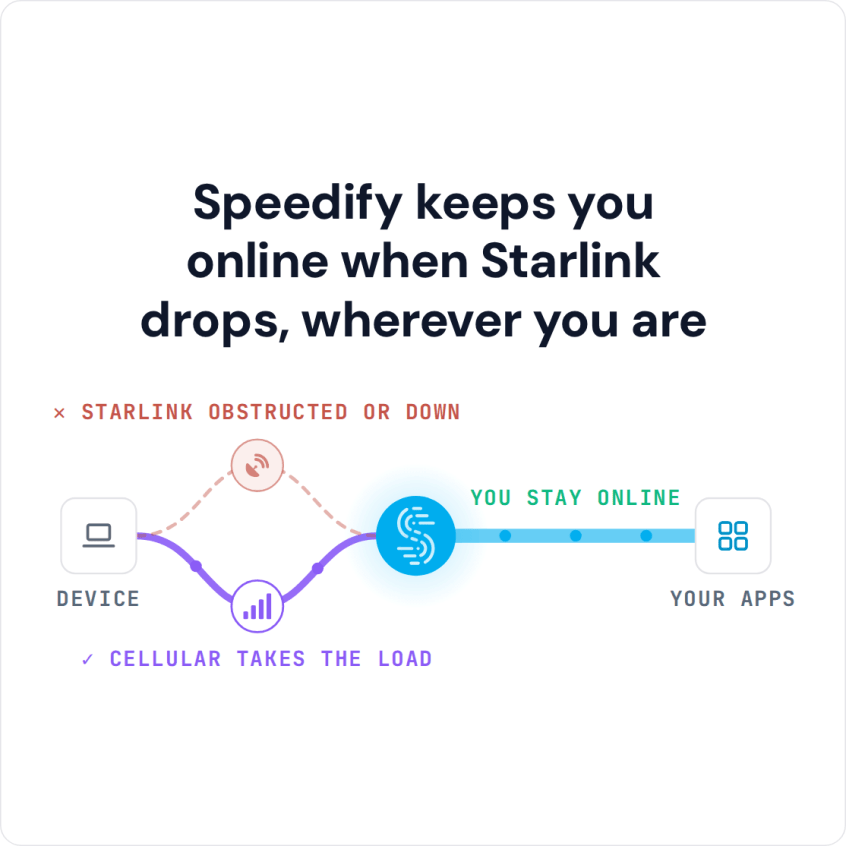
At a big event, one Starlink dish can run out of speed, and if it drops, ticket scanners, card readers and live streams stop with it. Speedify is an app that uses several Starlink dishes and 4G/5G cellular at the same time, so the event stays online when one internet connection drops.
Speedify keeps you online when Starlink drops, wherever you are
Watch now
How Speedify's channel bonding technology works on any hardware
Get started with Speedify for your business
Speedify offers three commercial paths. They're not exclusive — most enterprise customers combine two or more.
01
Speedify Teams
Speedify on every supported OS for every team member
Centralized dashboard for billing, user provisioning, and usage analytics
CSV import/export and a RESTful management API
02
Speedify for Routers
License for supported OpenWrt routers
Powered by Speedify hardware lineup ready to deploy out of the box
Miri, GL.iNET, and other partner models
Whole-LAN bonding without per-device install
03
Embed Speedify into your product
A · DIY
Build it yourself with the Speedify SDK.
Integrate Speedify into your iOS, Android, Windows, macOS, Linux, or QNX product. Full developer documentation, sample code, and supported integration paths. You own the build, we provide the bonding stack.
B · CUSTOM ENGINEERING
Have us build it for you.
How Starlink Works as Internet for Events and Festivals
Events often happen at outdoor venues, in temporary structures, on remote properties, or at venues whose own internet can’t handle the crowd. Starlink can be set up quickly at any of them. Residential plans are for one fixed address, so for events at different venues, use a Starlink plan that works on the move, like Roam or Priority.
One Starlink dish lists downloads of 45 to 280 Mbps and uploads of 10 to 30 Mbps. That covers registration, ticket scanning, card readers, presentation screens and a live stream for a small event. Twitch, for example, recommends 6 Mbps of upload for one 1080p stream at 60 frames per second.
A larger event with hundreds of guests, or several live streams, quickly uses up one Starlink dish. Adding more Starlink dishes gives you more upload and download speed. Adding 4G/5G cellular from one or more mobile carriers adds a second internet connection that doesn’t depend on satellites, which helps when a storm or a satellite switch interrupts Starlink.
How Speedify Keeps Event Internet Running When Starlink Drops
Speedify runs on a laptop or router at the event and uses every internet connection there at the same time, so you get faster uploads and downloads than any one of them gives alone. When one internet connection weakens or drops, Speedify moves its traffic to the others on its own. Ticket scanning, payments and the live stream keep going.
Speedify needs more than one internet connection to do that. With a single Starlink dish and nothing else, Speedify can’t add speed or stop drops.
Speedify also encrypts all internet traffic, which protects guest data, payments and staff communications on every internet connection at the event.
How to Set Up Speedify with Starlink at an Event
Step 1: Set Up the Starlink Dish at the Event Site
Place the Starlink dish with a clear view of the sky, away from stages, tents and trees. Check the Starlink app for obstructions before the event starts. Connect the Starlink router to your event network switch or router.
Step 2: Add More Starlink Dishes and 4G/5G Cellular Internet Connections
Connect 4G/5G cellular modems or more Starlink dishes to the event router or to the laptop running Speedify. At large events, modems from two or more mobile carriers add upload and download speed and don’t leave you depending on one carrier.
Step 3: Install Speedify on the Event Router or Laptop
Download Speedify and install it on the laptop or on a compatible router that runs the event’s internet. Speedify finds every internet connection and starts using them right away.
Which Event Teams Get the Most from Starlink and Speedify
- Event planners and production companies bringing internet to outdoor or temporary venues with no wired internet
- Corporate event organizers running presentations, video calls and live streams where a dropped connection is embarrassing
- Festival and concert producers who need internet for ticketing, card payments and broadcasts from an open field
- Wedding and private event venues offering guest Wi-Fi on Starlink to many people at once
- AV and event IT companies who run internet at events and want to combine connections without special hardware
Speedify Is Used on Millions of Devices Worldwide
Speedify has made internet connections faster and more reliable for businesses and individuals since 2014.
15M+
Speedify downloads worldwide75K+
5-star reviews for Speedify on iOS and Android82
Speedify server points of presence in 50+ cities on 6 continents500TB+
Of internet traffic carried by Speedify every weekSpeedify Partners
Speedify works with these companies to bring faster, more reliable internet and networking technology to their customers and employees.


Speedify Also Shows Your Starlink Dish Status During the Event
Speedify shows real-time Starlink dish alerts in the app during your event. If your Starlink dish has a problem, such as overheating, Speedify shows the alert, so your technical team can fix the problem before guests notice. With several Starlink dishes, the Starlink Control Center, a screen in the Speedify app, shows all of them in one place.
Speedify Business Solutions
Speedify Teams
Speedify for Routers

Speedify Embedded Solutions and Integrations
Embed Speedify software into your app or hardware products and leverage the core channel bonding technology of Speedify in new and interesting ways.