
Speedify Makes the Starlink Internet Connection Reliable for Telehealth: Faster Upload and Download Speeds
Yes, telehealth clinics can use Starlink. Satellite internet from Starlink is fast enough for telemedicine video visits, with a delay of 25 to 60 milliseconds on land, and it reaches the rural areas where patients need video visits most and wired internet is weakest.
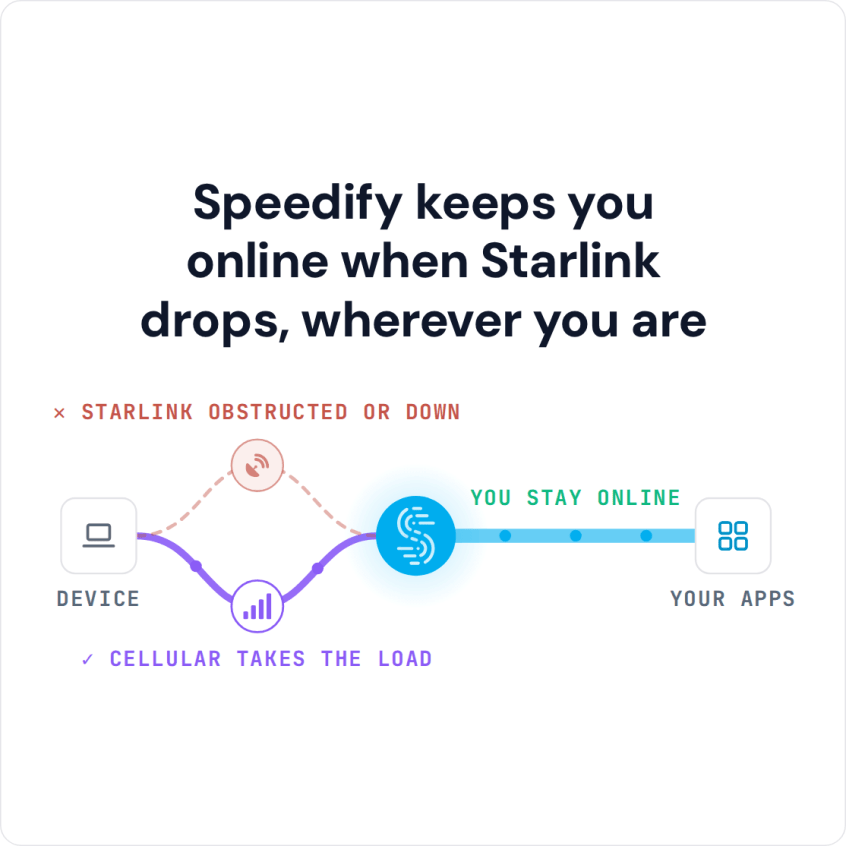
A dropped video visit leaves a patient waiting to reconnect, or cuts a therapy session short. Speedify is an app that uses Starlink and 4G/5G cellular at the same time, so if Starlink drops during a consultation, the video visit keeps going over cellular.
Speedify keeps you online when Starlink drops, wherever you are
Watch now
How Speedify's channel bonding technology works on any hardware
Get started with Speedify for your business
Speedify offers three commercial paths. They're not exclusive — most enterprise customers combine two or more.
01
Speedify Teams
Speedify on every supported OS for every team member
Centralized dashboard for billing, user provisioning, and usage analytics
CSV import/export and a RESTful management API
02
Speedify for Routers
License for supported OpenWrt routers
Powered by Speedify hardware lineup ready to deploy out of the box
Miri, GL.iNET, and other partner models
Whole-LAN bonding without per-device install
03
Embed Speedify into your product
A · DIY
Build it yourself with the Speedify SDK.
Integrate Speedify into your iOS, Android, Windows, macOS, Linux, or QNX product. Full developer documentation, sample code, and supported integration paths. You own the build, we provide the bonding stack.
B · CUSTOM ENGINEERING
Have us build it for you.
What Internet Telehealth Needs, and What Starlink Gives Rural Clinics
A telehealth video visit needs clear video and audio from start to finish. Most video visits need only a few Mbps each way. Closer clinical video, like skin or wound checks, needs more. The real requirement is that the internet connection stays steady for the whole visit, without breaks.
For rural clinics, mobile health vans and community health workers, Starlink lists downloads of 45 to 280 Mbps and uploads of 10 to 30 Mbps, far more than a video visit needs. The delay is short enough for a normal conversation. Older satellite internet had too much delay for back-and-forth clinical video.
The worry for healthcare providers is reliability. Your Starlink dish switches satellites about every 15 seconds, which causes short drops, and weather or trees can block it. One internet connection isn’t enough when a dropped call cuts short a mental health check-in or a prescription review.
How Speedify Keeps Telehealth Visits Connected on Starlink
Speedify runs on the clinic’s computer or router and uses Starlink and 4G/5G cellular at the same time. When both are working, you get more speed than either one alone. When Starlink drops, Speedify moves all traffic to cellular on its own. Video visits, remote patient monitoring and patient record systems keep working, and the video visit keeps going. For the patient’s side of the call, see Zoom dropping out during telehealth visits.
Speedify needs that second internet connection. With Starlink alone, Speedify can’t add speed or stop drops.
Speedify also encrypts all internet traffic, which protects patient data and clinical messages on every internet connection.
How to Set Up Speedify with Starlink for Telehealth
Step 1: Install the Starlink Dish at the Clinic or on the Mobile Health Van
Mount the Starlink dish with a clear view of the sky at your clinic, mobile health van or community health site. On a van, a portable mount lets you set the Starlink dish up at each stop. Check the Starlink app for obstructions before each session. A van that moves between sites needs a Starlink plan that works on the move, like Roam or Priority, because Residential plans are for one fixed address.
Step 2: Add a 4G/5G Cellular Internet Connection
Connect a 4G/5G cellular modem or a phone hotspot to the computer or router running Speedify. Even a modest rural cellular signal gives Speedify a second internet connection to keep a video visit going if Starlink drops.
Step 3: Download and Run Speedify
Download Speedify and install it on the clinic computer, or on a compatible router for the whole clinic. Speedify finds every internet connection and starts using them right away.
Which Healthcare Providers Get the Most from Starlink and Speedify
- Rural primary care clinics holding video visits with specialists and remote patients
- Mobile health units and community health workers bringing telehealth to patients where there is no wired internet
- Mental health providers giving remote therapy sessions that must not break halfway
- Remote patient monitoring programs sending health data from patients’ homes that can’t have gaps
- Health IT teams running the internet at many clinic sites
Speedify Is Used on Millions of Devices Worldwide
Speedify has powered stronger Internet for millions of consumers since 2014
15M
Millions of Speedify downloads worldwide, and growing every day5⭐️
More than 75,000 5-star reviews for Speedify in the iOS and Android app stores82
Points of Speedify presence in datacenters around the globe500TB
Hundreds of terabytes of fast, secure data streamed every week via SpeedifySpeedify Partners
Speedify partners with these amazing organizations to deliver better internet and next-generation networking technology to their customers and employees.


Speedify Also Shows Your Starlink Dish Status at the Clinic
Speedify shows real-time Starlink dish alerts in the app. If the Starlink dish at your clinic or on your van has a problem, such as overheating, Speedify shows the alert. Catching a Starlink dish problem before the first appointment keeps the day’s visits on schedule. If your clinic runs out of a van, see how to keep mobile clinic internet up.
For clinics and health systems: Speedify can combine Starlink and cellular at every clinic site and mobile unit. Contact Us to plan the setup.
For providers and patients at home: Download Speedify to use Starlink and cellular together for your video visits.
Speedify Business Solutions
Speedify Teams
Speedify for Routers

Speedify Embedded Solutions and Integrations
Embed Speedify software into your app or hardware products and leverage the core channel bonding technology of Speedify in new and interesting ways.