
Mobile Clinic Internet That Holds Through a Telehealth Visit
Mobile clinic internet has to work in a parking lot, a community centre or a vehicle parked well outside strong cellular coverage. A telehealth visit that drops mid-consultation is not a minor inconvenience, and Speedify bonds every connection the site has so one weak link cannot end the call.
Speedify removes that single point of failure by bonding every available internet connection a clinic has running, Wi-Fi, 4G/5G cellular, Ethernet, Starlink and other satellite, into one encrypted stream. Built on Speedify’s channel bonding technology, that bonded internet connection uses up to 95% of the combined capacity available, so a mobile unit gets the most out of whatever signal it can find.
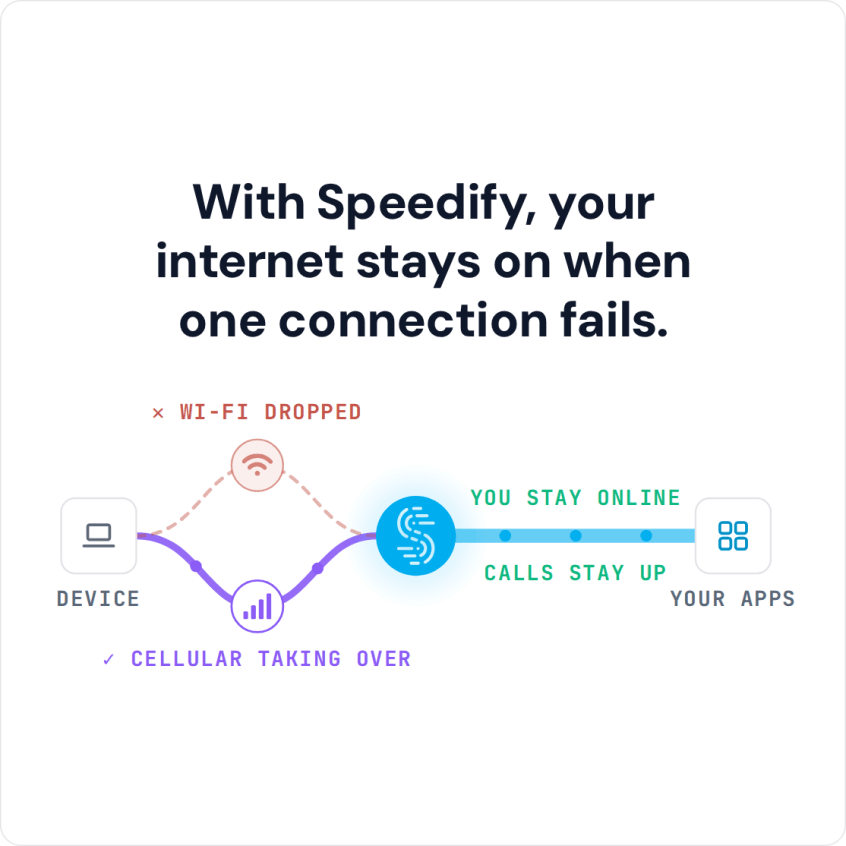
With Speedify, your internet stays on when one connection fails.
Watch now
How Speedify combines internet connections on any hardware
Get started with Speedify for your business
Speedify offers three commercial paths. They work together, and most enterprise customers use two or more.
01
Speedify Teams
Speedify on every supported OS for every team member
Centralized dashboard for billing, user provisioning, and usage analytics
CSV import/export and a RESTful management API
02
Speedify for Routers
License for supported OpenWrt routers
Powered by Speedify hardware lineup ready to deploy out of the box
Miri, GL.iNet and other partner models
Covers every device on the network, with no per-device install
03
Embed Speedify into your product
A · DIY
Build it yourself with the Speedify SDK.
Integrate Speedify into your iOS, Android, Windows, macOS, Linux or QNX product. Full developer documentation, sample code and supported integration paths. Your team owns the build, and the Speedify SDK handles combining the internet connections.
B · CUSTOM ENGINEERING
Have the Speedify team build it for you.
Why dropped internet connections are unacceptable in care delivery
A telehealth visit that cuts out mid-sentence forces a provider to choose between calling back and losing continuity, or pushing through with gaps in what a patient reported. Vitals uploads, e-prescriptions, and insurance verification all depend on a connection staying up long enough to complete a transaction, not just long enough to load a page. Mobile clinics and rural sites face this constantly because the surrounding infrastructure, cell towers, community Wi-Fi, was not built with continuous medical care in mind.
Bonding cellular and Starlink for mobile and rural clinics
Speedify bonds a cellular hotspot with a Starlink dish, or with a second carrier’s signal, so a mobile unit is never dependent on one tower or one satellite pass. When cellular signal fades behind a hill or a Starlink connection briefly reorients, Speedify shifts traffic to whichever path is performing, without a visible interruption to the person on screen. That approach mirrors bonding Starlink and 5G for business deployments, adapted to a vehicle or a pop-up clinic instead of a fixed office.
How Speedify protects video visits with seamless failover
During an active telehealth session, Speedify monitors every bonded connection continuously and fails over in under a second when one degrades or drops entirely. A provider mid-sentence does not need to repeat themselves, and a patient describing symptoms does not need to start over. This matters most in the exact moments clinics worry about: a delivery truck blocking line of sight to a satellite dish, a cellular tower hitting peak load, or a Wi-Fi router losing power. Speedify keeps the session running on whatever paths remain.
Security, compliance, and getting clinics online fast
Speedify encrypts every packet crossing its bonded tunnel under a strict no-logs policy, which matters when a visit includes protected health information moving across a public or shared network.
Speedify’s enterprise channel bonding adds dedicated servers for organizations that need consistent routing and predictable performance across every clinic location, rather than relying on shared infrastructure. Deploying across a fleet of vehicles or a network of rural sites follows a straightforward setup:
- Install Speedify on the tablet or laptop used for video visits at each site.
- Pair the primary cellular modem with a second connection, Starlink or another carrier.
- Download Speedify across the fleet using a Teams account for central management.
- Test failover on-site before the first scheduled patient visit.
One honest limit worth stating plainly: bonding needs at least two working connections to provide failover, and Speedify cannot manufacture signal where a site has none at all. A clinic parked somewhere with zero cellular coverage and no satellite line of sight still needs at least one usable path to build on.
Speedify Is Used on Millions of Devices Worldwide
Speedify has made internet connections faster and more reliable for businesses and individuals since 2014.
15M+
Speedify downloads worldwide75K+
5-star reviews for Speedify on iOS and Android82
Speedify server points of presence in 50+ cities on 6 continents500TB+
Of internet traffic carried by Speedify every weekSpeedify Partners
Speedify works with these companies to bring faster, more reliable internet and networking technology to their customers and employees.


Telehealth Connectivity: FAQ
Can Speedify run on a tablet used for patient visits?
Speedify installs on tablets, laptops, and phones, bonding whatever connections that device has active during a scheduled visit.
Does Speedify work with Starlink in moving vehicles?
Speedify bonds Starlink alongside cellular connections and shifts traffic automatically as satellite line of sight or signal strength changes.
Is patient data encrypted while using Speedify?
Speedify encrypts all bonded traffic under a strict no-logs policy, protecting session content as it moves across public or shared networks.
How fast does Speedify recover from a dropped tower or lost signal?
Speedify fails over to a remaining connection in under a second, keeping an active video visit running without restarting the call.
Speedify Business Solutions
Speedify Teams
Speedify for Routers

Speedify Embedded Solutions and Integrations
Add Speedify to your own app or hardware with the Speedify SDK. Your product then combines internet connections, fails over automatically when one drops, and encrypts the traffic, using the same technology as the Speedify app.