
Speedify Uses Starlink and 5G Together as One Business Internet Connection, and Switches to the Other When One Drops
Starlink vs 5G for business: 5G often has less delay and can cost less per month where a strong cell tower is nearby, while Starlink reaches sites where 5G has no usable signal. Each has bad days, and on a bad day a business on one internet connection gets stalled card payments, dropped calls and idle staff.
Speedify, software for your computers and routers, means you don’t have to choose. Speedify uses Starlink and 5G together, plus Ethernet, Wi-Fi or a second Starlink dish, and switches your traffic to the other internet connection the moment one drops. Speedify runs on your own devices or on Powered by Speedify routers, so there’s no special box to install.
Book a demo with the Speedify team.
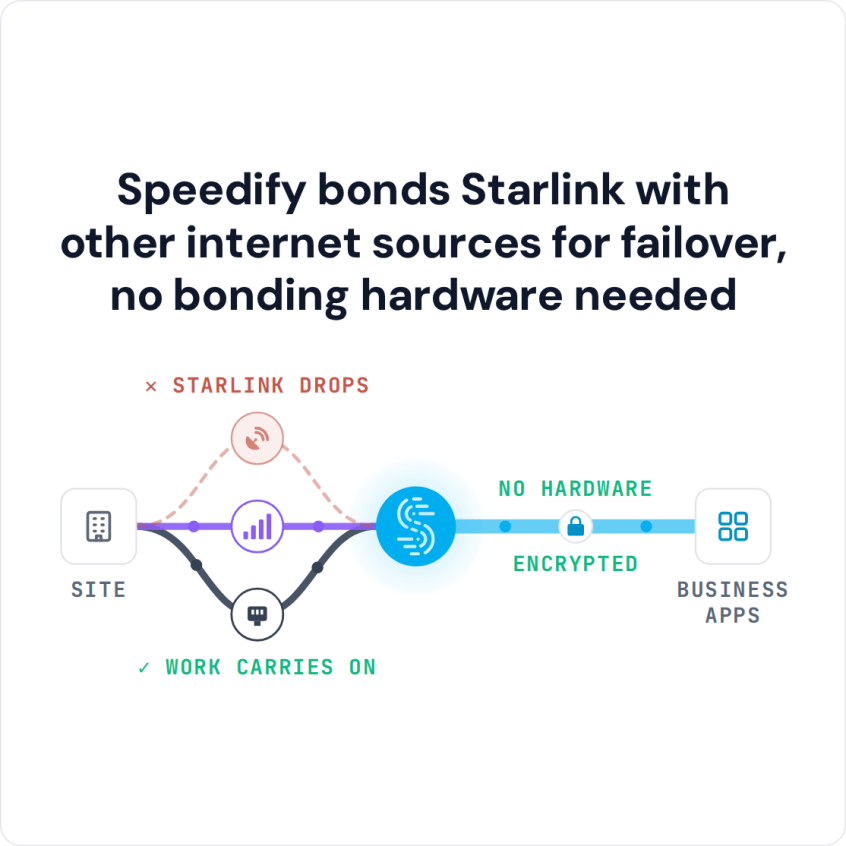
Speedify bonds Starlink with other internet sources for failover, no bonding hardware needed
Watch now
How Speedify's channel bonding technology works on any hardware
Get started with Speedify for your business
Speedify offers three commercial paths. They're not exclusive — most enterprise customers combine two or more.
01
Speedify Teams
Speedify on every supported OS for every team member
Centralized dashboard for billing, user provisioning, and usage analytics
CSV import/export and a RESTful management API
02
Speedify for Routers
License for supported OpenWrt routers
Powered by Speedify hardware lineup ready to deploy out of the box
Miri, GL.iNET, and other partner models
Whole-LAN bonding without per-device install
03
Embed Speedify into your product
A · DIY
Build it yourself with the Speedify SDK.
Integrate Speedify into your iOS, Android, Windows, macOS, Linux, or QNX product. Full developer documentation, sample code, and supported integration paths. You own the build, we provide the bonding stack.
B · CUSTOM ENGINEERING
Have us build it for you.
Starlink vs 5G for Business: Where Each Internet Connection Wins
- Coverage: Starlink reaches sites where 5G has no usable signal. 5G needs a nearby tower with room for more users, which limits it at rural and remote sites.
- Delay: 5G usually has less delay, and it’s steadier. Starlink says its delay is 25 to 60 milliseconds on land, but it jumps when the Starlink dish switches satellites, about every 15 seconds, and internet phone calls and live apps feel those jumps.
- Cost and busy times: 5G business plans often cost less per month. On Starlink, Priority plans are served first when the network is busy, at a higher price than Residential plans.
- Where each fits: 5G suits fixed sites with good coverage. Starlink suits field teams, ships, vehicles, and any site that has to be online before wired or cellular service arrives.
How Speedify Uses Starlink and 5G Together for Business
Most business routers can switch to a backup internet connection, but when the router switches from one internet connection to the other, everything that was open starts over. Internet phone calls drop and have to be redialed, video meetings disconnect, remote desktop sessions close, and VPNs have to reconnect. Staff notice every switch.
Speedify works differently. Speedify splits your traffic in small pieces across Starlink and 5G, and sends all of it through one encrypted connection, so open calls and sessions carry on when one internet connection changes. Speedify spreads your traffic across every internet connection for close to their combined speed, and for the most important traffic, Speedify can send the same data over both internet connections at once and use whichever arrives first. When Starlink weakens in bad weather, or 5G slows at busy times, Speedify moves the load to the stronger internet connection without dropping anything.
Speedify needs both internet connections to do this. With Starlink alone or 5G alone, Speedify can’t add speed or stop the drops.
How to Set Up Starlink and 5G Together with Speedify
Speedify runs as software on your existing devices, or on Powered by Speedify routers, so a business can use Starlink and 5G together without replacing its hardware. Set a priority for each internet connection in Speedify: 5G on Always and Starlink on Backup if you want 5G for calls and Starlink only when 5G drops, or both on Always for the most speed. The same setup works for a single office or a whole fleet of remote sites.
Which Businesses Need Starlink and 5G Together
- Stores with several locations: Checkouts, card payments and inventory systems that can’t stop when one internet connection drops.
- Field operations: Construction, mining, oil and gas, and survey sites that need internet before wired service arrives.
- Managed service providers: MSPs, the IT companies that run networks for other businesses, delivering reliable internet to client sites with patchy coverage.
- Events and broadcasts: Pop-up venues where two internet connections together give the extra speed one can’t.
- Remote doctor visits: Clinics where a dropped video call interrupts patient care.
Speedify Is Used on Millions of Devices Worldwide
Speedify has powered stronger Internet for millions of consumers since 2014
15M
Millions of Speedify downloads worldwide, and growing every day5⭐️
More than 75,000 5-star reviews for Speedify in the iOS and Android app stores82
Points of Speedify presence in datacenters around the globe500TB
Hundreds of terabytes of fast, secure data streamed every week via SpeedifySpeedify Partners
Speedify partners with these amazing organizations to deliver better internet and next-generation networking technology to their customers and employees.


Speedify and Starlink: Business Internet Without Choosing Between Starlink and 5G
Starlink vs 5G assumes a business has to pick one internet connection and live with its bad days. Speedify removes that choice by using Starlink, 5G and any other internet connection you have together, as one internet connection that’s faster, more reliable, and more secure than any of them alone. Each one covers the other’s weak spots, and switching between them doesn’t restart anything. For a home instead of a business, see Starlink vs 5G home internet.
To see how it works, see how Speedify combines internet connections for business, or read how Speedify keeps a business online when Starlink goes down.
To plan Starlink and 5G together for your business sites, Contact Us.
Speedify Business Solutions
Speedify Teams
Speedify for Routers

Speedify Embedded Solutions and Integrations
Embed Speedify software into your app or hardware products and leverage the core channel bonding technology of Speedify in new and interesting ways.