
How Field Journalists Get a Fast, Encrypted Internet Connection Anywhere
Speedify combines Wi-Fi, Ethernet, 4G/5G cellular, and Starlink into one reliable internet connection for reporters and journalism teams working in the field.
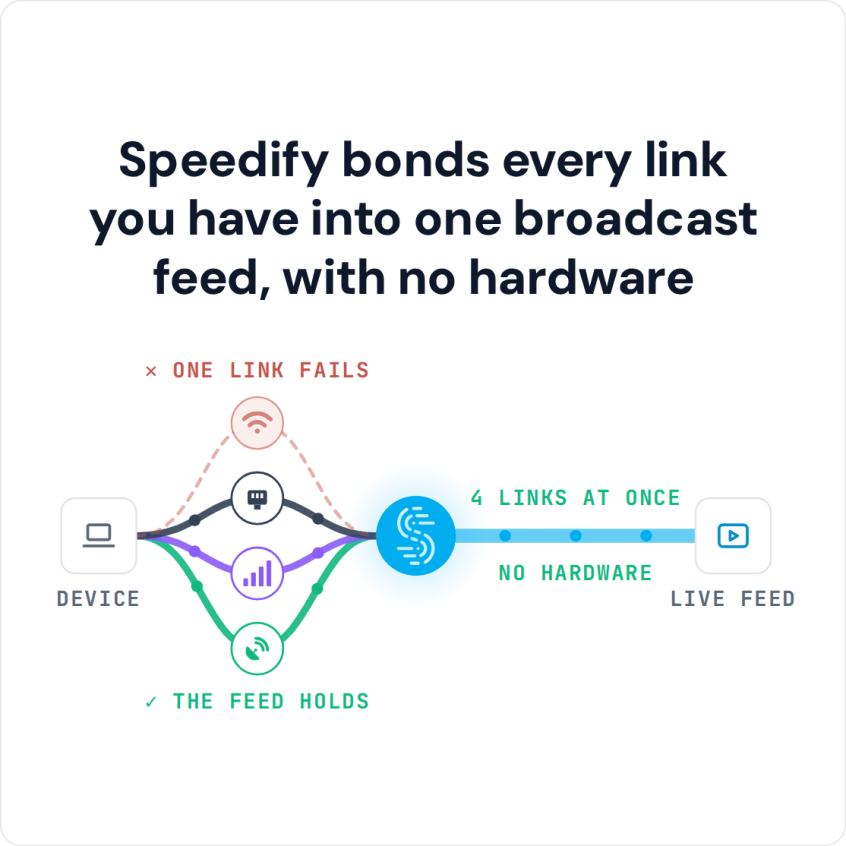
When a single internet connection drops or gets throttled, Speedify automatically shifts traffic to the remaining connections so live streams and video calls can stay up. That needs two or more internet connections; on a single connection Speedify works as an encrypted VPN and cannot stop that connection from dropping.
Speedify bonds every link you have into one broadcast feed, with no hardware
Speedify encrypts all traffic between the device and the Speedify server, so other users on a public or hotel Wi-Fi network cannot read it. Speedify is not an anonymity tool: Speedify records connection metadata (IP address, device ID, connection time and data used), though not the sites you visit.
This article covers how Speedify works for press and journalism, what connection setups deliver the most reliable field connectivity, and how to get started.
Watch now
How Speedify combines internet connections on any hardware
Get started with Speedify for your business
Speedify offers three commercial paths. They work together, and most enterprise customers use two or more.
01
Speedify Teams
Speedify on every supported OS for every team member
Centralized dashboard for billing, user provisioning, and usage analytics
CSV import/export and a RESTful management API
02
Speedify for Routers
License for supported OpenWrt routers
Powered by Speedify hardware lineup ready to deploy out of the box
Miri, GL.iNet and other partner models
Covers every device on the network, with no per-device install
03
Embed Speedify into your product
A · DIY
Build it yourself with the Speedify SDK.
Integrate Speedify into your iOS, Android, Windows, macOS, Linux or QNX product. Full developer documentation, sample code and supported integration paths. Your team owns the build, and the Speedify SDK handles combining the internet connections.
B · CUSTOM ENGINEERING
Have the Speedify team build it for you.
The Internet Connectivity Problems Field Journalists Face
Field journalism requires reliable internet connectivity in conditions that are inherently unpredictable. Reporters cover breaking news from locations with no fixed internet infrastructure, broadcast live from crowded public spaces where cellular towers are congested, and file stories and video from countries where ISPs throttle or block access to certain platforms and destinations.
The specific connectivity problems field journalists encounter:
- Cellular congestion at large public events (protests, elections, disasters, sports events) where every person at the scene is on the same towers at the same time.
- Hotel and venue Wi-Fi that is shared with hundreds of guests and unreliable for video upload or live broadcast.
- Government-imposed internet throttling or blocking of social platforms and news sites in certain countries and regions.
- Single-connection fragility during live broadcasts: one dropped cellular connection ends the segment.
- Security risks from operating on public or compromised Wi-Fi networks, where unencrypted traffic is visible to other users on the same network.
Speedify addresses these problems together: Speedify combines available connections for speed and redundancy, and encrypts traffic between the device and the Speedify server on every connection in use, so the local network cannot see which sites and platforms you open.
How Speedify Helps Press and Journalism Teams
Speedify’s technology for combining internet connections runs on the journalist’s laptop, smartphone, or tablet and uses all available internet connections simultaneously: hotel Wi-Fi, venue Ethernet, 4G/5G cellular from one or more carriers, and Starlink or other satellite where available. Speedify distributes internet traffic across all active connections in real time and adjusts routing as conditions change.
For live broadcasts, Speedify’s Enhance Streaming mode detects streaming traffic and prioritizes it over other internet traffic on the device. If packet loss is detected on one connection, Speedify increases redundancy for stream packets automatically to maintain broadcast quality.
For journalists working on networks that block platforms, Speedify’s encrypted tunnel carries all traffic to a Speedify server, so the local network sees only an encrypted connection to that server. Speedify cannot promise access in every country: some governments block VPN connections too.
With two or more internet connections, the combined speed usually makes up for the cost of encryption; on a single connection, Speedify can be a little slower, like any VPN.
Speedify also adapts its protocol automatically when standard VPN protocols are blocked, using HTTPS as a fallback to keep the tunnel active on restricted networks.
Speedify vs. Dedicated Broadcast Hardware for Field Journalism
| Feature | Dedicated cellular bonding hardware (LiveU, Dejero, Teradek, TVU Networks, Streambox) | Speedify |
|---|---|---|
| What you buy | A proprietary cellular bonding device, often paired with its own streaming encoder | A software subscription that runs on hardware you already own |
| Typical entry cost | Roughly $1,000 for an entry-level encoder, rising to about $5,000-$10,000 for a broadcast unit, plus an annual service subscription (LiveU’s LRT service is $450 a year) | $89.99 a year per user, billed yearly |
| Internet connections combined | Ethernet, Wi-Fi and cellular | Ethernet, Wi-Fi, 4G/5G cellular and Starlink, up to 31 connections |
| Maximum bonded throughput | 20 Mbps to 1 Gbps depending on the model | 300 Mbps on shared servers, up to 1 Gbps on a Dedicated Server |
| Failover method | Automatic failover between connections | Packet-level automatic failover |
| Platforms supported | Proprietary hardware only | Windows, macOS, Linux, iOS, Android, OpenWrt and embedded Linux |
| Getting started | Specify, buy, ship and configure a unit for every crew | Install the app, sign in, and start combining connections |
| If you do want hardware | Required | Optional: the Miri X510 router powered by Speedify |
Connection Setups for Field Journalists
- Two 4G/5G cellular connections from different carriers. The most practical field setup for most journalists. Combine a 4G/5G cellular connection from your primary carrier with a 4G/5G cellular connection from a second carrier via a tethered phone or USB cellular adapter. Even when one carrier’s tower is congested, the other carrier’s connection remains available. Speedify uses both simultaneously for faster upload and download speeds when both are healthy.
- 4G/5G cellular plus hotel or venue Wi-Fi. Combine your 4G/5G cellular connection with whatever Wi-Fi is available at your location. Speedify uses both connections for throughput and fails over to 4G/5G cellular automatically if the Wi-Fi becomes unreliable.
- Starlink plus 4G/5G cellular for remote or disaster zone reporting. Journalists covering events in areas with damaged or absent cellular infrastructure can combine a Starlink dish with any available 4G/5G cellular connections. Speedify manages the combined connection and provides automatic failover between satellite and cellular as coverage conditions change.
- Speedify’s cellular sharing feature for field teams. When a journalism team is operating together in the field, Speedify’s cellular sharing feature lets team members wirelessly share their 4G/5G cellular connections with each other. A reporter going live can pull additional cellular bandwidth from a colleague’s device without cables or additional hardware configuration.
How to Set Up Speedify for Field Journalism
- Install the Speedify app on your primary reporting device: a laptop, phone, or tablet. Speedify runs on Windows, macOS, Linux, iOS, and Android.
- Connect all available internet connections: your device’s own cellular, venue or hotel Wi-Fi, and a second 4G/5G cellular connection via a tethered phone or USB cellular adapter.
- Sign in to your Speedify account. Speedify automatically detects all active connections and begins combining them. All traffic is encrypted by default.
- For live streaming, confirm Enhance Streaming mode is active in Speedify settings. Open your broadcast app (Facebook Live, YouTube Live, Zoom, or any other platform) and go live. Speedify manages the combined connection in the background.
- For team deployments, set up a Speedify Teams account to manage all journalists on the team from a centralized dashboard, see usage statistics, and add or remove users remotely through the Teams API.
Who Uses Speedify for Press and Journalism
- Broadcast journalists and field reporters. Television and digital video reporters going live from the field need a reliable upload connection that can sustain broadcast-quality video without dropping. Speedify combines available cellular and Wi-Fi connections to provide that reliability on hardware the reporter already carries. Where cellular coverage runs out, see how Starlink works for journalists in the field.
- Print and digital journalists filing from the field. Reporters uploading video, photos, and written content from locations with unreliable internet need faster upload speeds and automatic failover. Speedify provides both without requiring additional hardware beyond the reporter’s existing devices.
- News agencies and media organizations. News organizations deploying journalists to cover events in multiple locations simultaneously benefit from Speedify Teams for centralized management, usage statistics for each journalist, and consistent deployment across all team members’ devices.
- Press teams in restricted internet environments. Journalists working in countries with government internet restrictions need encrypted connections. Speedify encrypts all traffic, but whether a platform is reachable still depends on how the country blocks it. Turkiye, for example, has restricted social platforms during major news events; here is how a VPN works in Turkiye.
- Documentary and investigative teams. Film crews and investigative journalism teams operating in remote locations or politically sensitive environments need both reliable connectivity and encrypted communications. Speedify provides both while supporting the diverse hardware these teams carry.
Speedify Plans for Press and Journalism
For individual journalists, a Speedify Individual plan includes connection combining, VPN encryption, Enhance Streaming mode and Speedify’s Speed Server network in more than 50 locations, on up to 5 devices at once.
For news organizations and media companies, Speedify Teams provides centralized management of all journalists and devices, per-user usage statistics, and a REST API for automated provisioning.
For organizations with data security requirements that demand all traffic route through private infrastructure, Speedify Self-Hosted Servers let the organization run Speedify traffic through its own server (Docker Compose on an x86_64 machine with a static public IP, in a cloud or on physical hardware). Self-Hosted Servers still activate through my.speedify.com.
Speedify Business Solutions
Speedify Teams
Speedify for Routers

Speedify Embedded Solutions and Integrations
Add Speedify to your own app or hardware with the Speedify SDK. Your product then combines internet connections, fails over automatically when one drops, and encrypts the traffic, using the same technology as the Speedify app.